This is best Fabric, Power BI, SQL and AI community event. How do we know? The last event sold out! Save €200 with code FABCMTY200.
Register nowA new Data Days event is coming soon! This time we’re going bigger than ever. Fabric, Power BI, SQL, AI and more. Don't miss out.
Hello,
I think this is another simple question and answer.
I'm receiving the following error when trying to refresh a dataset on PowerBI Service to a dataset in a PowerBI Desktop File.
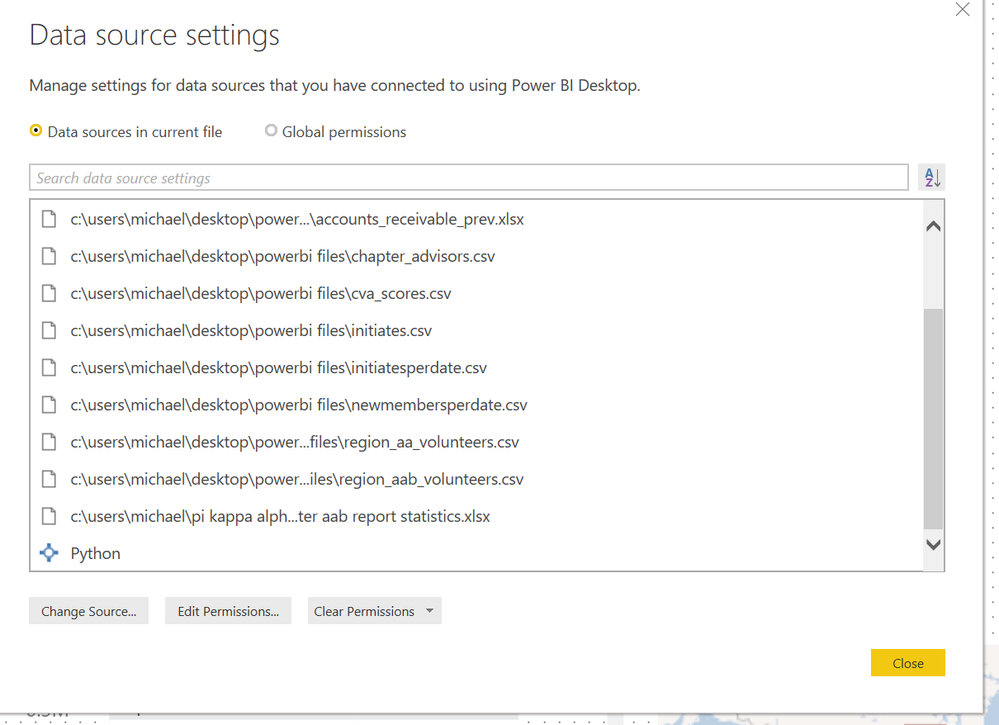
I assume it is because a datasource is not correct. However, all of my data sources are either locally hosted (on my laptop) .csv or .xlsx files EXCEPT for the "python" file/app that is also listed. See below:
Is the error I am getting when refreshing the dataset due to having Python listed as a source? How do I delete it as a source if so? Can I not use python scripts in PowerQuery to clean and transform data if I want to be able to publish and refresh the same dataset in PowerBI Service?
Any help would be great. My Python code is not particuluary complicated (only uses pandas to do a few row wise calculations) so I'm sure I could rewrite it in Dax/M if needed.
Thanks,
Michael
Solved! Go to Solution.
hi, @Anonymous
Python is only supported for Gateway personal mode. You need to install a personal gateway.
Best Regards,
Lin
hi, @Anonymous
Python is only supported for Gateway personal mode. You need to install a personal gateway.
Best Regards,
Lin
Check out the May 2026 Power BI update to learn about new features.
Sign up to receive a private message when registration opens and key events begin.
If you have recently started exploring Fabric, we'd love to hear how it's going. Your feedback can help with product improvements.
| User | Count |
|---|---|
| 9 | |
| 9 | |
| 8 | |
| 7 | |
| 7 |
| User | Count |
|---|---|
| 24 | |
| 20 | |
| 17 | |
| 17 | |
| 16 |