Don't miss your chance to take the Fabric Data Engineer (DP-600) exam for FREE! Find out how by attending the DP-600 session on April 23rd (pacific time), live or on-demand.
Learn moreNext up in the FabCon + SQLCon recap series: The roadmap for Microsoft SQL and Maximizing Developer experiences in Fabric. All sessions are available on-demand after the live show. Register now
I've got an Excel spreadsheet with Dates and values associated with each dates,
I'm trying to make a graph that can compare the sum of the values from June 21st 2018 to June 21st 2019 to the sum of the values between June 21st 2019 to June 21st 2020.
Is it possible ?
Thank you
Solved! Go to Solution.
Hi @Anonymous ,
I'm not sure what your table structure looks like and what kind of output visual you want.
I'd like to suggest you to create some Meaures as below.
sum2019 = CALCULATE(SUM('Table'[value]),FILTER('Table','Table'[date]>=DATE(2018,6,21)&&'Table'[date]<DATE(2019,6,21)))
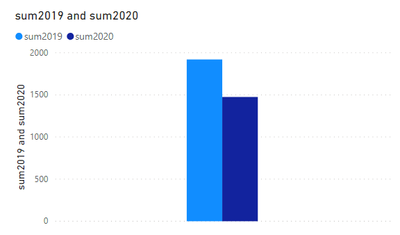
sum2020 = CALCULATE(SUM('Table'[value]),FILTER('Table','Table'[date]>=DATE(2019,6,21)&&'Table'[date]<DATE(2020,6,21)))Result would be shown as below.
If i misunderstood your meaning, please share some sample data and expected result to us if you don't have any Confidential Information.
Best Regards,
Jay
Community Support Team _ Jay Wang
If this post helps, then please consider Accept it as the solution to help the other members find it more quickly.
A more dynamic (future-proof) solution would be adding a custom column on the table that contains your dates. Lets assume the name of that table is 'table' and the column that contains dates is 'date'. Then the DAX should look something like this:
=if(month('table'[date])<6,year(date),if(month('table'[date])=6 && day('table'[date])<21,year(date),year(date)+1))
Then you can use this column to filter your data. Should give the categorisation you desire.
Hi @Anonymous ,
I'm not sure what your table structure looks like and what kind of output visual you want.
I'd like to suggest you to create some Meaures as below.
sum2019 = CALCULATE(SUM('Table'[value]),FILTER('Table','Table'[date]>=DATE(2018,6,21)&&'Table'[date]<DATE(2019,6,21)))
sum2020 = CALCULATE(SUM('Table'[value]),FILTER('Table','Table'[date]>=DATE(2019,6,21)&&'Table'[date]<DATE(2020,6,21)))Result would be shown as below.
If i misunderstood your meaning, please share some sample data and expected result to us if you don't have any Confidential Information.
Best Regards,
Jay
Community Support Team _ Jay Wang
If this post helps, then please consider Accept it as the solution to help the other members find it more quickly.
If you have recently started exploring Fabric, we'd love to hear how it's going. Your feedback can help with product improvements.
A new Power BI DataViz World Championship is coming this June! Don't miss out on submitting your entry.
Share feedback directly with Fabric product managers, participate in targeted research studies and influence the Fabric roadmap.