cancel
Showing results for 
Search instead for 
Did you mean: 

Learn from the best! Meet the four finalists headed to the FINALS of the Power BI Dataviz World Championships! Register now

Reply
Anonymous
Not applicable

DAX expression aggregation

Hello community,


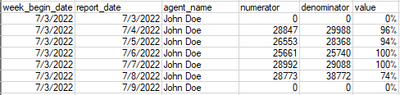
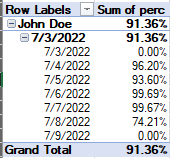
I am working with daily records stored mostly as durations in seconds. I am using DAX to DIVIDE numerators and denominators to return percentage values. Once I put these values into a matrix and aggregate by associate by week begin date the values sum to the level of aggregation which I do not want. I want the DIVIDE to continue throughout all levels. How can I solve for this? Below is an example of the data and what I am trying to accomplish.


JB86_0-1658497686561.png

JB86_1-1658497755293.png


1 ACCEPTED SOLUTION
v-zhangti
Community Support
Community Support

Hi, @Anonymous 


You can try the following methods.

Column:

value = IF([numerator]=0,0,DIVIDE([numerator],[denominator]))

vzhangti_0-1658821743161.png

Measure:

Measure =
IF (
    HASONEVALUE ( 'Table'[report_date] ),
    SUM ( 'Table'[value] ),
    DIVIDE ( SUM ( 'Table'[numerator] ), SUM ( 'Table'[denominator] ) )
)

vzhangti_1-1658821813859.png

Is this the result you expect?


Best Regards,

Community Support Team _Charlotte

If this post helps, then please consider Accept it as the solution to help the other members find it more quickly.

View solution in original post

6 REPLIES 6
v-zhangti
Community Support
Community Support

Hi, @Anonymous 


You can try the following methods.

Column:

value = IF([numerator]=0,0,DIVIDE([numerator],[denominator]))

vzhangti_0-1658821743161.png

Measure:

Measure =
IF (
    HASONEVALUE ( 'Table'[report_date] ),
    SUM ( 'Table'[value] ),
    DIVIDE ( SUM ( 'Table'[numerator] ), SUM ( 'Table'[denominator] ) )
)

vzhangti_1-1658821813859.png

Is this the result you expect?


Best Regards,

Community Support Team _Charlotte

If this post helps, then please consider Accept it as the solution to help the other members find it more quickly.

Anonymous
Not applicable

In the measure, what does 'Table'[Value] represent in your example?

Hi, @Anonymous 


'Table'[Value] is the percentage of your above table. 

vzhangti_0-1659073397602.png


Best Regards,

Community Support Team _Charlotte

If this post helps, then please consider Accept it as the solution to help the other members find it more quickly.


Anonymous
Not applicable

Works exactly the way I needed. Thank you!

gauthamboppana
Solution Specialist
Solution Specialist

@Anonymous  - If you want to look at weekly values, its better to create a calculated column in your table for week start date and then  use it in the Matrix (instead of the report date column).

WeekStart=[report_date] - WEEKDAY ([report_date], 3 )


Did I answer your question? Mark my post as a solution! If not, please feel free to ask me.

Also, I would ❤ Kudos if my solution helped.  It is a token of appreciation!

Thank you very much !


Anonymous
Not applicable

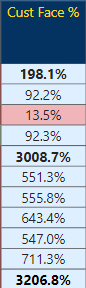
Thank you for the assistance! I had another question come from trying to return values for the current week where the value returned is calculating much higher than it should be. Would this calc column solve for that?
Example: None of these values should be higher than 100%

JB86_0-1663763057988.png


Helpful resources

Announcements
Join our Fabric User Panel

Join our Fabric User Panel

Share feedback directly with Fabric product managers, participate in targeted research studies and influence the Fabric roadmap.

February Power BI Update Carousel

Power BI Monthly Update - February 2026

Check out the February 2026 Power BI update to learn about new features.