cancel
Showing results for 
Search instead for 
Did you mean: 

Join the FabCon + SQLCon recap series. Up next: Power BI, Real-Time Intelligence, IQ and AI, and Data Factory take center stage. All sessions are available on-demand after the live show. Register now

Reply
PedroPablo
Helper I
Helper I

DATAMART

I recently started with the functionality of DATAMART


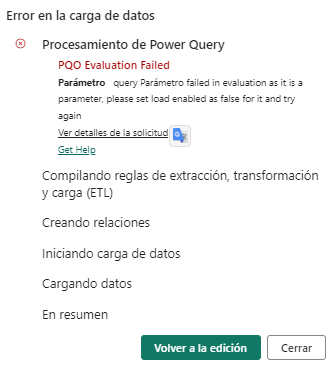
I try upload a SAP file (txt) in my DATAMART from my sharepoint , whe I press upload shows me the following message:

PQO Evaluation Failed Parámetroquery Parámetro failed in evaluation as it is a parameter, please set load enabled as false for it and try again Identificador de actividadefc2defb-96a3-91b3-fd09-cedf5b76dd0c Identificador de la solicitudab0999de-2055-590e-214e-c5e8cc53a531 Código de estado400 Código de errorPQO Evaluation Failed
 
PedroPablo_0-1679497463971.png


When I tried the same but in power BI desktop, worked perfect!!

could anyboy help me


1 REPLY 1
GilbertQ
Super User
Super User

Hi @PedroPablo 


I have not seen that error, I would suggest logging a support ticket?


Did I answer your question? Mark my post as a solution!

Proud to be a Super User!


Power BI Blog

Helpful resources

Announcements
April Power BI Update Carousel

Power BI Monthly Update - April 2026

Check out the April 2026 Power BI update to learn about new features.

New to Fabric survey Carousel

New to Fabric Survey

If you have recently started exploring Fabric, we'd love to hear how it's going. Your feedback can help with product improvements.

Power BI DataViz World Championships carousel

Power BI DataViz World Championships - June 2026

A new Power BI DataViz World Championship is coming this June! Don't miss out on submitting your entry.

FabCon and SQLCon Highlights Carousel

FabCon &SQLCon Highlights

Experience the highlights from FabCon & SQLCon, available live and on-demand starting April 14th.