Join us at FabCon Atlanta from March 16 - 20, 2026, for the ultimate Fabric, Power BI, AI and SQL community-led event. Save $200 with code FABCOMM.
Register now!The Power BI Data Visualization World Championships is back! Get ahead of the game and start preparing now! Learn more
Hi All,
Can someone tell me how to create a button with three states (selected, unselected, hovered over). Selected and Unselected Can be done with two buttons and two book marks. However, no idea how to create a button that shows all three states.
Thanks so much
Solved! Go to Solution.
Hi @etescher ,
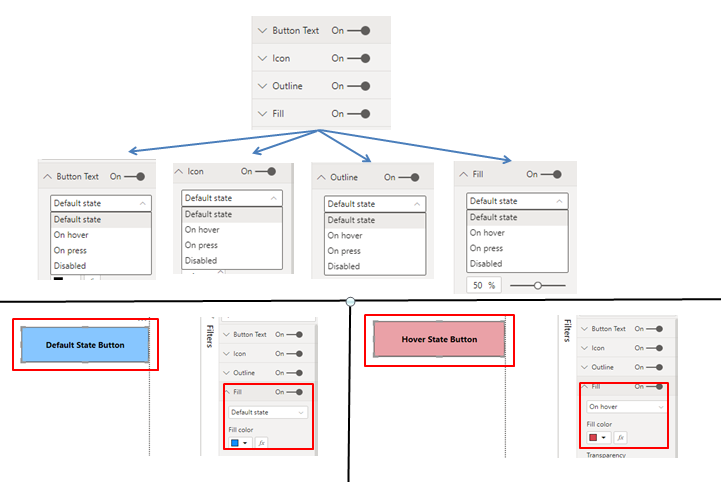
If you want to change the button text, button color, outline or Icon properties on hover/mouseover, then there is a direct option in the format of the buttons.
Refer below image:
Reference Link: https://www.wiseowl.co.uk/blog/s2588/action-buttons.htm
Give a thumbs up if this post helped you in any way and mark this post as solution if it solved your query !!!
Hi @etescher ,
If you want to change the button text, button color, outline or Icon properties on hover/mouseover, then there is a direct option in the format of the buttons.
Refer below image:
Reference Link: https://www.wiseowl.co.uk/blog/s2588/action-buttons.htm
Give a thumbs up if this post helped you in any way and mark this post as solution if it solved your query !!!
Check out the November 2025 Power BI update to learn about new features.
Advance your Data & AI career with 50 days of live learning, contests, hands-on challenges, study groups & certifications and more!