This time we’re going bigger than ever. Fabric, Power BI, SQL, AI and more. We're covering it all. You won't want to miss it.
Learn moreJoin the FabCon + SQLCon recap series. Up next: Power BI, Real-Time Intelligence, IQ and AI, and Data Factory take center stage. All sessions are available on-demand after the live show. Register now
I am trying to copy a visualization to use in a presentation, but when I copy it the scroll bars come through on the image if there is more data than can fit in the size. Is there a way to copy an image of the visualization that shows all of the data without the scroll bars?
Solved! Go to Solution.
Hi @jonathanprice ,
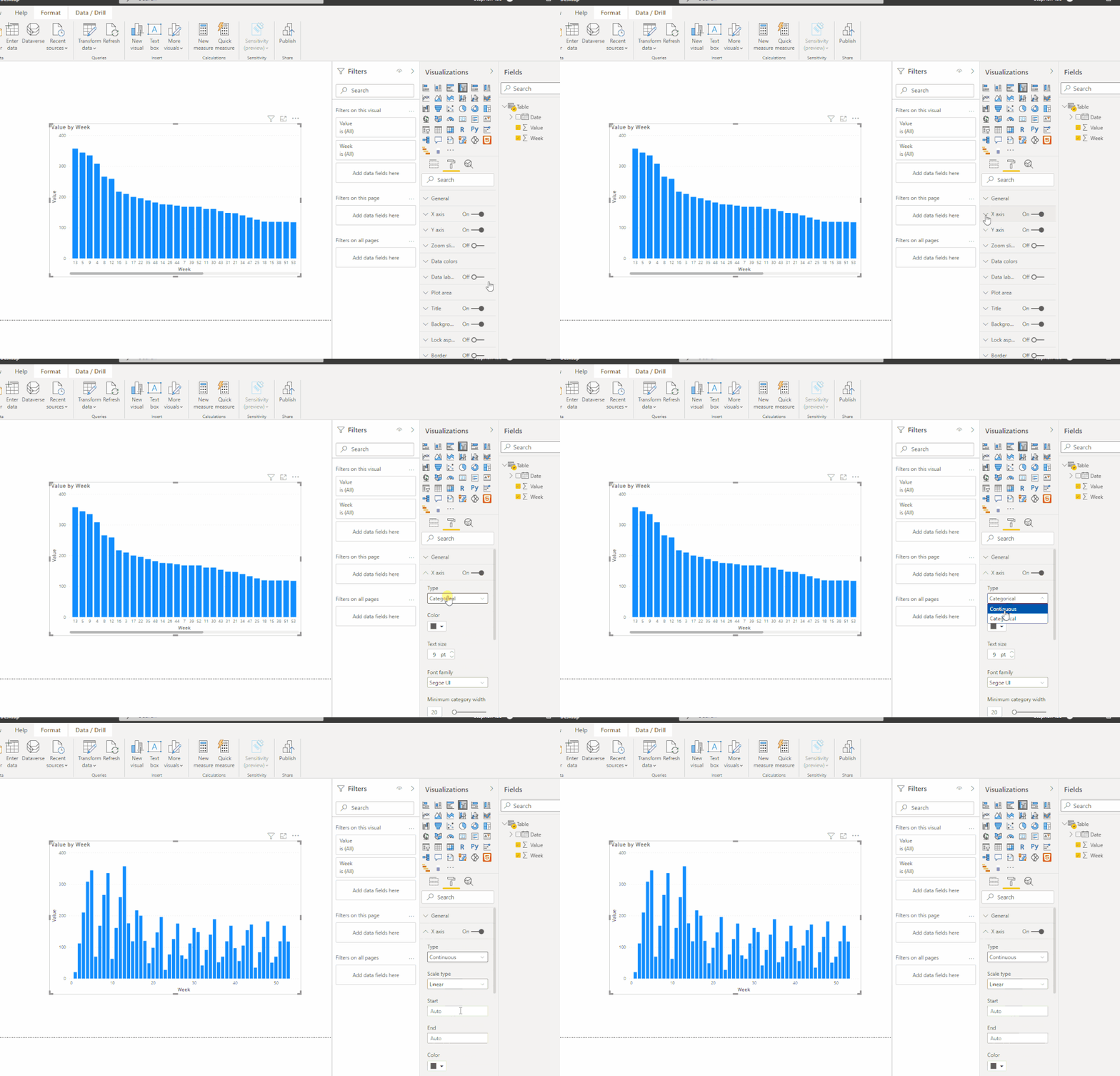
I suggest you change the chart x-axis to Continuous rather than Categorical like this:
Best Regards,
Eyelyn Qin
If this post helps, then please consider Accept it as the solution to help the other members find it more quickly.
Hi @jonathanprice ,
Could you tell me if your problem has been solved? If it is, kindly Accept it as the solution. More people will benefit from it.
Best Regards,
Eyelyn Qin
Hi @jonathanprice ,
I suggest you change the chart x-axis to Continuous rather than Categorical like this:
Best Regards,
Eyelyn Qin
If this post helps, then please consider Accept it as the solution to help the other members find it more quickly.
Eyelyn,
This partially works for me. It looks like due to the data types that I have on the x-axis I can't use the Continuous type. If I remove one of the values it works, but I need to confirm with the end users to see if removing this is acceptable.
Thanks
I believe the only way to do this is create the visual large enough to house the maximum items. You could set it to show the top x values if that helps.
What what type of visual are you using?
The visual I'm using is a line chart. The x-axis is fiscal weeks. Our projects have varying lengths and making the visual large enough to show all weeks for some of the longer projects isn't feasible. The users would like to be able to show the full chart from start to end of a project at once without having to piece together multiple images if that's possible.
Check out the April 2026 Power BI update to learn about new features.
If you have recently started exploring Fabric, we'd love to hear how it's going. Your feedback can help with product improvements.
A new Power BI DataViz World Championship is coming this June! Don't miss out on submitting your entry.
| User | Count |
|---|---|
| 11 | |
| 10 | |
| 10 | |
| 8 | |
| 7 |
| User | Count |
|---|---|
| 48 | |
| 34 | |
| 27 | |
| 21 | |
| 20 |