This is best Fabric, Power BI, SQL and AI community event. How do we know? The last event sold out! Save €200 with code FABCMTY200.
Register nowJuly 28 - August 9 | Final Round of the Power BI Dataviz World Championships. This is your chance. Learn more
For anyone having the same issue, I found a different resolution.
I found that i had to include the full server address
For example
Servername: SERVER1234
dataflow server address: SERVER1234.organisation.local
I had missed the ".organisation.local" this will be different for you, but may be worth checking
Hi, @Anonymous
You can try to exclude the gateway error. First make sure the gateway version is up to date.
You can refer to the following document, hope it can help you.
https://docs.microsoft.com/power-bi/connect-data/service-gateway-onprem-tshoot
Best Regards,
Community Support Team _Charlotte
If this post helps, then please consider Accept it as the solution to help the other members find it more quickly.
Hi @collinq,
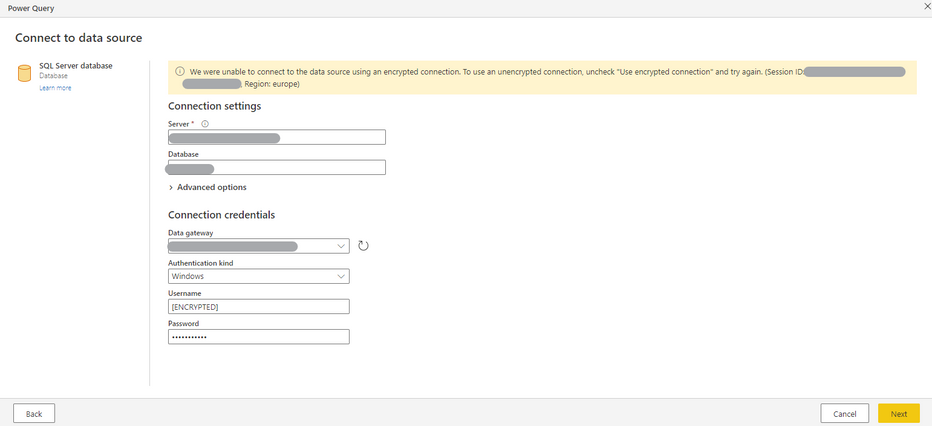
I've checked that, but there is no option "Use encrypted connection".
I've found that option on MySQL database Dataflow, as you can see below, but I need to use SQL since I have a SQL server.
Workspace > New > Dataflow > Define new tables (Add new tables) > MySQL database.
Hey @Anonymous ,
What is under the advanced options drop down? Is the Encrypted option hiding in there perhaps?
Proud to be a Datanaut!
Private message me for consulting or training needs.
Join us in Barcelona for FabCon and SQLCon, the Fabric, Power BI, SQL, and AI community event. Save €200 with code FABCMTY200.
| User | Count |
|---|---|
| 12 | |
| 11 | |
| 9 | |
| 6 | |
| 5 |