Join us at FabCon Atlanta from March 16 - 20, 2026, for the ultimate Fabric, Power BI, AI and SQL community-led event. Save $200 with code FABCOMM.
Register now!Vote for your favorite vizzies from the Power BI Dataviz World Championship submissions. Vote now!
Hello,
Is there a way to collapse the navigation pane in Power BI App? The navigation pane is taking substantial amount of space in the report.
Thanks.
Solved! Go to Solution.
Hi @Anonymous
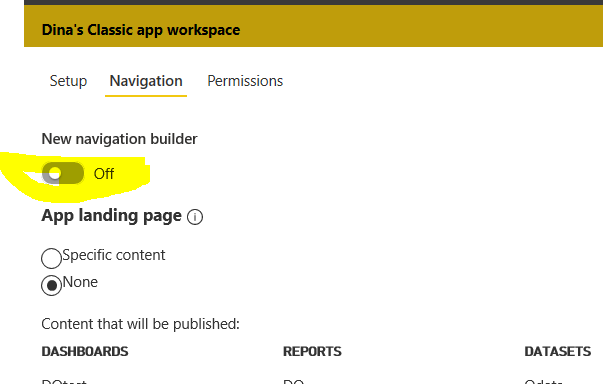
Did you use the new-look navigation? you can turn off the new navigation build in the app:
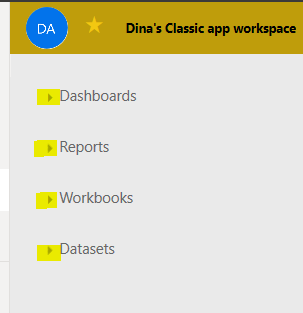
Then you can collapse the navigation as below:
@Anonymous
Please refer the below snippet.
If this post helps, then please consider Accept it as the solution to help the other members find it more
If this post was helpful may I ask you to mark it as solution and click on thumb symbol?
Hi @Anonymous
Did you use the new-look navigation? you can turn off the new navigation build in the app:
Then you can collapse the navigation as below:
Hi there
You can shrink it by hovering your mouse where the line is and drag it to the left.
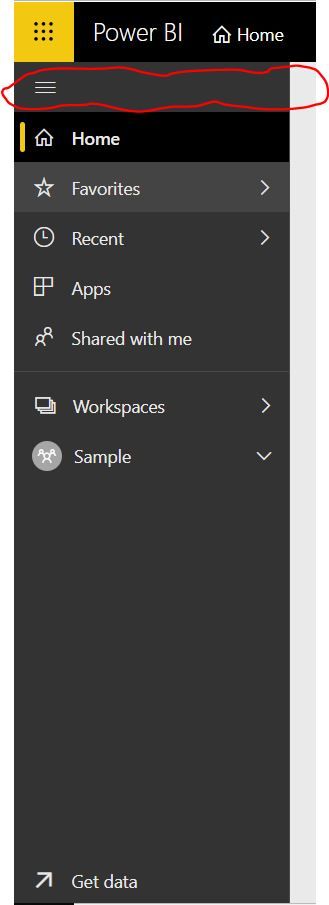
You can also collapse the pane on the left hand side by clicking on the three buttons to collapse that too?
Vote for your favorite vizzies from the Power BI World Championship submissions!
If you love stickers, then you will definitely want to check out our Community Sticker Challenge!
Check out the January 2026 Power BI update to learn about new features.
| User | Count |
|---|---|
| 22 | |
| 11 | |
| 10 | |
| 9 | |
| 9 |
| User | Count |
|---|---|
| 54 | |
| 38 | |
| 36 | |
| 25 | |
| 25 |