Don't miss your chance to take the Fabric Data Engineer (DP-700) exam on us!
Learn moreWe've captured the moments from FabCon & SQLCon that everyone is talking about, and we are bringing them to the community, live and on-demand. Starts on April 14th. Register now
Hello,
Is there a way to collapse the navigation pane in Power BI App? The navigation pane is taking substantial amount of space in the report.
Thanks.
Solved! Go to Solution.
Hi @Anonymous
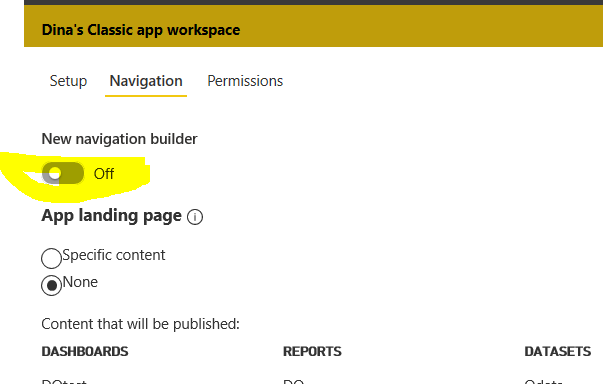
Did you use the new-look navigation? you can turn off the new navigation build in the app:
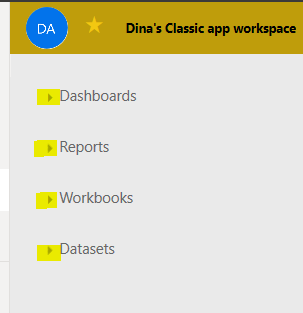
Then you can collapse the navigation as below:
@Anonymous
Please refer the below snippet.
If this post helps, then please consider Accept it as the solution to help the other members find it more
If this post was helpful may I ask you to mark it as solution and click on thumb symbol?
Hi @Anonymous
Did you use the new-look navigation? you can turn off the new navigation build in the app:
Then you can collapse the navigation as below:
Hi there
You can shrink it by hovering your mouse where the line is and drag it to the left.
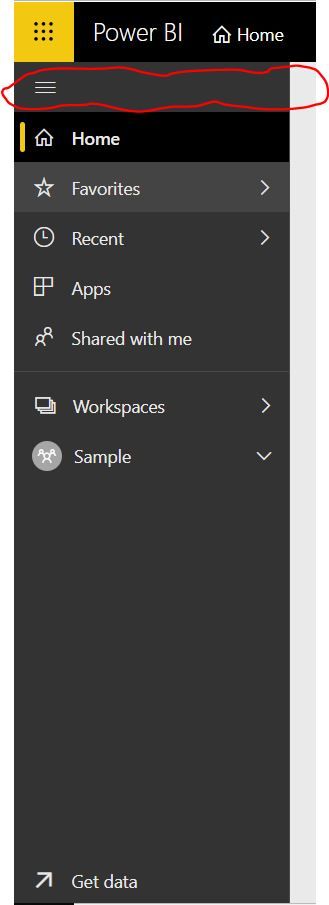
You can also collapse the pane on the left hand side by clicking on the three buttons to collapse that too?
If you have recently started exploring Fabric, we'd love to hear how it's going. Your feedback can help with product improvements.
A new Power BI DataViz World Championship is coming this June! Don't miss out on submitting your entry.
Share feedback directly with Fabric product managers, participate in targeted research studies and influence the Fabric roadmap.
| User | Count |
|---|---|
| 29 | |
| 23 | |
| 17 | |
| 15 | |
| 14 |