This is best Fabric, Power BI, SQL and AI community event. How do we know? The last event sold out! Save €200 with code FABCMTY200.
Register nowA new Data Days event is coming soon! This time we’re going bigger than ever. Fabric, Power BI, SQL, AI and more. Don't miss out.
Hello,
Is there a way to collapse the navigation pane in Power BI App? The navigation pane is taking substantial amount of space in the report.
Thanks.
Solved! Go to Solution.
Hi @Anonymous
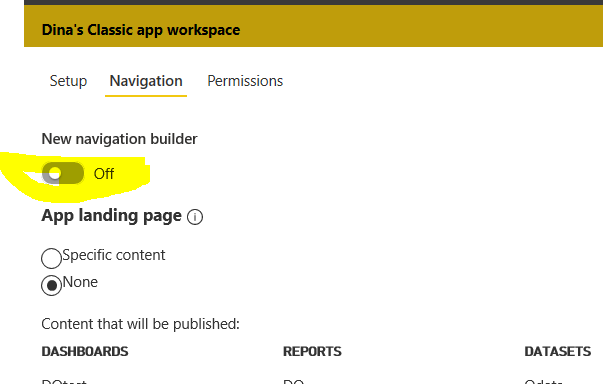
Did you use the new-look navigation? you can turn off the new navigation build in the app:
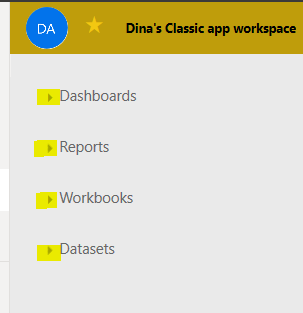
Then you can collapse the navigation as below:
@Anonymous
Please refer the below snippet.
If this post helps, then please consider Accept it as the solution to help the other members find it more
If this post was helpful may I ask you to mark it as solution and click on thumb symbol?
Hi @Anonymous
Did you use the new-look navigation? you can turn off the new navigation build in the app:
Then you can collapse the navigation as below:
Hi there
You can shrink it by hovering your mouse where the line is and drag it to the left.
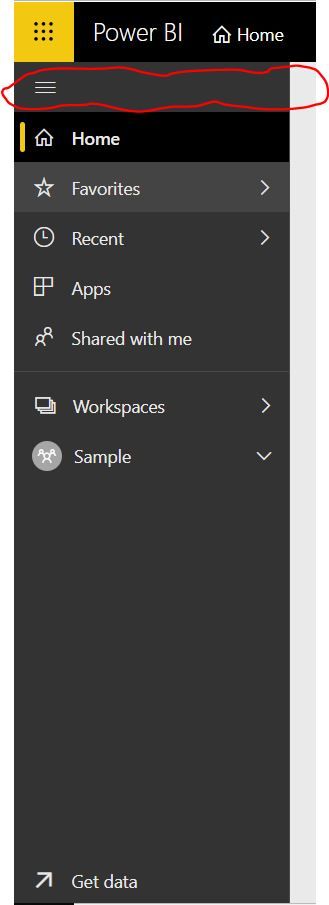
You can also collapse the pane on the left hand side by clicking on the three buttons to collapse that too?
Check out the May 2026 Power BI update to learn about new features.
Sign up to receive a private message when registration opens and key events begin.
If you have recently started exploring Fabric, we'd love to hear how it's going. Your feedback can help with product improvements.
| User | Count |
|---|---|
| 8 | |
| 8 | |
| 8 | |
| 8 | |
| 7 |
| User | Count |
|---|---|
| 21 | |
| 21 | |
| 18 | |
| 16 | |
| 11 |