This is best Fabric, Power BI, SQL and AI community event. How do we know? The last event sold out! Save €200 with code FABCMTY200.
Register nowThe Fabric community is upgrading! Read all of the details including the timeline and what you can expect. Learn more
Hi,
is it possible to see the logic of RLS direcly in Power BI Service.
I added the RLS via Desktop file (.pbix) and upload it. But i am able to see the restriction of a role (for example COUNTRY = 'US')
in Power BI Service or only in the desktop file?
Thanks a lot
Andy
Solved! Go to Solution.
Hi @AndyR123 ,
Row-Level-Security is defined in power bi desktop, you can create roles and define its expression. After publishing this report to power bi service, you can jsut test the roles instead of editing the definition fo roles.
For more information abou RLS, you can refer the Microsoft document that hope to help you too:
https://docs.microsoft.com/en-us/power-bi/service-admin-rls
Best Regards,
Yingjie Li
If this post helps then please consider Accept it as the solution to help the other members find it more quickly.
Hi @AndyR123 ,
Row-Level-Security is defined in power bi desktop, you can create roles and define its expression. After publishing this report to power bi service, you can jsut test the roles instead of editing the definition fo roles.
For more information abou RLS, you can refer the Microsoft document that hope to help you too:
https://docs.microsoft.com/en-us/power-bi/service-admin-rls
Best Regards,
Yingjie Li
If this post helps then please consider Accept it as the solution to help the other members find it more quickly.
Hi,
thank you very much. So it is only possible to see the restrictions ni Power BI desktop.
Thank you very much!
Andy
Hi there
In order to test the role, you can do the following.
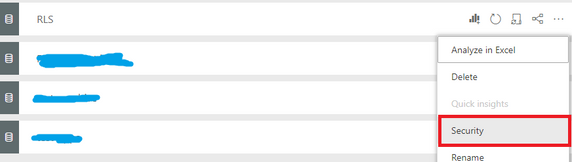
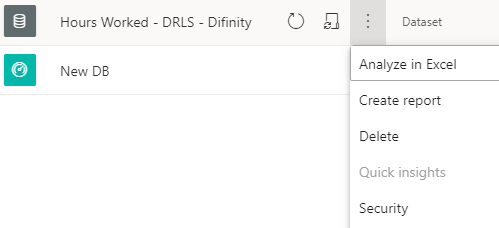
Go to the Dataset then click on the three dots ... and select Security
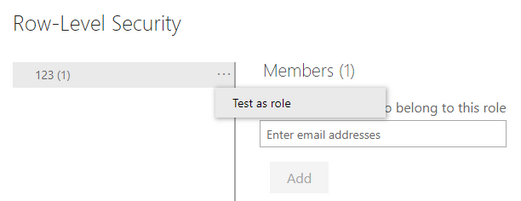
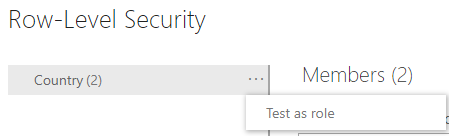
Then on the right hand side next to the Role name click on three dots again ... and select Test as role
This will then show you the Power BI Report as a member of the role so you can see if it works as expected.
You can test as a role in the service but I do not believe it shows you the underlying calculation.
Join us in Barcelona for FabCon and SQLCon, the Fabric, Power BI, SQL, and AI community event. Save €200 with code FABCMTY200.
| User | Count |
|---|---|
| 13 | |
| 11 | |
| 9 | |
| 6 | |
| 5 |