This time we’re going bigger than ever. Fabric, Power BI, SQL, AI and more. We're covering it all. You won't want to miss it.
Learn moreDid you hear? There's a new SQL AI Developer certification (DP-800). Start preparing now and be one of the first to get certified. Register now
Hi,
is it possible to see the logic of RLS direcly in Power BI Service.
I added the RLS via Desktop file (.pbix) and upload it. But i am able to see the restriction of a role (for example COUNTRY = 'US')
in Power BI Service or only in the desktop file?
Thanks a lot
Andy
Solved! Go to Solution.
Hi @AndyR123 ,
Row-Level-Security is defined in power bi desktop, you can create roles and define its expression. After publishing this report to power bi service, you can jsut test the roles instead of editing the definition fo roles.
For more information abou RLS, you can refer the Microsoft document that hope to help you too:
https://docs.microsoft.com/en-us/power-bi/service-admin-rls
Best Regards,
Yingjie Li
If this post helps then please consider Accept it as the solution to help the other members find it more quickly.
Hi @AndyR123 ,
Row-Level-Security is defined in power bi desktop, you can create roles and define its expression. After publishing this report to power bi service, you can jsut test the roles instead of editing the definition fo roles.
For more information abou RLS, you can refer the Microsoft document that hope to help you too:
https://docs.microsoft.com/en-us/power-bi/service-admin-rls
Best Regards,
Yingjie Li
If this post helps then please consider Accept it as the solution to help the other members find it more quickly.
Hi,
thank you very much. So it is only possible to see the restrictions ni Power BI desktop.
Thank you very much!
Andy
Hi there
In order to test the role, you can do the following.
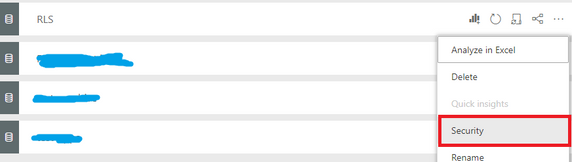
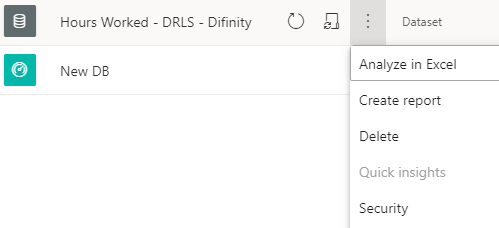
Go to the Dataset then click on the three dots ... and select Security
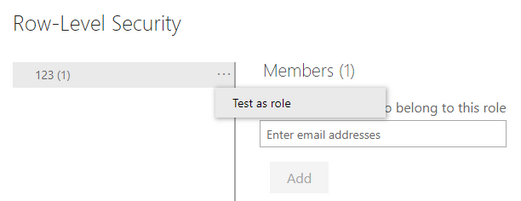
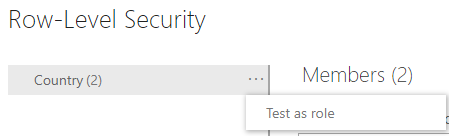
Then on the right hand side next to the Role name click on three dots again ... and select Test as role
This will then show you the Power BI Report as a member of the role so you can see if it works as expected.
You can test as a role in the service but I do not believe it shows you the underlying calculation.
Check out the April 2026 Power BI update to learn about new features.
Sign up to receive a private message when registration opens and key events begin.
If you have recently started exploring Fabric, we'd love to hear how it's going. Your feedback can help with product improvements.
| User | Count |
|---|---|
| 10 | |
| 8 | |
| 7 | |
| 7 | |
| 7 |
| User | Count |
|---|---|
| 49 | |
| 27 | |
| 21 | |
| 20 | |
| 20 |