cancel
Showing results for 
Search instead for 
Did you mean: 

July 7 - July 17 | Round 2 of the Power BI Dataviz World Championships. Don't miss your chance! Learn more

Reply
Anonymous
Not applicable

Changing data source on Service

Hi All,

This coming from a 5 Years Tableau user and i am new to PBI.

I recently developed a dashboard on PBI and deployed it on Service. The data source used is an excel file which is located on my local system (Laptop). This file will be updated daily with data so what i am thinking is that instead of me referhing the datasource daily i should schedule a refresh, for that i would upload the file to Onedrive for Business or sharepoint. So instead of refering to my laptop location for the refresh i should go to Onedrive for Business or sharepoint to refresh the datasource.

How can i change the location of the file from my local machine to Onedrive or Sharepoint ?

2 ACCEPTED SOLUTIONS
v-jiascu-msft
Microsoft Employee
Microsoft Employee

Hi @Anonymous,


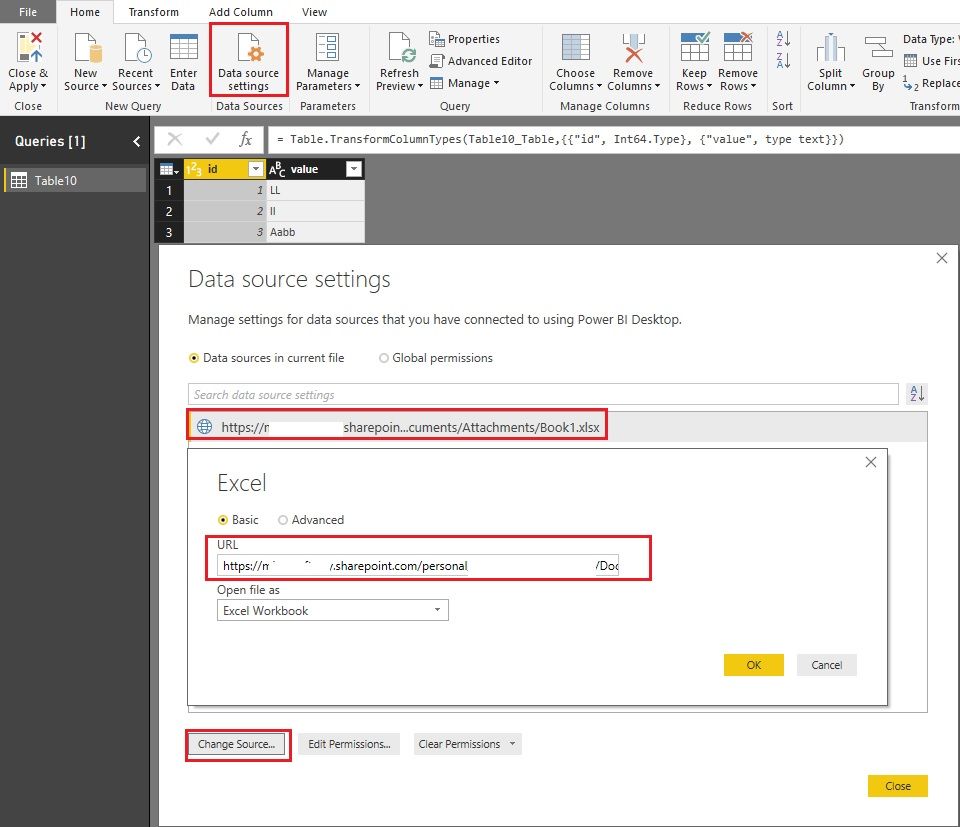
If you created the report in Power BI Desktop, you can change the data source in Desktop and then republish it to Service. Please reference: powerbi-desktop-use-onedrive-business-links.Changing data source on Service.jpg


If you created the report in Power BI Service, I'm afraid it can't be changed by now. Please vote or create an idea here: updatable-pbix-xlsx-datasets


Best Regards!

Dale

Community Support Team _ Dale
If this post helps, then please consider Accept it as the solution to help the other members find it more quickly.

View solution in original post

Anonymous
Not applicable

@v-jiascu-msft if the data is same in both data sources and i replace the data source will the model keep the changes that i made for e.g. Measure, columns i created or the data types of columns i changed ?


Thanks.

View solution in original post

4 REPLIES 4
Anonymous
Not applicable

Hi All,

This coming from a 5 Years Tableau user and i am new to PBI.

I recently developed a dashboard on PBI and deployed it on Service. The data source used is an excel file which is located on my local system (Laptop). This file will be updated daily with data so what i am thinking is that instead of me referhing the datasource daily i should schedule a refresh, for that i would upload the file to Onedrive for Business or sharepoint. So instead of refering to my laptop location for the refresh i should go to Onedrive for Business or sharepoint to refresh the datasource.

How can this be done ?

v-jiascu-msft
Microsoft Employee
Microsoft Employee

Hi @Anonymous,


If you created the report in Power BI Desktop, you can change the data source in Desktop and then republish it to Service. Please reference: powerbi-desktop-use-onedrive-business-links.Changing data source on Service.jpg


If you created the report in Power BI Service, I'm afraid it can't be changed by now. Please vote or create an idea here: updatable-pbix-xlsx-datasets


Best Regards!

Dale

Community Support Team _ Dale
If this post helps, then please consider Accept it as the solution to help the other members find it more quickly.
Anonymous
Not applicable

@v-jiascu-msft if the data is same in both data sources and i replace the data source will the model keep the changes that i made for e.g. Measure, columns i created or the data types of columns i changed ?


Thanks.

Hi @Anonymous,


Yes, the whole model won't be changed. It just retrieves data from a new source. 


Best Regards!

Dale

Community Support Team _ Dale
If this post helps, then please consider Accept it as the solution to help the other members find it more quickly.

Helpful resources

Announcements
FabCon and SQLCon Barcelona 2026

FabCon & SQLCon – Barcelona 2026

Join us in Barcelona for FabCon and SQLCon, the Fabric, Power BI, SQL, and AI community event. Save €200 with code FABCMTY200.

60 days of Data Days Carousel

Data Days 2026

Join Fabric Data Days 2026: 60 days of free live/on-demand sessions, challenges, study groups, and certification opportunities.

Power BI DataViz World Championships carousel

Power BI DataViz World Championships - June 2026

A new Power BI DataViz World Championship is coming this June! Don't miss out on submitting your entry.