Join us in Barcelona for FabCon and SQLCon, September 28 - October 1, 2026.
This is best Fabric, Power BI, SQL and AI community event. How do we know? The last event sold out! Save €200 with code FABCMTY200.
Register now- Power BI forums
- Get Help with Power BI
- Desktop
- Service
- Report Server
- Power Query
- Mobile Apps
- Developer
- DAX Commands and Tips
- Custom Visuals Development Discussion
- Health and Life Sciences
- Power BI Spanish forums
- Translated Spanish Desktop
- Training and Consulting
- Instructor Led Training
- Dashboard in a Day for Women, by Women
- Galleries
- Data Stories Gallery
- Themes Gallery
- Contests Gallery
- QuickViz Gallery
- Quick Measures Gallery
- Visual Calculations Gallery
- Fabric Apps Gallery
- Notebook Gallery
- Translytical Task Flow Gallery
- TMDL Gallery
- R Script Showcase
- Webinars and Video Gallery
- Ideas
- Custom Visuals Ideas (read-only)
- Issues
- Issues
- Events
- Upcoming Events
The Fabric community is now in read-only for platform upgrade. Learn more
- Power BI forums
- Forums
- Get Help with Power BI
- Service
- Re: Cannot load model
- Subscribe to RSS Feed
- Mark Topic as New
- Mark Topic as Read
- Float this Topic for Current User
- Bookmark
- Subscribe
- Printer Friendly Page


- Mark as New
- Bookmark
- Subscribe
- Mute
- Subscribe to RSS Feed
- Permalink
Cannot load model
I got this error when I try to open the report I published to PBI service. At the very beginning I thought it was me not connect my database to service, but the error still exists after I setup the data source credential. I have no idea what is going on. Any help would be appreciated.
Underlying Error: PowerBI service client received error HTTP response. HttpStatus: 400. PowerBIErrorCode: QueryUserError
QueryUserError: Login failed for user '<token-identified principal>'.. The exception was raised by the IDbConnection interface.
Correlation ID: a965fed1-a08d-052f-ce16-332c54684790
Activity ID: bc55f587-63e2-4bc7-a8f0-60c025bb57cb
Request ID: a9cdf434-5a41-f8b3-3eec-c892b46e6178
Time: Sun Sep 26 2021 15:15:17 GMT+0800 (China Standard Time)
Service version: 13.0.16890.50
Client version: 2109.4.07853-train
Cluster URI: https://df-msit-scus-redirect.analysis.windows.net/
Solved! Go to Solution.


- Mark as New
- Bookmark
- Subscribe
- Mute
- Subscribe to RSS Feed
- Permalink
Indeed you need a gateway, On premises Gateway. Or use that personal Gateway installed in your Laptop. But if the source is not in your Laptop then you need a to install an On-Prem Gateway
Regards
Amine Jerbi
If I answered your question, please mark this thread as accepted
and you can follow me on
My Website, LinkedIn and Facebook


- Mark as New
- Bookmark
- Subscribe
- Mute
- Subscribe to RSS Feed
- Permalink
@miloooooz : I would re-publish the report and try again. In the past, I had similar issues resolved by re-publishing.
If this post helps, then please consider Accepting it as the solution, Give Kudos to motivate the contributors.
- Mark as New
- Bookmark
- Subscribe
- Mute
- Subscribe to RSS Feed
- Permalink
I tried and it still doesn't work, really weird.
- Mark as New
- Bookmark
- Subscribe
- Mute
- Subscribe to RSS Feed
- Permalink
Hi @miloooooz
Can you refresh the report in your desktop? What type of source is it? Does it need a Gateway?
Regards
Amine Jerbi
If I answered your question, please mark this thread as accepted
and you can follow me on
My Website, LinkedIn and Facebook
- Mark as New
- Bookmark
- Subscribe
- Mute
- Subscribe to RSS Feed
- Permalink
1. Yes I can refresh the report from the desktop.
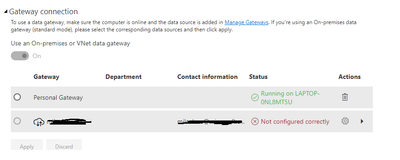
2. The visual that cannot display uses SQL server as data source, I added the data source into the gateway, but the dataset setting says the gateway is not cofigured correctly. But do I really need a gateway to display my current report? I thought gateway is necessary only if I need to refresh the report. Anyways, I added the SQL server database into the gateway, but it shows like below. I don't know if it is the problem of gateway.
- Mark as New
- Bookmark
- Subscribe
- Mute
- Subscribe to RSS Feed
- Permalink
Indeed you need a gateway, On premises Gateway. Or use that personal Gateway installed in your Laptop. But if the source is not in your Laptop then you need a to install an On-Prem Gateway
Regards
Amine Jerbi
If I answered your question, please mark this thread as accepted
and you can follow me on
My Website, LinkedIn and Facebook
- Mark as New
- Bookmark
- Subscribe
- Mute
- Subscribe to RSS Feed
- Permalink
Problem solved, need to set database credential or add source to the gateway and wait for it. Thank you very much for your answer.
- Mark as New
- Bookmark
- Subscribe
- Mute
- Subscribe to RSS Feed
- Permalink
I do have the gatway mapping to the SQL server data source, now I think the problem is the mapping for my local file for other visuals within the same report. I don't know why but the gateway gives 400 error when I tried to add local file to the data source.

Helpful resources

FabCon & SQLCon – Barcelona 2026
Join us in Barcelona for FabCon and SQLCon, the Fabric, Power BI, SQL, and AI community event. Save €200 with code FABCMTY200.

Power BI DataViz World Championships - June 2026
A new Power BI DataViz World Championship is coming this June! Don't miss out on submitting your entry.

| User | Count |
|---|---|
| 15 | |
| 11 | |
| 9 | |
| 8 | |
| 6 |


| User | Count |
|---|---|
| 27 | |
| 23 | |
| 17 | |
| 13 | |
| 13 |


