cancel
Showing results for 
Search instead for 
Did you mean: 

A new Data Days event is coming soon! This time we’re going bigger than ever. Fabric, Power BI, SQL, AI and more. Don't miss out.

Reply
sanjyot_firke
Helper II
Helper II

Cannot convert date into Local Time zone. Option Working Incorrectly in Power Query Editor

Hello Everyone,

Is anyone else facing this issue? This was fine till early this week.


The "Local Time" option working incorrectly in the dataflow power query editor. Due to this, we are unable to convert the date into Local AUS time and the data is coming as server time, which is US. It has messed up our data and totals completely.


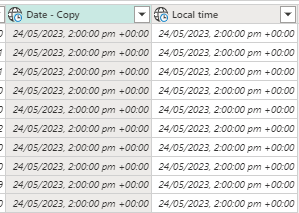
Below snapshot of the data coming "Date - Copy" field contains date with the local time zone and Local time field contains local time zone. In both cases, the timezone should have been +10. However, it is coming as +0

sanjyot_firke_1-1685061539283.png


How do we handle this?


Regards,

Sanjyot


1 ACCEPTED SOLUTION

Hi , @sanjyot_firke 

According to your descripition, in AUS havs daylight savings, and you need to judge the date if the time zone changes.

If the date is the fixable , you can use if to judge it like this (example as 6/21 per year):

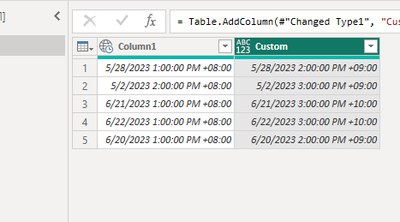
if Date.Month([Column1]) >6   or  (Date.Day([Column1])>=21 and Date.Month([Column1])=6) then       DateTimeZone.SwitchZone([Column1],10) else DateTimeZone.SwitchZone([Column1],9)

vyueyunzhmsft_0-1685339169763.png

The result is as follows:

vyueyunzhmsft_1-1685339182136.png


Thank you for your time and sharing, and thank you for your support and understanding of PowerBI! 


Best Regards,

Aniya Zhang

If this post helps, then please consider Accept it as the solution to help the other members find it more quickly

View solution in original post

3 REPLIES 3
sanjyot_firke
Helper II
Helper II

Hi Aniya,


Thank you so much for the detailed explanation.


How do we handle daylight savings in this function?  Can we use conditional logic?

Sydney, AUS havs daylight savings


Regards,

Sanjyot Firke

Hi , @sanjyot_firke 

According to your descripition, in AUS havs daylight savings, and you need to judge the date if the time zone changes.

If the date is the fixable , you can use if to judge it like this (example as 6/21 per year):

if Date.Month([Column1]) >6   or  (Date.Day([Column1])>=21 and Date.Month([Column1])=6) then       DateTimeZone.SwitchZone([Column1],10) else DateTimeZone.SwitchZone([Column1],9)

vyueyunzhmsft_0-1685339169763.png

The result is as follows:

vyueyunzhmsft_1-1685339182136.png


Thank you for your time and sharing, and thank you for your support and understanding of PowerBI! 


Best Regards,

Aniya Zhang

If this post helps, then please consider Accept it as the solution to help the other members find it more quickly

v-yueyunzh-msft
Community Support
Community Support

Hi, @sanjyot_firke 

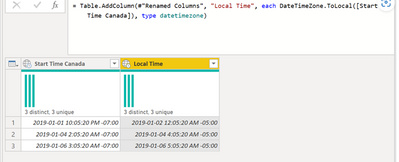
Accoridng to your descrition, you use the "Local Time" option in Power Query to convert the timezone.
vyueyunzhmsft_0-1685333413309.png

The caveat here is that it uses the local time from the regional settings of my machine, meaning that if I was to use a machine that had different regional settings, it wouldn’t yield the correct result.


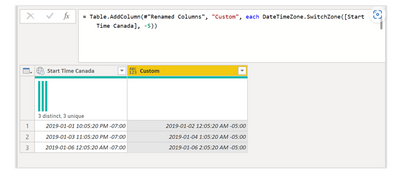
This one requires you to use a specific function, but it’s quite a simple function called DateTimeZone.SwitchZone which, in comparison to the DateTimeZone.ToLocal, only adds a second argument where you can input (as a number) the correct time zone to which you want to “switch” your original datetimezone value.

The result of that will look like this:
vyueyunzhmsft_1-1685333480105.png


For more information, you can refer to :
Handling Different Time Zones in Power BI / Power Query — The Power User


Thank you for your time and sharing, and thank you for your support and understanding of PowerBI! 


Best Regards,

Aniya Zhang

If this post helps, then please consider Accept it as the solution to help the other members find it more quickly

Helpful resources

Announcements
May Power BI Update Carousel

Power BI Monthly Update - May 2026

Check out the May 2026 Power BI update to learn about new features.

Fabric SQL PBI Data Days

Data Days 2026 coming soon!

Sign up to receive a private message when registration opens and key events begin.

New to Fabric survey Carousel

New to Fabric Survey

If you have recently started exploring Fabric, we'd love to hear how it's going. Your feedback can help with product improvements.

Power BI DataViz World Championships carousel

Power BI DataViz World Championships - June 2026

A new Power BI DataViz World Championship is coming this June! Don't miss out on submitting your entry.