cancel
Showing results for 
Search instead for 
Did you mean: 

Data Days is here! Join us now for 60+ days of learning, challenges, and connection. Learn more

Reply
sastrup
Regular Visitor

Market Share Percent In Ribbon Chart - % Of Column Total

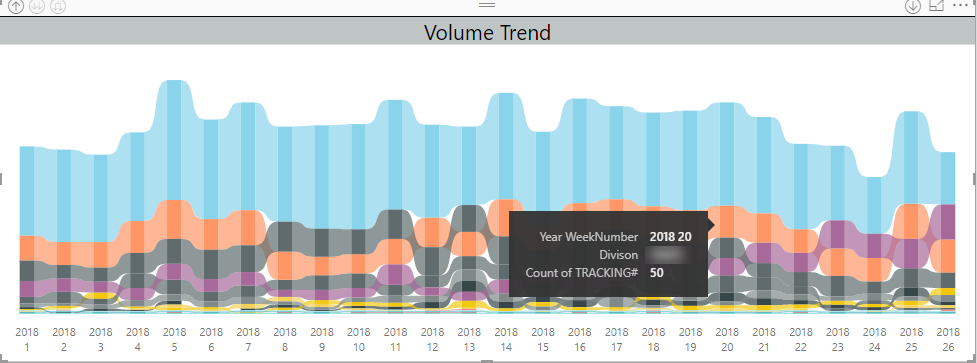
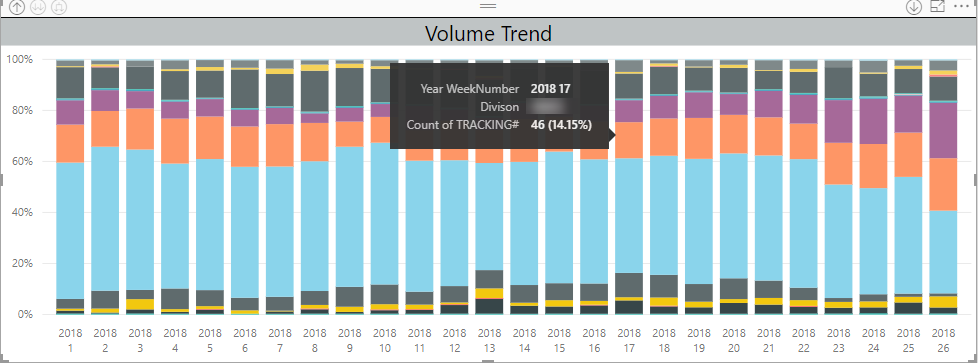
We are trying to mimic The 100% stacked bar chart's % of column total calculation on a ribbon chart. So essentially a market share % of total calculation for each date we have.


We've tried creating a measure that we thought would work but it has not:

AllDivisionTracking := CALCULATE ( [TrackingNumbers], ALL ( Divisions ) )

PercentOfTotal := DIVIDE ( [TrackingNumbers], [AllDivisionTracking] )


This measure does not seem to work when inserted as the measure on a ribbon chart. The ribbon chart seems to make this calculation over the entire date range instead of limiting it to each day as we would have expected.

Ribbon.pngStacked Column.png

1 ACCEPTED SOLUTION
matsder
Regular Visitor

Taking @deldersveld solution into consideration a ribion chart with Market Share Trends can be created. I used the formulas below and tested it for accuracy and it seems to work:

AllDivisionTracking := CALCULATE ( DistinctCount([TrackingNumbers]),FILTER(DateTable,DateTable[Date]), ALL ( Divisions ) )

PercentOfTotal := DIVIDE ( DistinctCount([TrackingNumbers]), [AllDivisionTracking] )

I added an external date table that was used in the calculation. 


View solution in original post

3 REPLIES 3
ShaneR
New Member

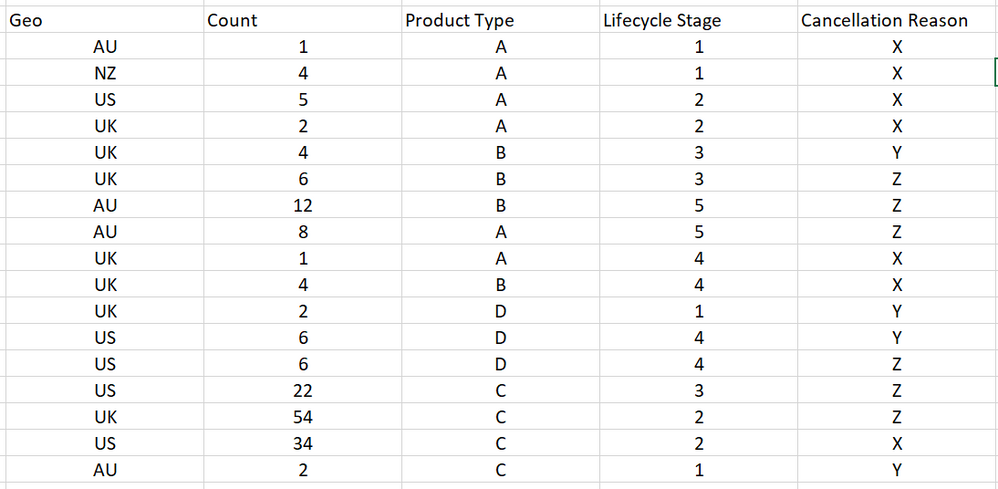
I'm having the exact same problem but I think my data is set up slightly differently and I can't figure out what is going wrong. My data looks like the image attached. 

I want the X axis on the chart to be Lifecycle Stage and the Y axis to be % of total cancellations by lifecycle stage, with each column split by cancellation reason. 

I'd also like to be able to filter the resulting chart by geo and/or product type. 


These are the measures I tried:


cancellation_reasons_per_stage =CALCULATE(SUM('Table 1'[Count]),filter('Table 1','Table 1'[Lifecycle Stage]),ALL('Table 1'[Cancellation Reason]))


%_of_total = DIVIDE(SUM('Table 1'[Count]),[cancellation_reasons_per_stage])

Thanks!
 image.png

matsder
Regular Visitor

Taking @deldersveld solution into consideration a ribion chart with Market Share Trends can be created. I used the formulas below and tested it for accuracy and it seems to work:

AllDivisionTracking := CALCULATE ( DistinctCount([TrackingNumbers]),FILTER(DateTable,DateTable[Date]), ALL ( Divisions ) )

PercentOfTotal := DIVIDE ( DistinctCount([TrackingNumbers]), [AllDivisionTracking] )

I added an external date table that was used in the calculation. 


deldersveld
Resident Rockstar
Resident Rockstar

Try using ALLEXCEPT with the date column instead of ALL: https://msdn.microsoft.com/en-us/query-bi/dax/allexcept-function-dax

Helpful resources

Announcements
Fabric Data Days is here Carousel

Fabric Data Days 2026

Don't miss out on Data Days, June 15 through August 7. Learn Fabric, Power BI, SQL, AI and more.

May Power BI Update Carousel

Power BI Monthly Update - May 2026

Check out the May 2026 Power BI update to learn about new features.

Power BI DataViz World Championships carousel

Power BI DataViz World Championships - June 2026

A new Power BI DataViz World Championship is coming this June! Don't miss out on submitting your entry.