cancel
Showing results for 
Search instead for 
Did you mean: 

July 7 - July 17 | Round 2 of the Power BI Dataviz World Championships. Don't miss your chance! Learn more

Reply
sastrup
Regular Visitor

Market Share Percent In Ribbon Chart - % Of Column Total

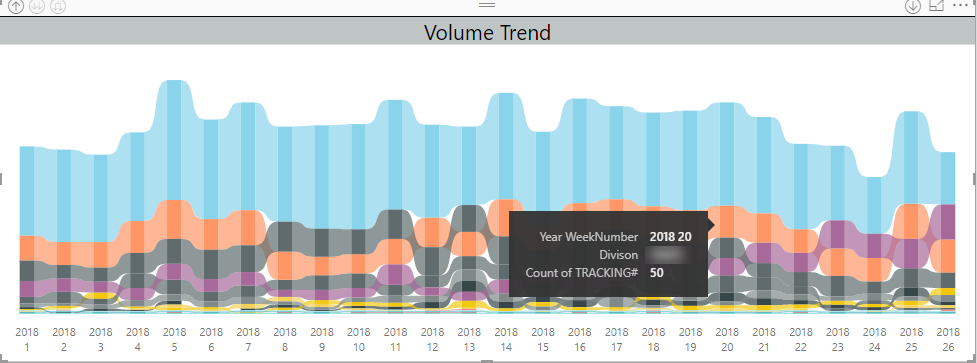
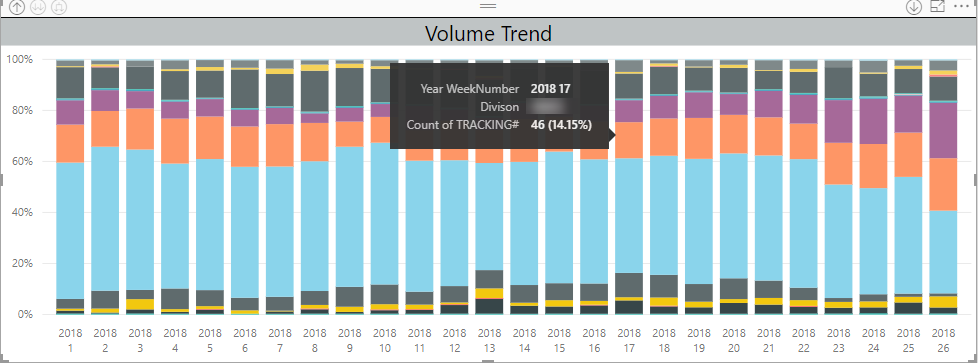
We are trying to mimic The 100% stacked bar chart's % of column total calculation on a ribbon chart. So essentially a market share % of total calculation for each date we have.


We've tried creating a measure that we thought would work but it has not:

AllDivisionTracking := CALCULATE ( [TrackingNumbers], ALL ( Divisions ) )

PercentOfTotal := DIVIDE ( [TrackingNumbers], [AllDivisionTracking] )


This measure does not seem to work when inserted as the measure on a ribbon chart. The ribbon chart seems to make this calculation over the entire date range instead of limiting it to each day as we would have expected.

Ribbon.pngStacked Column.png

1 ACCEPTED SOLUTION
matsder
Regular Visitor

Taking @deldersveld solution into consideration a ribion chart with Market Share Trends can be created. I used the formulas below and tested it for accuracy and it seems to work:

AllDivisionTracking := CALCULATE ( DistinctCount([TrackingNumbers]),FILTER(DateTable,DateTable[Date]), ALL ( Divisions ) )

PercentOfTotal := DIVIDE ( DistinctCount([TrackingNumbers]), [AllDivisionTracking] )

I added an external date table that was used in the calculation. 


View solution in original post

3 REPLIES 3
ShaneR
New Member

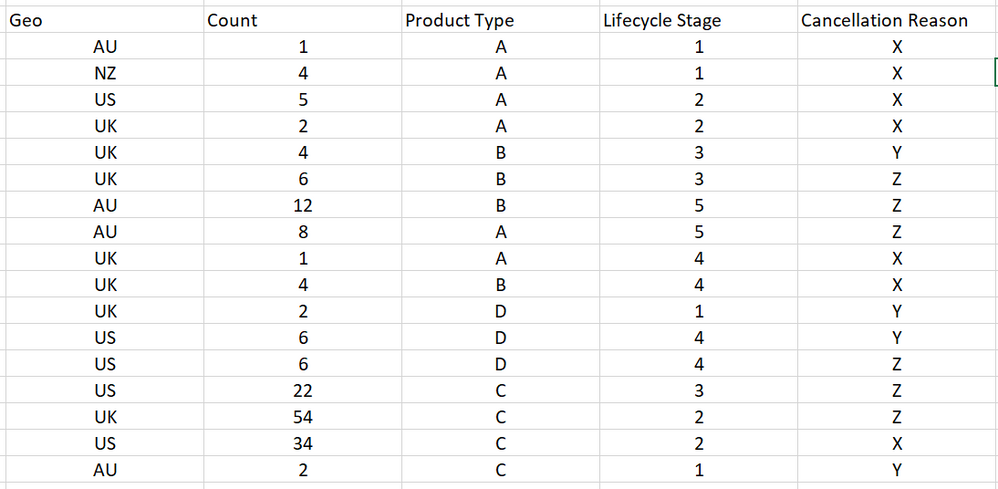
I'm having the exact same problem but I think my data is set up slightly differently and I can't figure out what is going wrong. My data looks like the image attached. 

I want the X axis on the chart to be Lifecycle Stage and the Y axis to be % of total cancellations by lifecycle stage, with each column split by cancellation reason. 

I'd also like to be able to filter the resulting chart by geo and/or product type. 


These are the measures I tried:


cancellation_reasons_per_stage =CALCULATE(SUM('Table 1'[Count]),filter('Table 1','Table 1'[Lifecycle Stage]),ALL('Table 1'[Cancellation Reason]))


%_of_total = DIVIDE(SUM('Table 1'[Count]),[cancellation_reasons_per_stage])

Thanks!
 image.png

matsder
Regular Visitor

Taking @deldersveld solution into consideration a ribion chart with Market Share Trends can be created. I used the formulas below and tested it for accuracy and it seems to work:

AllDivisionTracking := CALCULATE ( DistinctCount([TrackingNumbers]),FILTER(DateTable,DateTable[Date]), ALL ( Divisions ) )

PercentOfTotal := DIVIDE ( DistinctCount([TrackingNumbers]), [AllDivisionTracking] )

I added an external date table that was used in the calculation. 


deldersveld
Resident Rockstar
Resident Rockstar

Try using ALLEXCEPT with the date column instead of ALL: https://msdn.microsoft.com/en-us/query-bi/dax/allexcept-function-dax

Helpful resources

Announcements
FabCon and SQLCon Barcelona 2026

FabCon & SQLCon – Barcelona 2026

Join us in Barcelona for FabCon and SQLCon, the Fabric, Power BI, SQL, and AI community event. Save €200 with code FABCMTY200.

60 days of Data Days Carousel

Data Days 2026

Join Fabric Data Days 2026: 60 days of free live/on-demand sessions, challenges, study groups, and certification opportunities.

Power BI DataViz World Championships carousel

Power BI DataViz World Championships - June 2026

A new Power BI DataViz World Championship is coming this June! Don't miss out on submitting your entry.