cancel
Showing results for 
Search instead for 
Did you mean: 

Try your skills in the Power BI Dataviz World Championship! Round one ends June 26. Join now

Reply
smithry3
Frequent Visitor

January 2019 Browser Cache Issue


Is anyone else experiencing the browser cache issue with the January 2019 release that impacted the August 2018 release.  I upgraded from the March 2018 release to January 2018 and my reports have a "Data loading" message with a spinning icon that spins indefinitely.  I'm using chrome.  Is there anything I can do to not have users have to clear their cache in order to use reports on Power BI Report Server?


Here is the August 2018 issue I referenced above.

https://community.powerbi.com/t5/Issues/Report-Server-August-2018-Massive-show-stopper-bug-where-use...


Thanks,


Ryan


1 ACCEPTED SOLUTION
rpatkar
Power BI Team
Power BI Team

Hi Ryan,


The browser cache issue was fixed in Auguest 2018 relesae but still needed one final time that users would need to clear their browser cache. Users upgrading from Aug 2018 to Jan 2019 should not be seeing the browser cache issue.


In your case, since you are upgrading from March 2018 to Jan 2019, your users will need to do one final browser cache refresh after which we do not expect this to be needed again.


Was discussed @ https://community.powerbi.com/t5/Report-Server/June-2018-Release-of-Power-BI-Report-Server/td-p/4297...


Thanks,

Rohit

View solution in original post

4 REPLIES 4
JonathanP
New Member

Have the same kind of issue.

Since January 2019 (and like we had with August), some users had issues with the existing Power BI reports.

Issues are:

  • Linked objects (link to bookmark) are not working anymore
  • Some visuals "still loading" and never appear

Same issue on Chrome and IE.

Same solution: clean the cache/reset the explorer properties.

That's really disapointing, we can't ask our users to do such manipulation every 6 months...

Jacky
Frequent Visitor

The issue is not resolved yet.

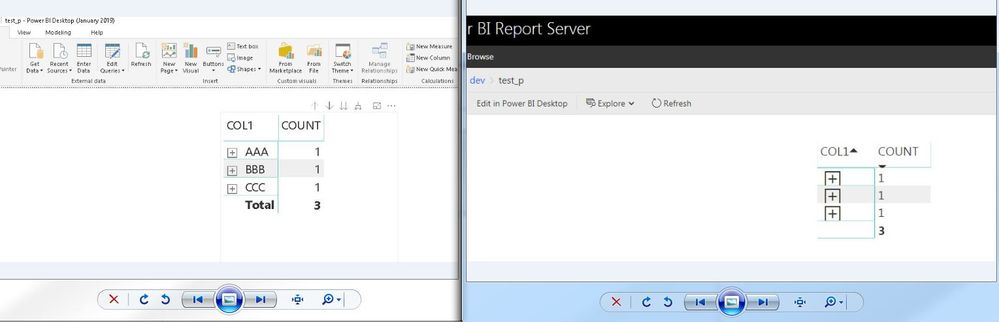
We still have problems with +/- icons in chrome (after clearing all history and cache files)

This is after intalling the version from 30/01/2019...


desktop_vs_service.JPG


and timeline for the fix ?


thanks

rpatkar
Power BI Team
Power BI Team

Hi Ryan,


The browser cache issue was fixed in Auguest 2018 relesae but still needed one final time that users would need to clear their browser cache. Users upgrading from Aug 2018 to Jan 2019 should not be seeing the browser cache issue.


In your case, since you are upgrading from March 2018 to Jan 2019, your users will need to do one final browser cache refresh after which we do not expect this to be needed again.


Was discussed @ https://community.powerbi.com/t5/Report-Server/June-2018-Release-of-Power-BI-Report-Server/td-p/4297...


Thanks,

Rohit

What about this issue ?

anyone else still has this kind of problem.

I'm taking about the +/- ikons in the browser.

we work with chrome and still face this issue even after clearing cache.

Helpful resources

Announcements
Fabric Data Days is here Carousel

Fabric Data Days 2026

Don't miss out on Data Days, June 15 through August 7. Learn Fabric, Power BI, SQL, AI and more.

May Power BI Update Carousel

Power BI Monthly Update - May 2026

Check out the May 2026 Power BI update to learn about new features.

Power BI DataViz World Championships carousel

Power BI DataViz World Championships - June 2026

A new Power BI DataViz World Championship is coming this June! Don't miss out on submitting your entry.