cancel
Showing results for 
Search instead for 
Did you mean: 

July 7 - July 17 | Round 2 of the Power BI Dataviz World Championships. Don't miss your chance! Learn more

Reply
smithry3
Frequent Visitor

January 2019 Browser Cache Issue


Is anyone else experiencing the browser cache issue with the January 2019 release that impacted the August 2018 release.  I upgraded from the March 2018 release to January 2018 and my reports have a "Data loading" message with a spinning icon that spins indefinitely.  I'm using chrome.  Is there anything I can do to not have users have to clear their cache in order to use reports on Power BI Report Server?


Here is the August 2018 issue I referenced above.

https://community.powerbi.com/t5/Issues/Report-Server-August-2018-Massive-show-stopper-bug-where-use...


Thanks,


Ryan


1 ACCEPTED SOLUTION
rpatkar
Power BI Team
Power BI Team

Hi Ryan,


The browser cache issue was fixed in Auguest 2018 relesae but still needed one final time that users would need to clear their browser cache. Users upgrading from Aug 2018 to Jan 2019 should not be seeing the browser cache issue.


In your case, since you are upgrading from March 2018 to Jan 2019, your users will need to do one final browser cache refresh after which we do not expect this to be needed again.


Was discussed @ https://community.powerbi.com/t5/Report-Server/June-2018-Release-of-Power-BI-Report-Server/td-p/4297...


Thanks,

Rohit

View solution in original post

4 REPLIES 4
JonathanP
New Member

Have the same kind of issue.

Since January 2019 (and like we had with August), some users had issues with the existing Power BI reports.

Issues are:

  • Linked objects (link to bookmark) are not working anymore
  • Some visuals "still loading" and never appear

Same issue on Chrome and IE.

Same solution: clean the cache/reset the explorer properties.

That's really disapointing, we can't ask our users to do such manipulation every 6 months...

Jacky
Frequent Visitor

The issue is not resolved yet.

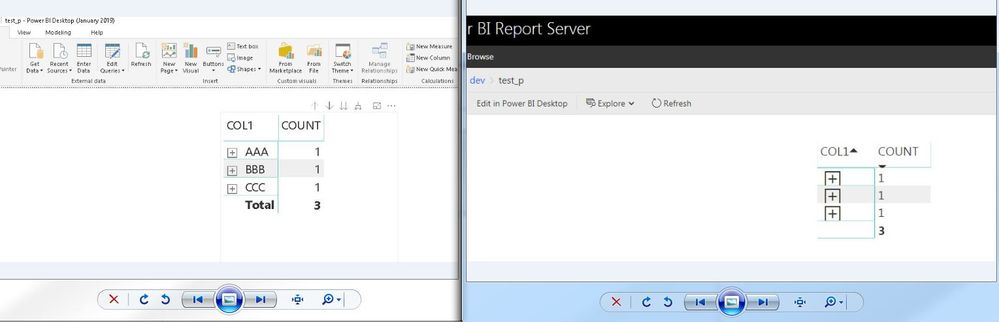
We still have problems with +/- icons in chrome (after clearing all history and cache files)

This is after intalling the version from 30/01/2019...


desktop_vs_service.JPG


and timeline for the fix ?


thanks

rpatkar
Power BI Team
Power BI Team

Hi Ryan,


The browser cache issue was fixed in Auguest 2018 relesae but still needed one final time that users would need to clear their browser cache. Users upgrading from Aug 2018 to Jan 2019 should not be seeing the browser cache issue.


In your case, since you are upgrading from March 2018 to Jan 2019, your users will need to do one final browser cache refresh after which we do not expect this to be needed again.


Was discussed @ https://community.powerbi.com/t5/Report-Server/June-2018-Release-of-Power-BI-Report-Server/td-p/4297...


Thanks,

Rohit

What about this issue ?

anyone else still has this kind of problem.

I'm taking about the +/- ikons in the browser.

we work with chrome and still face this issue even after clearing cache.

Helpful resources

Announcements
FabCon and SQLCon Barcelona 2026

FabCon & SQLCon – Barcelona 2026

Join us in Barcelona for FabCon and SQLCon, the Fabric, Power BI, SQL, and AI community event. Save €200 with code FABCMTY200.

60 days of Data Days Carousel

Data Days 2026

Join Fabric Data Days 2026: 60 days of free live/on-demand sessions, challenges, study groups, and certification opportunities.

Power BI DataViz World Championships carousel

Power BI DataViz World Championships - June 2026

A new Power BI DataViz World Championship is coming this June! Don't miss out on submitting your entry.