Join us at FabCon Atlanta from March 16 - 20, 2026, for the ultimate Fabric, Power BI, AI and SQL community-led event. Save $200 with code FABCOMM.
Register now!Get Fabric Certified for FREE during Fabric Data Days. Don't miss your chance! Request now
Hello firends!
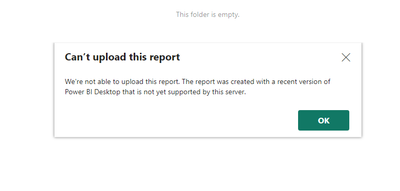
I have a latest version of PBI Desktop at home. I have created a PBIX report file and tried to open at where I have Report server with older version. Initially iy gave me an error message, but eventually did open it. After opening it in Report server, I "saved as" pbix file on work computer. When I tried to upload on server folder for sharing, it gave me an error that "We're not able to upload this report. The report was created with a recent version of Power Bi Desktop that is not yest supported by this server". See the screen shot attached.
At work, I can not upgrade Report Server tot he newer version. Can I "save as" my PBIX file at home to older version, and then open it into Report server at work? I could not find any info on this. Can some body please help me?
Solved! Go to Solution.
The following blog post details some possible solutions for this
Power BI Report Server – fixing “Can’t upload this report” – Random Procrastination (gosbell.com)
Thanks @d_gosbell .
I kinda suspected that I have re-create the whole report...which I dont want to do!
Anyways, I have learned my lesson and will take care of it for the next report.
Thanks and keep supporting community.
Abhi.
The following blog post details some possible solutions for this
Power BI Report Server – fixing “Can’t upload this report” – Random Procrastination (gosbell.com)
Check out the November 2025 Power BI update to learn about new features.
Advance your Data & AI career with 50 days of live learning, contests, hands-on challenges, study groups & certifications and more!
| User | Count |
|---|---|
| 7 | |
| 2 | |
| 2 | |
| 2 | |
| 1 |
| User | Count |
|---|---|
| 14 | |
| 6 | |
| 3 | |
| 3 | |
| 2 |