Join us at FabCon Atlanta from March 16 - 20, 2026, for the ultimate Fabric, Power BI, AI and SQL community-led event. Save $200 with code FABCOMM.
Register now!Vote for your favorite vizzies from the Power BI Dataviz World Championship submissions. Vote now!
Hello,
I have this scenario on automating my email.
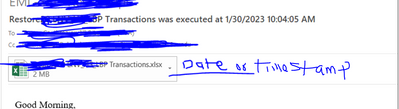
1. I am able to send email using file share and time stamp appended.
2. When I use standard subscription, the time stamp appears on the subject line and not with the attachment.
Is there a way the timestamp can be appended on the attachment using standard subscription?. My datasource is Oracle Data Source
Solved! Go to Solution.
Hi M_nwadibia,
Unfortunately, there is no method to change the report name using the Standard or Data-driven subscription while using the email Distribution option. The email option uses the RDL name as is.
The Windows File Share option allows creating the file, e.g., Excel, with a different name.
Hi M_nwadibia,
Unfortunately, there is no method to change the report name using the Standard or Data-driven subscription while using the email Distribution option. The email option uses the RDL name as is.
The Windows File Share option allows creating the file, e.g., Excel, with a different name.
One option to achieve this is to use a DAX formula to create a calculated column that concatenates the desired date/time value with the existing data. This calculated column can then be used in the report to display the date/time information.
Here's an example of how to do this:
=TEXT(NOW(), "MM/DD/YYYY HH:MM:SS")
This approach will allow the user to append a timestamp or date to their Power BI report when using a standard subscription.
This is SSRS and not Power BI
Vote for your favorite vizzies from the Power BI World Championship submissions!
If you love stickers, then you will definitely want to check out our Community Sticker Challenge!
Check out the January 2026 Power BI update to learn about new features.
| User | Count |
|---|---|
| 3 | |
| 3 | |
| 1 | |
| 1 | |
| 1 |
| User | Count |
|---|---|
| 6 | |
| 4 | |
| 4 | |
| 3 | |
| 2 |