cancel
Showing results for 
Search instead for 
Did you mean: 

The Fabric community is now in read-only for platform upgrade. Learn more

Reply
shatha
Frequent Visitor

sales force

I am trying to load data from salesforce report, however the number of rows loaded in BI are only 2000, while the actual report in SF have 2314 records, why BI is not loading the full report

1 ACCEPTED SOLUTION
Anonymous
Not applicable

Hi @shatha,

The 2000 row limit is from  Salesforce Report API but not from Power BI.

As a workaround for the above issue, you can use Salesforce Object connector in Power BI Desktop to pull all the rows from individual tables and recreate reports you’d like, then you can publish the reports to Power BI Service and create dashboards. The Object connector doesn’t have the 2000 row limit.
1.png


Thanks,
Lydia Zhang

View solution in original post

3 REPLIES 3
metrica
Post Prodigy
Post Prodigy

Hi @shatha,


The accepted solution is still correct. The Salesforce Reports API limits the native connector to 2,000 rows. Salesforce Objects avoids that limit, but the report logic must be rebuilt in Power BI.


Power BI Connector for Salesforce is another option and has no report row cap.


AppExchange and 30-day trial:
https://appexchange.salesforce.com/appxListingDetail?listingId=31526f0e-abd8-4cb5-bd1a-3bd56b5c0577


Docs:
https://metricasoftware.com/docs/salesforce/


Cheers,
Metrica Team

CoderZen08
Helper V
Helper V

Hi @shatha  As a workaround, maybe you can try to test your connection with a 3rd party connector. I've tried windsor.ai, supermetrics and funnel.io. I stayed with windsor because it is much cheaper so just to let you know other options. In case you wonder, to make the connection first search for the Salesforce connector in the data sources list:
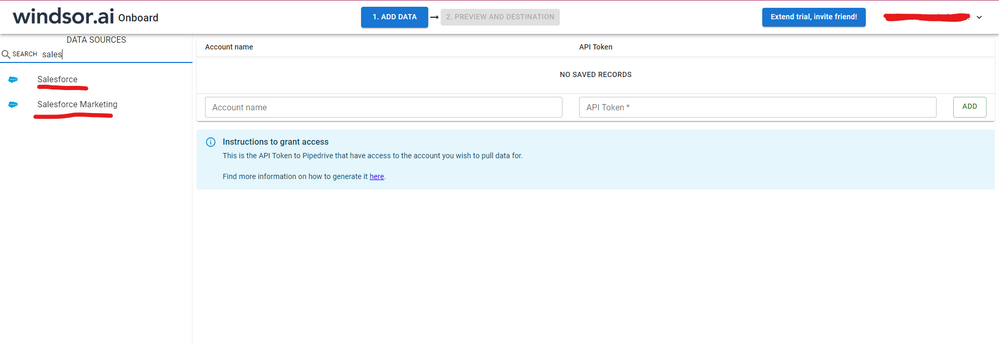
 

SALESFORCE-1.png


After that, just grant access to your Salesforce account using your credentials, then on preview and destination page you will see a preview of your Salesforce fields:
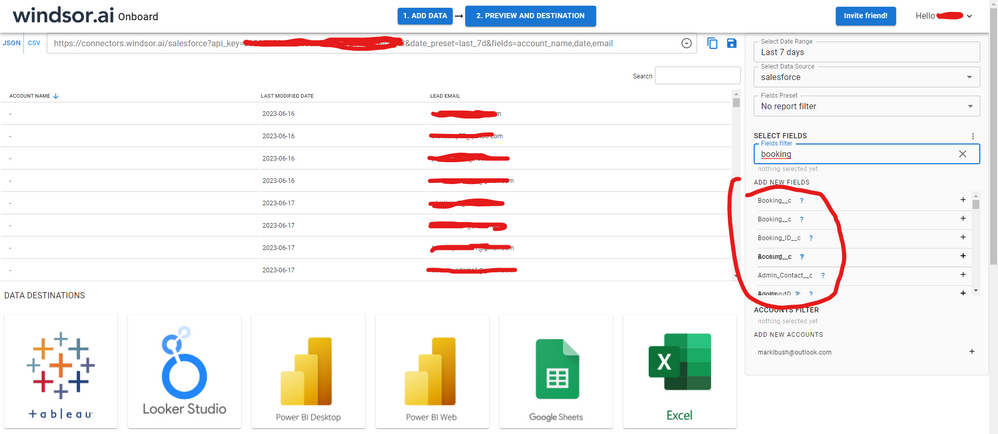
 

SALESFORCE-2.png


There just select the fields you need. It is also compatible with custom fields and custom objects, so you'll be able to export them through windsor.  Finally, just select PBI as your data destination and finally just copy and paste the url on PBI --> Get Data --> Web --> Paste the url. 
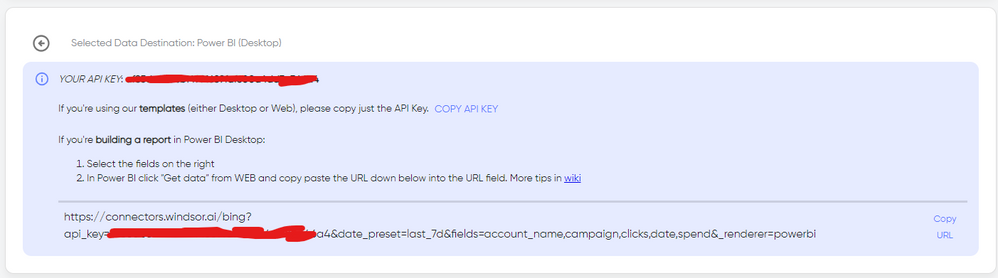
 

SELECT_DESTINATION_NEW.png

Anonymous
Not applicable

Hi @shatha,

The 2000 row limit is from  Salesforce Report API but not from Power BI.

As a workaround for the above issue, you can use Salesforce Object connector in Power BI Desktop to pull all the rows from individual tables and recreate reports you’d like, then you can publish the reports to Power BI Service and create dashboards. The Object connector doesn’t have the 2000 row limit.
1.png


Thanks,
Lydia Zhang

Helpful resources

Announcements
FabCon and SQLCon Barcelona 2026

FabCon & SQLCon – Barcelona 2026

Join us in Barcelona for FabCon and SQLCon, the Fabric, Power BI, SQL, and AI community event. Save €200 with code FABCMTY200.

Power BI DataViz World Championships carousel

Power BI DataViz World Championships - June 2026

A new Power BI DataViz World Championship is coming this June! Don't miss out on submitting your entry.