cancel
Showing results for 
Search instead for 
Did you mean: 

The Power BI Data Visualization World Championships is back! Get ahead of the game and start preparing now! Learn more

Reply
shatha
Frequent Visitor

sales force

I am trying to load data from salesforce report, however the number of rows loaded in BI are only 2000, while the actual report in SF have 2314 records, why BI is not loading the full report

1 ACCEPTED SOLUTION
Anonymous
Not applicable

Hi @shatha,

The 2000 row limit is from  Salesforce Report API but not from Power BI.

As a workaround for the above issue, you can use Salesforce Object connector in Power BI Desktop to pull all the rows from individual tables and recreate reports you’d like, then you can publish the reports to Power BI Service and create dashboards. The Object connector doesn’t have the 2000 row limit.
1.png


Thanks,
Lydia Zhang

View solution in original post

2 REPLIES 2
CoderZen08
Helper V
Helper V

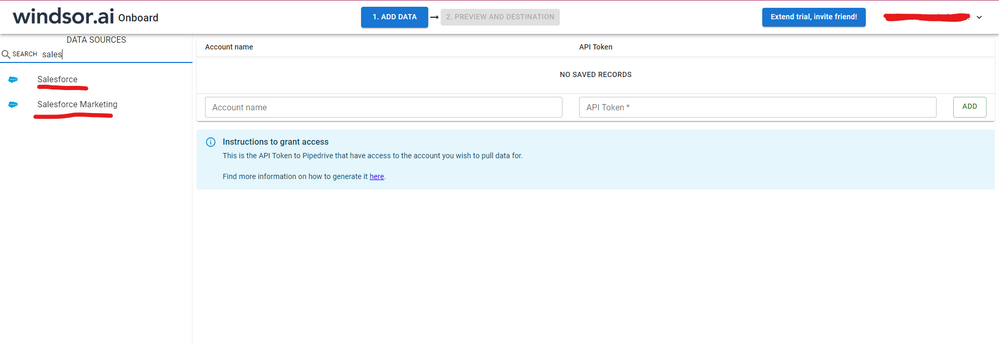
Hi @shatha  As a workaround, maybe you can try to test your connection with a 3rd party connector. I've tried windsor.ai, supermetrics and funnel.io. I stayed with windsor because it is much cheaper so just to let you know other options. In case you wonder, to make the connection first search for the Salesforce connector in the data sources list:


SALESFORCE-1.png


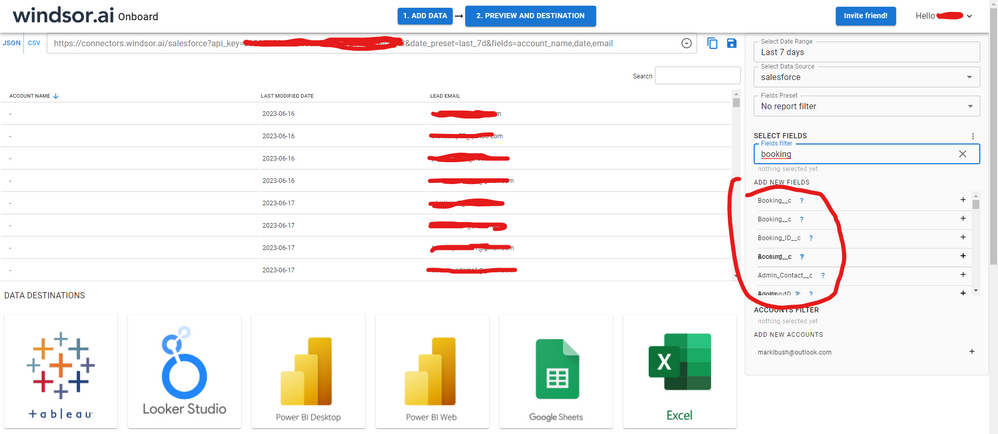
After that, just grant access to your Salesforce account using your credentials, then on preview and destination page you will see a preview of your Salesforce fields:


SALESFORCE-2.png


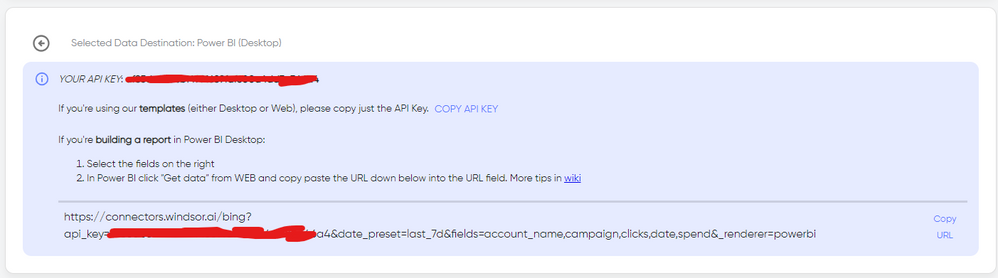
There just select the fields you need. It is also compatible with custom fields and custom objects, so you'll be able to export them through windsor.  Finally, just select PBI as your data destination and finally just copy and paste the url on PBI --> Get Data --> Web --> Paste the url. 


SELECT_DESTINATION_NEW.png

Anonymous
Not applicable

Hi @shatha,

The 2000 row limit is from  Salesforce Report API but not from Power BI.

As a workaround for the above issue, you can use Salesforce Object connector in Power BI Desktop to pull all the rows from individual tables and recreate reports you’d like, then you can publish the reports to Power BI Service and create dashboards. The Object connector doesn’t have the 2000 row limit.
1.png


Thanks,
Lydia Zhang

Helpful resources

Announcements
Power BI DataViz World Championships

Power BI Dataviz World Championships

The Power BI Data Visualization World Championships is back! Get ahead of the game and start preparing now!

December 2025 Power BI Update Carousel

Power BI Monthly Update - December 2025

Check out the December 2025 Power BI Holiday Recap!

FabCon Atlanta 2026 carousel

FabCon Atlanta 2026

Join us at FabCon Atlanta, March 16-20, for the ultimate Fabric, Power BI, AI and SQL community-led event. Save $200 with code FABCOMM.

Top Solution Authors