This is best Fabric, Power BI, SQL and AI community event. How do we know? The last event sold out! Save €200 with code FABCMTY200.
Register nowJuly 28 - August 9 | Final Round of the Power BI Dataviz World Championships. This is your chance. Learn more
Hi All,
I am not sure if this is something power query can help me to do--or maybe this is simply an excel question. Any help in the right direction would be great!!!
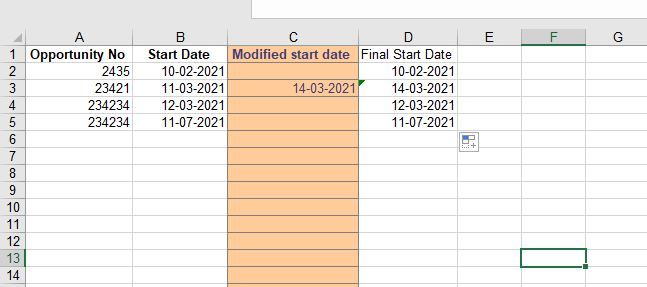
I have a dataset of opportunities with their corresponding start date. In addition, there is a "modify column" that allows the end user to input their "new date" if they wish to. the final start date simply takes either the "modified start date" if any else the "start date".
The issue here is that if i paste new opportunity numbers and start date, the position of the "modified start date" might be wrong. E.g., Opportunity No 23421 end up in the 6th row and therefore the modified start date position is wrong.
Is there a formula or something that power query can address here?
Thanks so much for the help
Hi @Anonymous
Sorry I'm not fully understanding the issue. What do you mean by the position of the "modified start date" might be wrong? Per my understanding, if you paste new opportunity number and start date in a new row, other cells in the same row are still blank. Can you describe the issue more clearly? Thank you.
Regards,
Community Support Team _ Jing
Join us in Barcelona for FabCon and SQLCon, the Fabric, Power BI, SQL, and AI community event. Save €200 with code FABCMTY200.
If you love stickers, then you will definitely want to check out our community sticker challenge, Barcelona edition!
Check out the July 2026 Power BI update to learn about new features.