Get certified for free when you join Fabric Data Days 2026 and dive into Fabric, Power BI, SQL, AI, and other essential data skills.
Join nowData Days is here! Join us now for 60+ days of learning, challenges, and connection. Learn more
Hi All,
I am not sure if this is something power query can help me to do--or maybe this is simply an excel question. Any help in the right direction would be great!!!
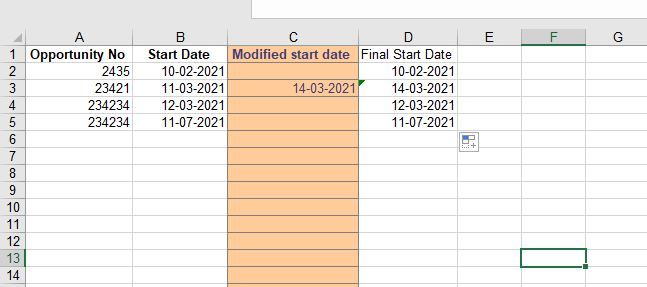
I have a dataset of opportunities with their corresponding start date. In addition, there is a "modify column" that allows the end user to input their "new date" if they wish to. the final start date simply takes either the "modified start date" if any else the "start date".
The issue here is that if i paste new opportunity numbers and start date, the position of the "modified start date" might be wrong. E.g., Opportunity No 23421 end up in the 6th row and therefore the modified start date position is wrong.
Is there a formula or something that power query can address here?
Thanks so much for the help
Hi @Anonymous
Sorry I'm not fully understanding the issue. What do you mean by the position of the "modified start date" might be wrong? Per my understanding, if you paste new opportunity number and start date in a new row, other cells in the same row are still blank. Can you describe the issue more clearly? Thank you.
Regards,
Community Support Team _ Jing
Don't miss out on Data Days, June 15 through August 7. Learn Fabric, Power BI, SQL, AI and more.
Check out the May 2026 Power BI update to learn about new features.
| User | Count |
|---|---|
| 4 | |
| 4 | |
| 3 | |
| 2 | |
| 1 |
| User | Count |
|---|---|
| 11 | |
| 11 | |
| 5 | |
| 4 | |
| 3 |