
cancel
Showing results for 
Search instead for 
Did you mean: 

The Power BI Data Visualization World Championships is back! Get ahead of the game and start preparing now! Learn more

Reply
AnisAnalyst
Frequent Visitor

cannot Upload XML!

Dear community memebers,

I have been trying to upload an XML file into Power BI, that the data does not display (only the column headers). I tried this on another application and it worked. Can you help me please?

Thanks

1 ACCEPTED SOLUTION
Anonymous
Not applicable

6 REPLIES 6
Anonymous
Not applicable

@AnisAnalyst,

I make a test using this sample XML file, everything works well when I connect to this XML file to the latest version of Power BI Desktop(2.47.4766.542). Would you mind sharing me your XML file so that I can test?

Regards,
Lydia

Thanks Lydia.

Here is the XML file I have been trying to open in Power BI but without success. 


https://1drv.ms/u/s!Ai_AaGbGZf0basPYf4ME0waF8Rs


If you look at the XML data you ll realise it has many column fields, but it only shows one field once opened.


Please help me to open this to display all fileds.


Anis

Anonymous
Not applicable

@AnisAnalyst,

After connecting to your XML file in the latest version of Power BI Desktop, I get the following data format in Query Editor of Power BI Desktop. You would need to expand the Header and Body columns to get detailed data.
1.PNG

Regards,

Ans some of them do not replace the "Table" by values?

Thanks Lydia,

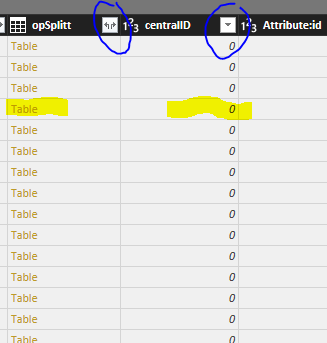
Once i expand, I get the "Table" in side cells. Once I click on the two arrows and then click ok, the values appear instead of the link"Table". Is there a way to do that for all columns at once.

Thanks

Anis


power BI.PNG


Anonymous
Not applicable

@AnisAnalyst,


You can use Power Query to expand all columns at once. For more details, please review the following blog and similar thread.

https://blog.crossjoin.co.uk/2014/05/21/expanding-all-columns-in-a-table-in-power-query/
https://community.powerbi.com/t5/Desktop/How-to-expand-all-nested-tables-at-once-table-expandtableco...

Regards,

Helpful resources

Announcements
Power BI DataViz World Championships

Power BI Dataviz World Championships

The Power BI Data Visualization World Championships is back! Get ahead of the game and start preparing now!

December 2025 Power BI Update Carousel

Power BI Monthly Update - December 2025

Check out the December 2025 Power BI Holiday Recap!

FabCon Atlanta 2026 carousel

FabCon Atlanta 2026

Join us at FabCon Atlanta, March 16-20, for the ultimate Fabric, Power BI, AI and SQL community-led event. Save $200 with code FABCOMM.

Top Solution Authors