Get Fabric or SQL Certified for Free.
Get certified for free when you join Fabric Data Days 2026 and dive into Fabric, Power BI, SQL, AI, and other essential data skills.
Join now- Power BI forums
- Get Help with Power BI
- Desktop
- Service
- Report Server
- Power Query
- Mobile Apps
- Developer
- DAX Commands and Tips
- Custom Visuals Development Discussion
- Health and Life Sciences
- Power BI Spanish forums
- Translated Spanish Desktop
- Training and Consulting
- Instructor Led Training
- Dashboard in a Day for Women, by Women
- Galleries
- Data Stories Gallery
- Themes Gallery
- Contests Gallery
- QuickViz Gallery
- Quick Measures Gallery
- Visual Calculations Gallery
- Notebook Gallery
- Translytical Task Flow Gallery
- TMDL Gallery
- R Script Showcase
- Webinars and Video Gallery
- Ideas
- Custom Visuals Ideas (read-only)
- Issues
- Issues
- Events
- Upcoming Events
Try your skills in the Power BI Dataviz World Championship! Round one ends June 26. Join now
- Power BI forums
- Forums
- Get Help with Power BI
- Power Query
- Re: cannot Upload XML!
- Subscribe to RSS Feed
- Mark Topic as New
- Mark Topic as Read
- Float this Topic for Current User
- Bookmark
- Subscribe
- Printer Friendly Page

- Mark as New
- Bookmark
- Subscribe
- Mute
- Subscribe to RSS Feed
- Permalink
- Report Inappropriate Content
cannot Upload XML!
Dear community memebers,
I have been trying to upload an XML file into Power BI, that the data does not display (only the column headers). I tried this on another application and it worked. Can you help me please?
Thanks
Solved! Go to Solution.
- Mark as New
- Bookmark
- Subscribe
- Mute
- Subscribe to RSS Feed
- Permalink
- Report Inappropriate Content
You can use Power Query to expand all columns at once. For more details, please review the following blog and similar thread.
https://blog.crossjoin.co.uk/2014/05/21/expanding-all-columns-in-a-table-in-power-query/
https://community.powerbi.com/t5/Desktop/How-to-expand-all-nested-tables-at-once-table-expandtableco...
Regards,

- Mark as New
- Bookmark
- Subscribe
- Mute
- Subscribe to RSS Feed
- Permalink
- Report Inappropriate Content
@AnisAnalyst,
I make a test using this sample XML file, everything works well when I connect to this XML file to the latest version of Power BI Desktop(2.47.4766.542). Would you mind sharing me your XML file so that I can test?
Regards,
Lydia
- Mark as New
- Bookmark
- Subscribe
- Mute
- Subscribe to RSS Feed
- Permalink
- Report Inappropriate Content
Thanks Lydia.
Here is the XML file I have been trying to open in Power BI but without success.
https://1drv.ms/u/s!Ai_AaGbGZf0basPYf4ME0waF8Rs
If you look at the XML data you ll realise it has many column fields, but it only shows one field once opened.
Please help me to open this to display all fileds.
Anis
- Mark as New
- Bookmark
- Subscribe
- Mute
- Subscribe to RSS Feed
- Permalink
- Report Inappropriate Content
@AnisAnalyst,
After connecting to your XML file in the latest version of Power BI Desktop, I get the following data format in Query Editor of Power BI Desktop. You would need to expand the Header and Body columns to get detailed data.
Regards,

- Mark as New
- Bookmark
- Subscribe
- Mute
- Subscribe to RSS Feed
- Permalink
- Report Inappropriate Content
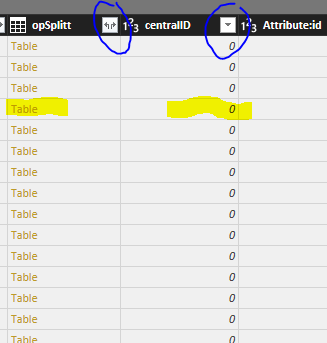
Ans some of them do not replace the "Table" by values?
- Mark as New
- Bookmark
- Subscribe
- Mute
- Subscribe to RSS Feed
- Permalink
- Report Inappropriate Content
Thanks Lydia,
Once i expand, I get the "Table" in side cells. Once I click on the two arrows and then click ok, the values appear instead of the link"Table". Is there a way to do that for all columns at once.
Thanks
Anis
- Mark as New
- Bookmark
- Subscribe
- Mute
- Subscribe to RSS Feed
- Permalink
- Report Inappropriate Content
You can use Power Query to expand all columns at once. For more details, please review the following blog and similar thread.
https://blog.crossjoin.co.uk/2014/05/21/expanding-all-columns-in-a-table-in-power-query/
https://community.powerbi.com/t5/Desktop/How-to-expand-all-nested-tables-at-once-table-expandtableco...
Regards,
Helpful resources

Fabric Data Days 2026
Don't miss out on Data Days, June 15 through August 7. Learn Fabric, Power BI, SQL, AI and more.

Power BI DataViz World Championships - June 2026
A new Power BI DataViz World Championship is coming this June! Don't miss out on submitting your entry.

| User | Count |
|---|---|
| 4 | |
| 3 | |
| 2 | |
| 2 | |
| 1 |


| User | Count |
|---|---|
| 11 | |
| 9 | |
| 5 | |
| 4 | |
| 4 |


