
cancel
Showing results for 
Search instead for 
Did you mean: 

July 7 - July 17 | Round 2 of the Power BI Dataviz World Championships. Don't miss your chance! Learn more

Reply
AnisAnalyst
Frequent Visitor

cannot Upload XML!

Dear community memebers,

I have been trying to upload an XML file into Power BI, that the data does not display (only the column headers). I tried this on another application and it worked. Can you help me please?

Thanks

1 ACCEPTED SOLUTION
Anonymous
Not applicable

6 REPLIES 6
Anonymous
Not applicable

@AnisAnalyst,

I make a test using this sample XML file, everything works well when I connect to this XML file to the latest version of Power BI Desktop(2.47.4766.542). Would you mind sharing me your XML file so that I can test?

Regards,
Lydia

Thanks Lydia.

Here is the XML file I have been trying to open in Power BI but without success. 


https://1drv.ms/u/s!Ai_AaGbGZf0basPYf4ME0waF8Rs


If you look at the XML data you ll realise it has many column fields, but it only shows one field once opened.


Please help me to open this to display all fileds.


Anis

Anonymous
Not applicable

@AnisAnalyst,

After connecting to your XML file in the latest version of Power BI Desktop, I get the following data format in Query Editor of Power BI Desktop. You would need to expand the Header and Body columns to get detailed data.
1.PNG

Regards,

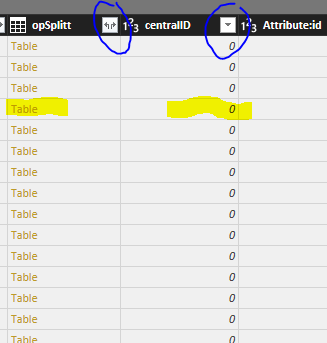
Ans some of them do not replace the "Table" by values?

Thanks Lydia,

Once i expand, I get the "Table" in side cells. Once I click on the two arrows and then click ok, the values appear instead of the link"Table". Is there a way to do that for all columns at once.

Thanks

Anis


power BI.PNG


Anonymous
Not applicable

@AnisAnalyst,


You can use Power Query to expand all columns at once. For more details, please review the following blog and similar thread.

https://blog.crossjoin.co.uk/2014/05/21/expanding-all-columns-in-a-table-in-power-query/
https://community.powerbi.com/t5/Desktop/How-to-expand-all-nested-tables-at-once-table-expandtableco...

Regards,

Helpful resources

Announcements
FabCon and SQLCon Barcelona 2026

FabCon & SQLCon – Barcelona 2026

Join us in Barcelona for FabCon and SQLCon, the Fabric, Power BI, SQL, and AI community event. Save €200 with code FABCMTY200.

July Power BI Update Carousel

Power BI Monthly Update - July 2026

Check out the July 2026 Power BI update to learn about new features.

60 days of Data Days Carousel

Data Days 2026

Join Data Days 2026: 60 days of free live/on-demand sessions, challenges, study groups, and certification opportunities.

Power BI DataViz World Championships carousel

Power BI DataViz World Championships - June 2026

A new Power BI DataViz World Championship is coming this June! Don't miss out on submitting your entry.

Top Solution Authors