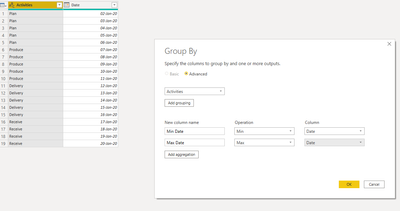
a non natural way to get the same result (I use the table.pivot function with a user defined aggregation function to get multiple aggregation result and collapsed the combine and split column function to only one expression) :
let
    Source = Table.FromRows(Json.Document(Binary.Decompress(Binary.FromText("dc+xCoAgEIDhd3EO1MtK9x4gWsUh6oZACoSC3r5IIoe79fun33sxxGkTldASJChQIlSF1YQZwhrC2sLSvhwzvtzRbGl2NGvFuP69x7iemK4cgAs1FwwXGi4UxyPO+JTsHeOWcUc7fNPhBg==", BinaryEncoding.Base64), Compression.Deflate)), let _t = ((type text) meta [Serialized.Text = true]) in type table [Activities = _t, Date = _t]),
    #"Changed Type" = Table.TransformColumnTypes(Source,{{"Activities", type text}, {"Date", type date}},"en-US"),

    #"Pivoted Column" = Table.Pivot(#"Changed Type", List.Distinct(#"Changed Type"[Activities]), "Activities", "Date", (x)=>{List.Min(x),List.Max(x)}),
    #"Demoted Headers" = Table.DemoteHeaders(#"Pivoted Column"),
    #"Transposed Table" = Table.Transpose(#"Demoted Headers"),
    #"Combine and Split Column" = Table.SplitColumn(#"Transposed Table", "Column2", each Splitter.SplitTextByDelimiter(";", QuoteStyle.Csv)(Text.Combine(List.Transform(_,Text.From), ";")), {"Start", "End"})
in
    #"Combine and Split Column"
let
    Source = Table.FromRows(Json.Document(Binary.Decompress(Binary.FromText("dc+xCoAgEIDhd3EO1MtK9x4gWsUh6oZACoSC3r5IIoe79fun33sxxGkTldASJChQIlSF1YQZwhrC2sLSvhwzvtzRbGl2NGvFuP69x7iemK4cgAs1FwwXGi4UxyPO+JTsHeOWcUc7fNPhBg==", BinaryEncoding.Base64), Compression.Deflate)), let _t = ((type text) meta [Serialized.Text = true]) in type table [Activities = _t, Date = _t]),
    #"Changed Type" = Table.TransformColumnTypes(Source,{{"Activities", type text}, {"Date", type date}},"en-US"),
    #"Pivoted Column" = Table.Pivot(#"Changed Type", List.Distinct(#"Changed Type"[Activities]), "Activities", "Date",(x)=>Text.From(List.Min(x))&";"&Text.From(List.Max(x))),
    #"Demoted Headers" = Table.DemoteHeaders(#"Pivoted Column"),
    #"Transposed Table" = Table.Transpose(#"Demoted Headers"),
    #"Split Column" = Table.SplitColumn(#"Transposed Table", "Column2", Splitter.SplitTextByDelimiter(";", QuoteStyle.Csv), {"Start", "End"}),
    #"Changed Type1" = Table.TransformColumnTypes(#"Split Column",{{"Start", type date}, {"End", type date}})
in
    #"Changed Type1"