Learn from the best! Meet the four finalists headed to the FINALS of the Power BI Dataviz World Championships! Register now
Hi All ,
Iam facing a issue while trying to sort my date column in calender sequence . My actual date column is in the format MMMYY Dec19,Jan20,Feb20 etc., user wants to see aggregated SWAP values on MMMYY basis .
When I place it in matrix form the columns are aligning in 'alphabetical order' . Expected format is calendar order .
I tried to create a sort table and tried to relate to main dataset and create a sequence . But when I enter data in Power query in 'Enter data' for the table.
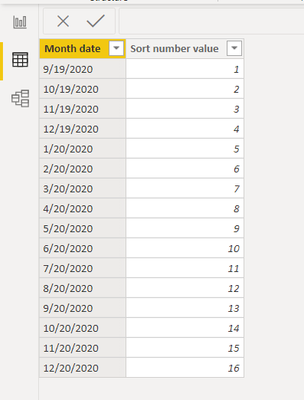
For the 'month date' column below though I try to enter it as date in MMMYY format .ex(Dec19,Jan20) the dates are auto-converting in the below format . So , my 'Dec19' datavalue is changing to '9/19/2020' which is not right .
Attached sample reult below while I enter data :
Request to let me know the approch i need to follow in this case .
Thanks in advance .
@PowerQuestion @PowerQueryFTW @ttcalendar @BIHelp
Solved! Go to Solution.
@neeharikathota
Go to Power Query, Select the column that has dates like "DEC19", RIGHT-CLICK > Change Type > select Date. Now you can do the formatting in the data model as MMMYY.
Let me know if need further help on this.
________________________
If my answer was helpful, please consider Accept it as the solution to help the other members find it
Click on the Thumbs-Up icon if you like this reply 🙂
⭕ Subscribe and learn Power BI from these videos
⚪ Website ⚪ LinkedIn ⚪ PBI User Group
@neeharikathota try this:
let
Source = Table.FromRows(Json.Document(Binary.Decompress(Binary.FromText("i45WcklNNrRUitWJVvJKzDMyALPcUpNArFgA", BinaryEncoding.Base64), Compression.Deflate)), let _t = ((type nullable text) meta [Serialized.Text = true]) in type table [MonthYear = _t]),
#"Convert To Date" = Table.TransformColumns(Source,{{"MonthYear", each Date.FromText(Text.Start(_,3) & "1, 20" & Text.End(_,2)), type date}})
in
#"Convert To Date"
It takes the Dec19 and converts it to the string "Dec 1, 2019" then converts to a date. Jan20 becomes "Jan 1, 2020" and again, a date.
You can wrap a Date.EndOfMonth() around that if you want it to be Dec 31, 2019 after conversion, or replace the "1, 20" part of the formula with, say, "15, 20" to convert to Dec 15, 2019 before it converts.
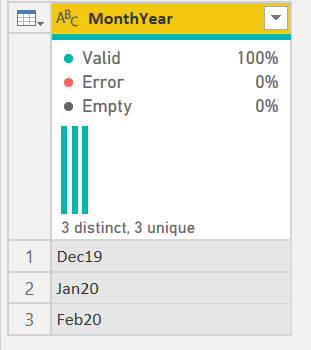
becomes
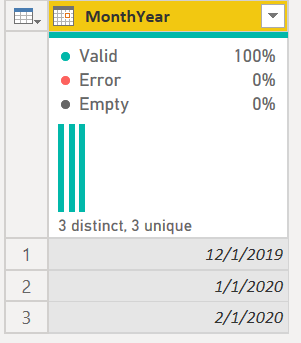
Note the code also automatically converts it to a date column.
How to use M code provided in a blank query:
1) In Power Query, select New Source, then Blank Query
2) On the Home ribbon, select "Advanced Editor" button
3) Remove everything you see, then paste the M code I've given you in that box.
4) Press Done
5) See this article if you need help using this M code in your model.
DAX is for Analysis. Power Query is for Data Modeling
Proud to be a Super User!
MCSA: BI Reportingtry this
let
Source = Table.FromRows(Json.Document(Binary.Decompress(Binary.FromText("i45WSk/NU9JRMjRUitWJVkosKAJyjIzAnJTMZCDH2BjMSUtNAnJMkFSZgtnpmaVAthmYnVOaDmSbg9n5JSVAtoVSbCwA", BinaryEncoding.Base64), Compression.Deflate)), let _t = ((type text) meta [Serialized.Text = true]) in type table [idx = _t, val = _t]),
#"Changed Type" = Table.TransformColumnTypes(Source,{{"idx", type text}, {"val", Int64.Type}}),
ttr=Table.ToRecords(#"Changed Type"),
mesi=Record.FromList({1..12},List.Transform({1..12}, each Text.Start(Date.MonthName(#date(2020,_,1)),3)))
in
Table.FromRecords(List.Sort(ttr, (x,y)=>Value.Compare(Record.Field(mesi,x[idx]),Record.Field(mesi,y[idx]))))
@neeharikathota
Go to Power Query, Select the column that has dates like "DEC19", RIGHT-CLICK > Change Type > select Date. Now you can do the formatting in the data model as MMMYY.
Let me know if need further help on this.
________________________
If my answer was helpful, please consider Accept it as the solution to help the other members find it
Click on the Thumbs-Up icon if you like this reply 🙂
⭕ Subscribe and learn Power BI from these videos
⚪ Website ⚪ LinkedIn ⚪ PBI User Group
A new Power BI DataViz World Championship is coming this June! Don't miss out on submitting your entry.
Share feedback directly with Fabric product managers, participate in targeted research studies and influence the Fabric roadmap.
| User | Count |
|---|---|
| 5 | |
| 4 | |
| 4 | |
| 3 | |
| 2 |
| User | Count |
|---|---|
| 11 | |
| 10 | |
| 7 | |
| 7 | |
| 6 |