cancel
Showing results for 
Search instead for 
Did you mean: 

Data Days is here! Join us now for 60+ days of learning, challenges, and connection. Learn more

Reply
Anonymous
Not applicable

Transform data_Select start date and end date

Dear all,


Please your help to advise how can I convert below data.


Original data includes 2 columns: activities and date. I want to define the start date and end date of each activities.


Original data:


ActivitiesDate
Plan1/2/2020
Plan1/3/2020
Plan1/4/2020
Plan1/5/2020
Plan1/6/2020
Produce1/7/2020
Produce1/8/2020
Produce1/9/2020
Produce1/10/2020
Produce1/11/2020
Delivery1/12/2020
Delivery1/13/2020
Delivery1/14/2020
Delivery1/15/2020
Delivery1/16/2020
Receive1/17/2020
Receive1/18/2020
Receive1/19/2020
Receive1/20/2020


What I expect:


ActivitiesStart dateEnd date
Plan1/2/20201/6/2020
Produce1/7/20201/11/2020
Delivery1/12/20201/16/2020
Receive1/17/20201/20/2020


Thanks for your support!


1 ACCEPTED SOLUTION
Fowmy
Super User
Super User

@Anonymous 

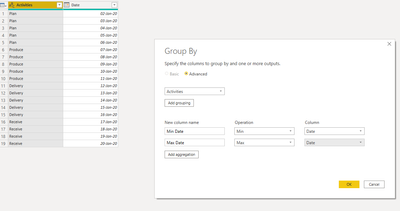
Group it:

Fowmy_0-1598528059797.png

Fowmy_1-1598528069750.png

________________________

If my answer was helpful, please consider Accept it as the solution to help the other members find it

Click on the Thumbs-Up icon if you like this reply 🙂

YouTube  LinkedIn


Did I answer your question? Mark my post as a solution! and hit thumbs up


Subscribe and learn Power BI from these videos

Website LinkedIn PBI User Group

View solution in original post

3 REPLIES 3
Fowmy
Super User
Super User

@Anonymous 

Group it:

Fowmy_0-1598528059797.png

Fowmy_1-1598528069750.png

________________________

If my answer was helpful, please consider Accept it as the solution to help the other members find it

Click on the Thumbs-Up icon if you like this reply 🙂

YouTube  LinkedIn


Did I answer your question? Mark my post as a solution! and hit thumbs up


Subscribe and learn Power BI from these videos

Website LinkedIn PBI User Group

Anonymous
Not applicable

a non natural way to get the same result  (I use the table.pivot function with a user defined aggregation function to get multiple aggregation result and collapsed the combine and split column function to only one expression) :


let
    Source = Table.FromRows(Json.Document(Binary.Decompress(Binary.FromText("dc+xCoAgEIDhd3EO1MtK9x4gWsUh6oZACoSC3r5IIoe79fun33sxxGkTldASJChQIlSF1YQZwhrC2sLSvhwzvtzRbGl2NGvFuP69x7iemK4cgAs1FwwXGi4UxyPO+JTsHeOWcUc7fNPhBg==", BinaryEncoding.Base64), Compression.Deflate)), let _t = ((type text) meta [Serialized.Text = true]) in type table [Activities = _t, Date = _t]),
    #"Changed Type" = Table.TransformColumnTypes(Source,{{"Activities", type text}, {"Date", type date}},"en-US"),

    #"Pivoted Column" = Table.Pivot(#"Changed Type", List.Distinct(#"Changed Type"[Activities]), "Activities", "Date", (x)=>{List.Min(x),List.Max(x)}),
    #"Demoted Headers" = Table.DemoteHeaders(#"Pivoted Column"),
    #"Transposed Table" = Table.Transpose(#"Demoted Headers"),
    #"Combine and Split Column" = Table.SplitColumn(#"Transposed Table", "Column2", each Splitter.SplitTextByDelimiter(";", QuoteStyle.Csv)(Text.Combine(List.Transform(_,Text.From), ";")), {"Start", "End"})
in
    #"Combine and Split Column"


let
    Source = Table.FromRows(Json.Document(Binary.Decompress(Binary.FromText("dc+xCoAgEIDhd3EO1MtK9x4gWsUh6oZACoSC3r5IIoe79fun33sxxGkTldASJChQIlSF1YQZwhrC2sLSvhwzvtzRbGl2NGvFuP69x7iemK4cgAs1FwwXGi4UxyPO+JTsHeOWcUc7fNPhBg==", BinaryEncoding.Base64), Compression.Deflate)), let _t = ((type text) meta [Serialized.Text = true]) in type table [Activities = _t, Date = _t]),
    #"Changed Type" = Table.TransformColumnTypes(Source,{{"Activities", type text}, {"Date", type date}},"en-US"),
    #"Pivoted Column" = Table.Pivot(#"Changed Type", List.Distinct(#"Changed Type"[Activities]), "Activities", "Date",(x)=>Text.From(List.Min(x))&";"&Text.From(List.Max(x))),
    #"Demoted Headers" = Table.DemoteHeaders(#"Pivoted Column"),
    #"Transposed Table" = Table.Transpose(#"Demoted Headers"),
    #"Split Column" = Table.SplitColumn(#"Transposed Table", "Column2", Splitter.SplitTextByDelimiter(";", QuoteStyle.Csv), {"Start", "End"}),
    #"Changed Type1" = Table.TransformColumnTypes(#"Split Column",{{"Start", type date}, {"End", type date}})
in
    #"Changed Type1"


Greg_Deckler
Community Champion
Community Champion

@Anonymous - So put Activities in a table visualization and then put date in twice, once with a min (first) aggregation and then with a max (last) aggregation.


Follow on LinkedIn
@ me in replies or I'll lose your thread!!!
Instead of a Kudo, please vote for this idea
Become an expert!: Enterprise DNA
External Tools: MSHGQM
YouTube Channel!: Microsoft Hates Greg
Latest book!:
DAX For Humans

DAX is easy, CALCULATE makes DAX hard...

Helpful resources

Announcements
Fabric Data Days is here Carousel

Fabric Data Days 2026

Don't miss out on Data Days, June 15 through August 7. Learn Fabric, Power BI, SQL, AI and more.

May Power BI Update Carousel

Power BI Monthly Update - May 2026

Check out the May 2026 Power BI update to learn about new features.

Power BI DataViz World Championships carousel

Power BI DataViz World Championships - June 2026

A new Power BI DataViz World Championship is coming this June! Don't miss out on submitting your entry.