cancel
Showing results for 
Search instead for 
Did you mean: 

The Power BI Data Visualization World Championships is back! Get ahead of the game and start preparing now! Learn more

Reply
rebecka
Frequent Visitor

Top N Table

Hi,

Is there a way to create a table in Power Query to get Top N organizations dynamically?

I have some visuals and I want them all to present data from my Top N organizations, but Top N organization are different depending on the values in my slicers.


I've solved it for one visual with the following DAX measures:

SelectedTopNNumber = IF(HASONEVALUE('TopN'[Top]);Min('TopN'[Top]);10)
AntalEval = COUNT('table1'[StatisticKey])
OrgRankByTopN = IF(HASONEVALUE('dimOrg'[OrgName]);RANKX(ALLSELECTED('dimOrg'[OrgName]); [AntalEval]))
ShouldOrgBeIncluded = IF([OrgRankByTopN]<=[SelectedTopNNumber];1;0)
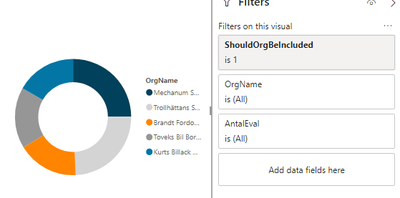
And the visual looks like this:
Skärmklipp1.PNG
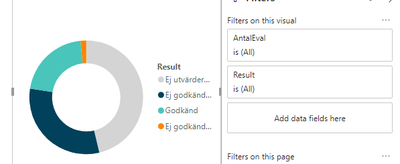
But I don't know how to do it for the visual below. I want it to present AntalEval for my Top N organizations. But I don't know how to do it when OrgName is not in the visual.
Skärmklipp2.PNG


So I was wondering if there's someway to create a table which consist of Top N organizations and use that. But it must be made dynamic since I have slicers on date and so on which change the Top N organizations.


4 REPLIES 4
v-juanli-msft
Community Support
Community Support

Hi @rebecka 

Besides measures created in my previous reply,

Create measures below

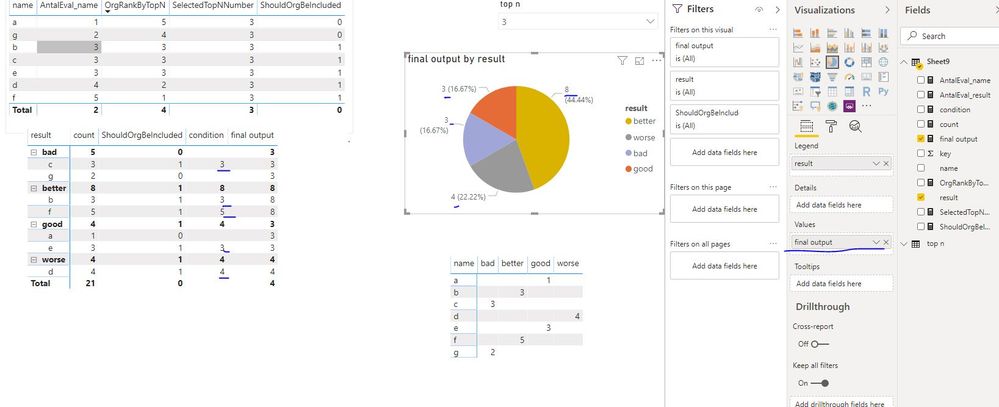
count = COUNT(Sheet9[key])

condition = IF([ShouldOrgBeIncluded]=1,[count])

final output = SUMX(FILTER(ALLSELECTED(Sheet9),Sheet9[condition]<>BLANK()&&Sheet9[result]=MAX(Sheet9[result])),[condition])

Capture16.JPG


Best Regards
Maggie
Community Support Team _ Maggie Li
If this post helps, then please consider Accept it as the solution to help the other members find it more quickly.

Hi @v-juanli-msft !

It works fine for this small dataset, but when I tried to apply it to my original report with a much larger data set I get out o memory exception.

And also I would like to add a date dimension to this and I'm not sure if it's possible to implement this in a line chart with date on the x-axis (only showing lines of the highest ranked).

Best Regards, Rebecka

v-juanli-msft
Community Support
Community Support

Hi @rebecka 

Create measures

AntalEval_name = CALCULATE(COUNT(Sheet9[key]),FILTER(ALLSELECTED(Sheet9),Sheet9[name]=MAX(Sheet9[name])))

AntalEval_result = CALCULATE(COUNT(Sheet9[key]),FILTER(ALLSELECTED(Sheet9),Sheet9[result]=MAX(Sheet9[result])))

OrgRankByTopN = RANKX(ALLSELECTED(Sheet9),[AntalEval_name],,DESC,Dense)

SelectedTopNNumber = IF(HASONEVALUE('top n'[top n]),SELECTEDVALUE('top n'[top n]),10)

ShouldOrgBeIncluded = IF([OrgRankByTopN]<=[SelectedTopNNumber],1,0)

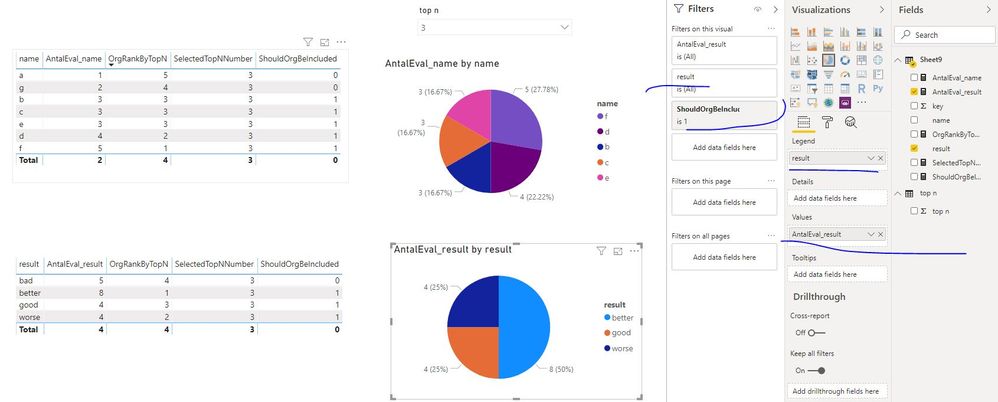
Capture18.JPG

Add "AntalEval_name" and "name" in one visual,

add "AntalEval_result" and "result" in another visual.


Best Regards
Maggie
Community Support Team _ Maggie Li
If this post helps, then please consider Accept it as the solution to help the other members find it more quickly.


Hi @v-juanli-msft 

No that's not really what I'm looking for. The first visual is correct!

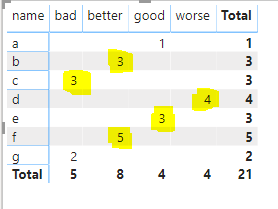
We can see that f, d, b, c and e are my Top N (3) organizations and therefore I want their result presented in the other visual. I want the highlighted yellow numbers in the below figure.

Skärmklipp.PNG

So the other visual should present
Bad: 3
Better: 8

Good: 3

Worse: 4

Since that is the result of my Top N organizations.


I hope I explanied it better this time!

Best Regards,

Rebecka

Helpful resources

Announcements
Power BI DataViz World Championships

Power BI Dataviz World Championships

The Power BI Data Visualization World Championships is back! Get ahead of the game and start preparing now!

December 2025 Power BI Update Carousel

Power BI Monthly Update - December 2025

Check out the December 2025 Power BI Holiday Recap!

FabCon Atlanta 2026 carousel

FabCon Atlanta 2026

Join us at FabCon Atlanta, March 16-20, for the ultimate Fabric, Power BI, AI and SQL community-led event. Save $200 with code FABCOMM.

Top Solution Authors