cancel
Showing results for 
Search instead for 
Did you mean: 

The Power BI Data Visualization World Championships is back! It's time to submit your entry. Live now!

Reply
rebecka
Frequent Visitor

Top N Table

Hi,

Is there a way to create a table in Power Query to get Top N organizations dynamically?

I have some visuals and I want them all to present data from my Top N organizations, but Top N organization are different depending on the values in my slicers.


I've solved it for one visual with the following DAX measures:

SelectedTopNNumber = IF(HASONEVALUE('TopN'[Top]);Min('TopN'[Top]);10)
AntalEval = COUNT('table1'[StatisticKey])
OrgRankByTopN = IF(HASONEVALUE('dimOrg'[OrgName]);RANKX(ALLSELECTED('dimOrg'[OrgName]); [AntalEval]))
ShouldOrgBeIncluded = IF([OrgRankByTopN]<=[SelectedTopNNumber];1;0)
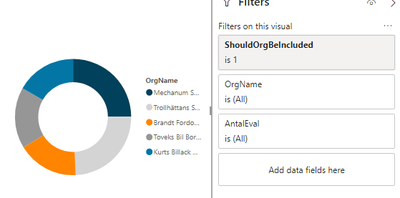
And the visual looks like this:
Skärmklipp1.PNG
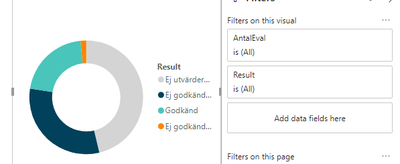
But I don't know how to do it for the visual below. I want it to present AntalEval for my Top N organizations. But I don't know how to do it when OrgName is not in the visual.
Skärmklipp2.PNG


So I was wondering if there's someway to create a table which consist of Top N organizations and use that. But it must be made dynamic since I have slicers on date and so on which change the Top N organizations.


4 REPLIES 4
v-juanli-msft
Community Support
Community Support

Hi @rebecka 

Besides measures created in my previous reply,

Create measures below

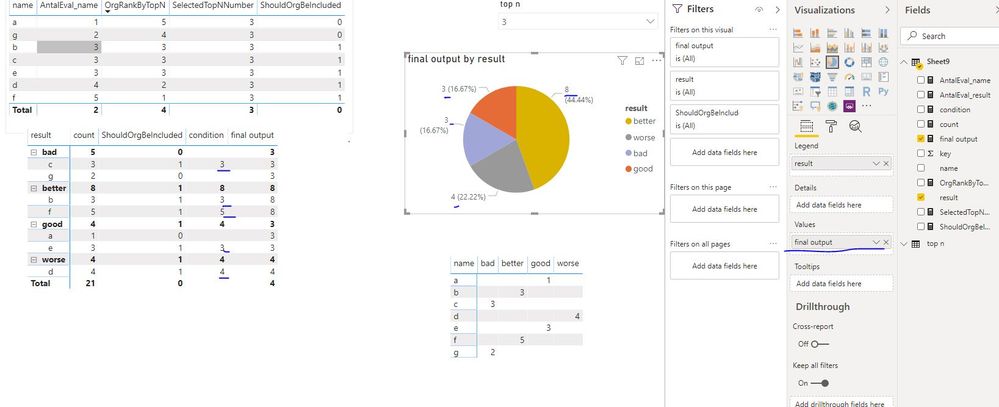
count = COUNT(Sheet9[key])

condition = IF([ShouldOrgBeIncluded]=1,[count])

final output = SUMX(FILTER(ALLSELECTED(Sheet9),Sheet9[condition]<>BLANK()&&Sheet9[result]=MAX(Sheet9[result])),[condition])

Capture16.JPG


Best Regards
Maggie
Community Support Team _ Maggie Li
If this post helps, then please consider Accept it as the solution to help the other members find it more quickly.

Hi @v-juanli-msft !

It works fine for this small dataset, but when I tried to apply it to my original report with a much larger data set I get out o memory exception.

And also I would like to add a date dimension to this and I'm not sure if it's possible to implement this in a line chart with date on the x-axis (only showing lines of the highest ranked).

Best Regards, Rebecka

v-juanli-msft
Community Support
Community Support

Hi @rebecka 

Create measures

AntalEval_name = CALCULATE(COUNT(Sheet9[key]),FILTER(ALLSELECTED(Sheet9),Sheet9[name]=MAX(Sheet9[name])))

AntalEval_result = CALCULATE(COUNT(Sheet9[key]),FILTER(ALLSELECTED(Sheet9),Sheet9[result]=MAX(Sheet9[result])))

OrgRankByTopN = RANKX(ALLSELECTED(Sheet9),[AntalEval_name],,DESC,Dense)

SelectedTopNNumber = IF(HASONEVALUE('top n'[top n]),SELECTEDVALUE('top n'[top n]),10)

ShouldOrgBeIncluded = IF([OrgRankByTopN]<=[SelectedTopNNumber],1,0)

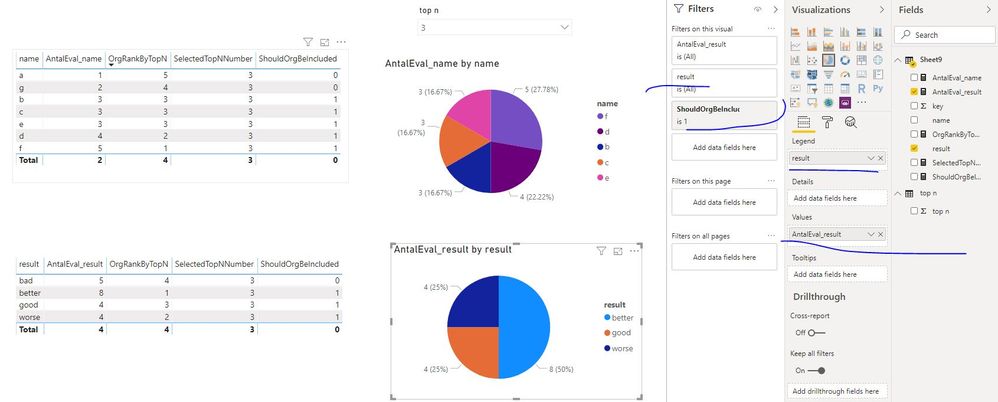
Capture18.JPG

Add "AntalEval_name" and "name" in one visual,

add "AntalEval_result" and "result" in another visual.


Best Regards
Maggie
Community Support Team _ Maggie Li
If this post helps, then please consider Accept it as the solution to help the other members find it more quickly.


Hi @v-juanli-msft 

No that's not really what I'm looking for. The first visual is correct!

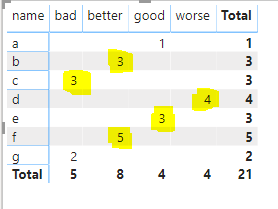
We can see that f, d, b, c and e are my Top N (3) organizations and therefore I want their result presented in the other visual. I want the highlighted yellow numbers in the below figure.

Skärmklipp.PNG

So the other visual should present
Bad: 3
Better: 8

Good: 3

Worse: 4

Since that is the result of my Top N organizations.


I hope I explanied it better this time!

Best Regards,

Rebecka

Helpful resources

Announcements
FabCon Atlanta 2026 carousel

FabCon Atlanta 2026

Join us at FabCon Atlanta, March 16-20, for the ultimate Fabric, Power BI, AI and SQL community-led event. Save $200 with code FABCOMM.