Join us at FabCon Atlanta from March 16 - 20, 2026, for the ultimate Fabric, Power BI, AI and SQL community-led event. Save $200 with code FABCOMM.
Register now!The Power BI Data Visualization World Championships is back! Get ahead of the game and start preparing now! Learn more
Hi,
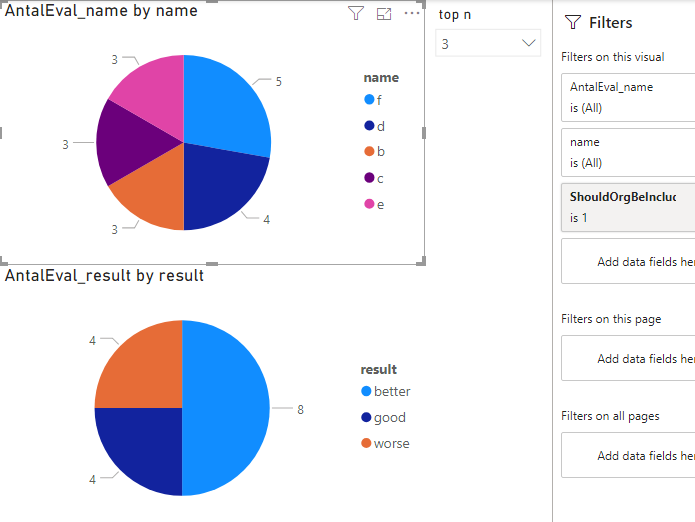
I have a report where I would like to present data from my Top N customers (N is selected in the report). To present which customer that are my Top N is no problem (see visual with header AntalEval_name by name).
But the problem is to the present data connected to my Top N customers (see visual with header AntalEval_result by result).
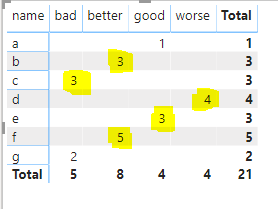
The second visual is not correct. I would like to present the highlighted yellow data in the visual below. That is the result for my Top N customer (when N=3 my top customers are b, c, d, e, f, according to the above visual (b, c and e are in shared 3rd place)).
Hi rebecka,
I am not sure whether this is what you want, please refer to my sample to see whether it work or not. If this is not what you want, please correct me.
Best Regards,
Zoe Zhi
If this post helps, then please consider Accept it as the solution to help the other members find it more quickly.
Hi @dax !
The solution is not correct unfortunately.
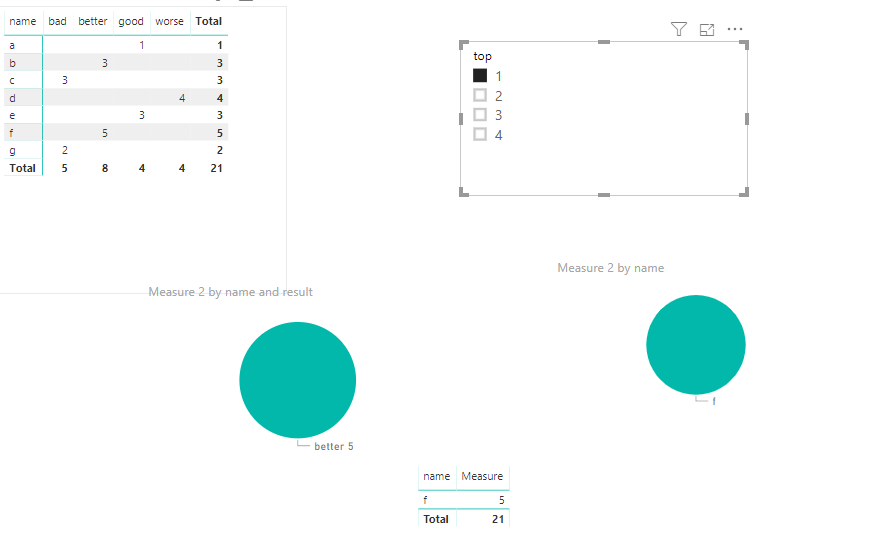
The top N should rank the names according to the sum of amount, so Top 1 in your .pbix is name f. And therefore we want Better 5 when choosing Top 1 (since that is f's result).
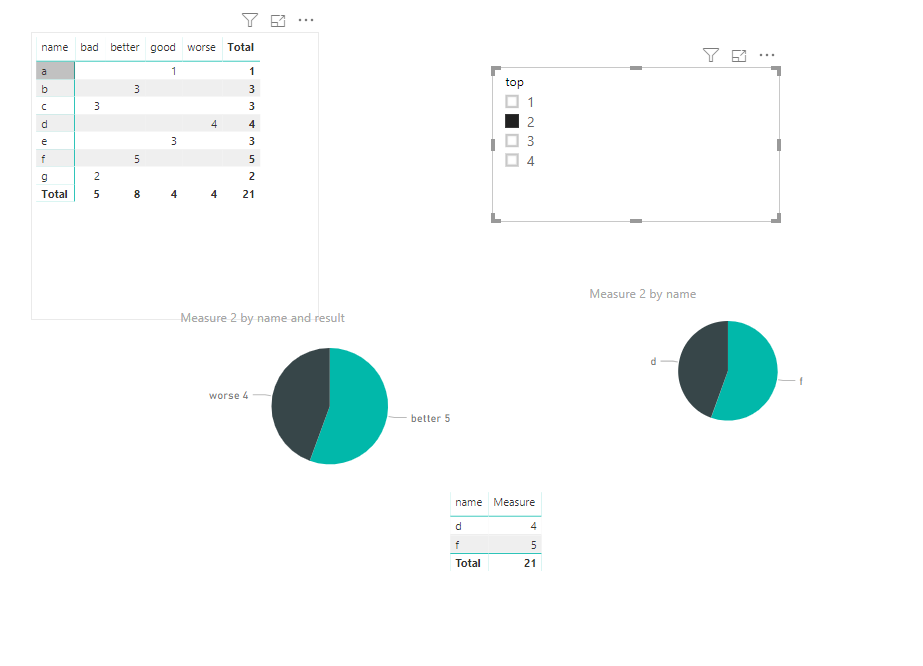
Our Top 2 is d and f, and therefore should the pie chart show better 5 and worse 4 (the result of d and f).
Do you follow?
Can you fix that, would love if you can give it a try!
Best Regards, Rebecka
Hi rebecka,
I thought you want to get measure for second image, so I just create measure for result. If you want to get top N of name, you could use another measure like below
Measure = if(SELECTEDVALUE(slicer[top])>=RaNKX(ALLSELECTED('Table'),CALCULATE(SUM('Table'[amount]), ALLEXCEPT('Table','Table'[name])),,DESC,Dense),CALCULATE(SUM('Table'[amount]), ALLEXCEPT('Table','Table'[name])),BLANK())
You could referto my sample for details.
Best Regards,
Zoe Zhi
If this post helps, then please consider Accept it as the solution to help the other members find it more quickly.
Hi again @dax !
I can calculate Top N for name that's not the problem.
And I don't want Top N for result, I want the result from my Top N names.
Do you see the difference?
Your new measure doesn't present the correct numbers as a mentioned in my previous answer.
Best Regards,
Rebecka
Hi @dax !
It's sort of right. But when you choose Top 3 you get two slice's both with the result better (one with 3 and one with 5), i would like one slice with better 8.
Best Regards,
Rebecka
The Power BI Data Visualization World Championships is back! Get ahead of the game and start preparing now!
| User | Count |
|---|---|
| 17 | |
| 9 | |
| 9 | |
| 7 | |
| 7 |