cancel
Showing results for 
Search instead for 
Did you mean: 

Did you hear? There's a new SQL AI Developer certification (DP-800). Start preparing now and be one of the first to get certified. Register now

Reply
asif999
Frequent Visitor

Table.SelectRows Custom Column Looping Variable

I am new to Power Query.


I got this solution from another forum. I want to understand the logic behind this function.


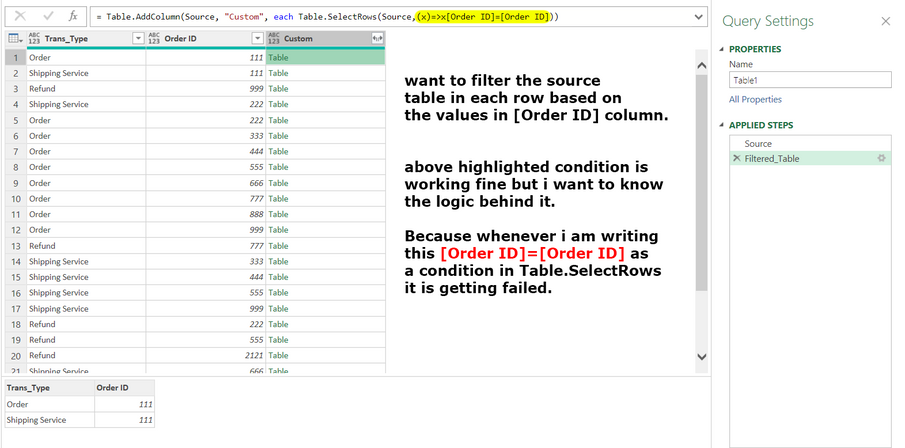
asif999_0-1680181510652.png


Funtion used = Table.AddColumn(Source, "Custom", each Table.SelectRows(Source,(x)=>x[Order ID]=[Order ID])) (highlighted part)


The above functions fell into the error when I tweaked it from this condition (x)=>x[Order ID]=[Order ID] to [Order ID]=[Order ID].


Download File

1 ACCEPTED SOLUTION
AlienSx
Super User
Super User

Hi, @asif999 it's all about misleading "each" replacing (_) => and omitting _ later. Makes sense to use this in simple expressions but when you are dealing with iterator inside another iterator ... it's easy to get lost. Rewrite your step as below. Table.AddColumn iterates Source and (w) is a current row of that iteration. But w[Order ID] is another table you are iterating. (x) is a current item (row) of that iteration (over w[Order ID] table)  


Table.AddColumn(Source, "Custom", (w) => Table.SelectRows(Source,(x) => x[Order ID]= w[Order ID]))


View solution in original post

3 REPLIES 3
AlienSx
Super User
Super User

Hi, @asif999 it's all about misleading "each" replacing (_) => and omitting _ later. Makes sense to use this in simple expressions but when you are dealing with iterator inside another iterator ... it's easy to get lost. Rewrite your step as below. Table.AddColumn iterates Source and (w) is a current row of that iteration. But w[Order ID] is another table you are iterating. (x) is a current item (row) of that iteration (over w[Order ID] table)  


Table.AddColumn(Source, "Custom", (w) => Table.SelectRows(Source,(x) => x[Order ID]= w[Order ID]))


@asif999 many thanks for accepting my answer as a solution... but I would like to reconsider my explanation. 

Table.AddColumns still iterates Source table row by row. "w" is still a variable referring to the current row of iteration. But at any particular row of iteration "w" calls for another iteration function - Table.SelectRows. The last one asks for a table to iterate on - the original Source table -  and iteratates row by row with (x), selects those records of Source with [Order ID] = currently iterated row (w[Order ID]). It all looks like Table.Group by [Order ID] but it's not. It must be painfully slow. 

Thanks for the explanation.


Now I got it 100%.


I was doubting the Table.SelectRows' iterator (x). And I was about to ask you the same.


I appreciate you have reconsidered your answer. Thanks once again😊

Helpful resources

Announcements
April Power BI Update Carousel

Power BI Monthly Update - April 2026

Check out the April 2026 Power BI update to learn about new features.

Fabric SQL PBI Data Days

Data Days 2026 coming soon!

Sign up to receive a private message when registration opens and key events begin.

New to Fabric survey Carousel

New to Fabric Survey

If you have recently started exploring Fabric, we'd love to hear how it's going. Your feedback can help with product improvements.

Power BI DataViz World Championships carousel

Power BI DataViz World Championships - June 2026

A new Power BI DataViz World Championship is coming this June! Don't miss out on submitting your entry.