cancel
Showing results for 
Search instead for 
Did you mean: 

The Power BI Data Visualization World Championships is back! Get ahead of the game and start preparing now! Learn more

Reply
automated_user
Frequent Visitor

Sum total occurrences of each value in a string using Power Query

Hello, 

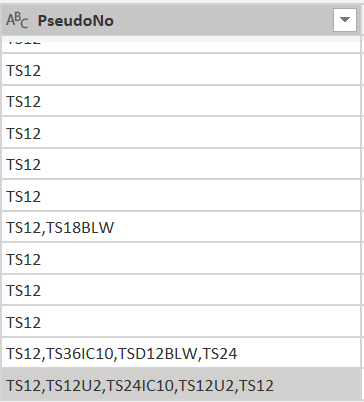
I was wondering if there is a way to sum the total occurrences of each value appearing in a string in a column called PseudoNo as show below:

Screenshot 2022-07-27 175232.png

As an example for the one highlighted in gray the output would be: 


PartNumsCount
TS122
TS12U22
TS24IC101


Any help would be great!

Thank you

1 ACCEPTED SOLUTION

Hi @automated_user 


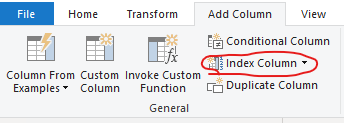
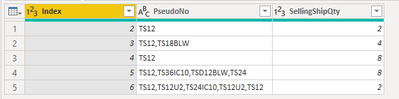
I assume that you have a column which contains unique values in the table e.g. OrderID, SellingID.... If not, add an Index column to the table first. 

vjingzhang_0-1659332720681.png

vjingzhang_1-1659332828390.png


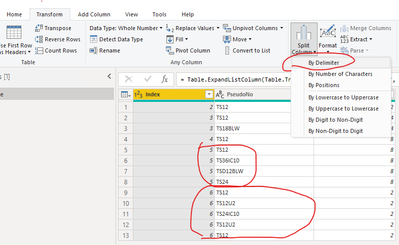
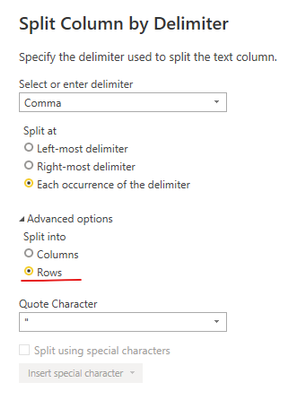
Select PseudoNo column, split it by delimiter into Rows

vjingzhang_2-1659332939662.pngvjingzhang_5-1659333288839.png


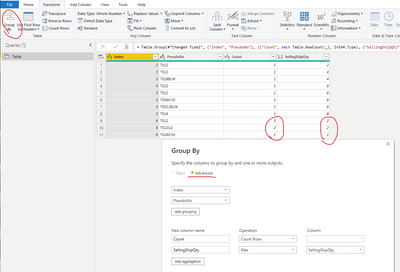
Group by the Index column (or the unique key column) and PseudoNo column like below. 

vjingzhang_3-1659333052729.png


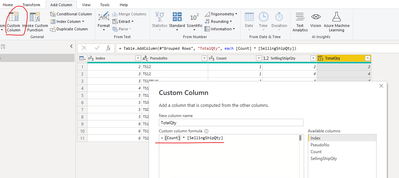
At last add a custom column to multiply two columns. 

vjingzhang_4-1659333110038.png


Sample file is attached at bottom. 


Best Regards,
Community Support Team _ Jing
If this post helps, please Accept it as Solution to help other members find it.

View solution in original post

3 REPLIES 3
jennratten
Super User
Super User

Does the expected result for the last two rows match what is shown below?  If not, please explain how the results for each row should be combined. 


PartsNums Count
TS12 1
TS36IC10 1
TSD12BLW 1
TS24 1
TS12 2
TS12U2 2
TS24IC10 1


Hello @jennratten 

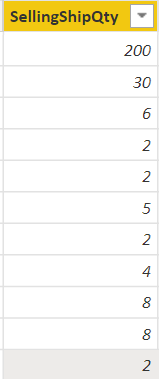
So for each specific row, I have to also multiply the count of each part from the PseudoNo column with the shipping quantity of that row. For example the shipping qty column below with the PseudoNo column I have above:

automated_user_1-1659016620459.png

Would result in the table for the highlighted rows:

PartNumsCountTotalQty
TS1224
TS12U224
TS24IC1012


So the method that you stated above would work if we also added another column like above to track the total qty as well. 


Hi @automated_user 


I assume that you have a column which contains unique values in the table e.g. OrderID, SellingID.... If not, add an Index column to the table first. 

vjingzhang_0-1659332720681.png

vjingzhang_1-1659332828390.png


Select PseudoNo column, split it by delimiter into Rows

vjingzhang_2-1659332939662.pngvjingzhang_5-1659333288839.png


Group by the Index column (or the unique key column) and PseudoNo column like below. 

vjingzhang_3-1659333052729.png


At last add a custom column to multiply two columns. 

vjingzhang_4-1659333110038.png


Sample file is attached at bottom. 


Best Regards,
Community Support Team _ Jing
If this post helps, please Accept it as Solution to help other members find it.

Helpful resources

Announcements
Power BI DataViz World Championships

Power BI Dataviz World Championships

The Power BI Data Visualization World Championships is back! Get ahead of the game and start preparing now!

December 2025 Power BI Update Carousel

Power BI Monthly Update - December 2025

Check out the December 2025 Power BI Holiday Recap!

FabCon Atlanta 2026 carousel

FabCon Atlanta 2026

Join us at FabCon Atlanta, March 16-20, for the ultimate Fabric, Power BI, AI and SQL community-led event. Save $200 with code FABCOMM.