Get certified for free when you join Fabric Data Days 2026 and dive into Fabric, Power BI, SQL, AI, and other essential data skills.
Join nowData Days is here! Join us now for 60+ days of learning, challenges, and connection. Learn more
Hi,
I have a problem with Power Query, I absolutely don't understand:
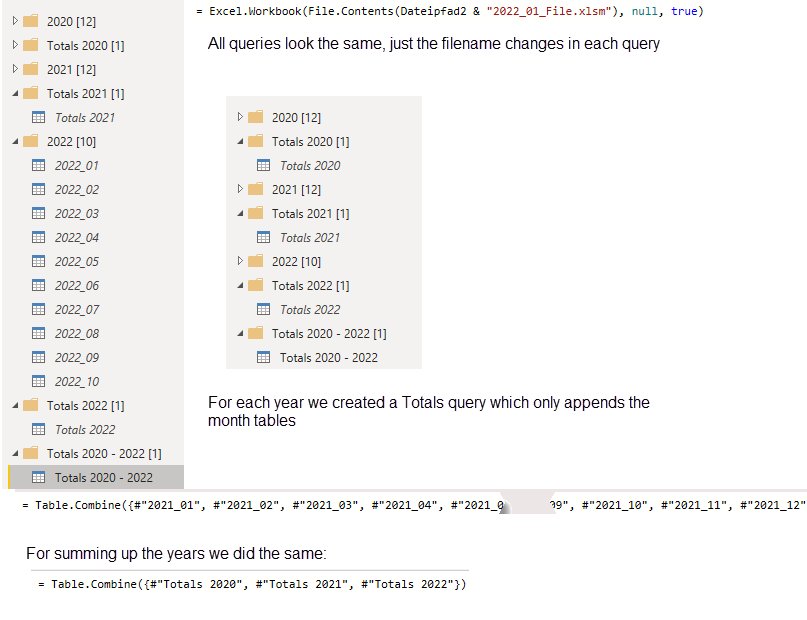
We get data from SAP which we store in a folder by month - below you see the import text for the single files - only query name and filename changed, the query was done once and then duplicated.
Then they were appended by year and finally the 3 years were appended - in the totals queries there is only the one line of code you can see below, I only shortened the months statement a bit in the middle.
My problem: in Power BI we realized that the numbers for November, 2021 were duplicated - just for November, 2021!
I had all queries' rows counted, the numbers were perfect for all month and for all single-year queries, in the query Totals 2020 - 2022 the miscalculation all of a sudden appears. There I have double the amount of rows for November, 2021, and the entire query statement is shown above. I can't understand that logic! I finally solved the issue by removing duplicates from the entire table, but I would consider that only as a workaround.
Solved! Go to Solution.
Hello - I recommend you take a closer look through the individual query results. If they really are correct individually then the appended/summed result would be correct also.
Hi, thank you for your reply - problem was the Excel files generated from SAP - in 2 files the filter was set to the wrong year - that caused the problem 😞
Hello - I recommend you take a closer look through the individual query results. If they really are correct individually then the appended/summed result would be correct also.
Hi, thank you for your reply - problem was the Excel files generated from SAP - in 2 files the filter was set to the wrong year - that caused the problem 😞
Don't miss out on Data Days, June 15 through August 7. Learn Fabric, Power BI, SQL, AI and more.
Check out the May 2026 Power BI update to learn about new features.
| User | Count |
|---|---|
| 4 | |
| 4 | |
| 3 | |
| 2 | |
| 1 |
| User | Count |
|---|---|
| 11 | |
| 11 | |
| 5 | |
| 4 | |
| 4 |