Don't miss your chance to take the Fabric Data Engineer (DP-600) exam for FREE! Find out how by watching the DP-600 session on-demand now through April 28th.
Learn moreJoin the FabCon + SQLCon recap series. Up next: Power BI, Real-Time Intelligence, IQ and AI, and Data Factory take center stage. All sessions are available on-demand after the live show. Register now
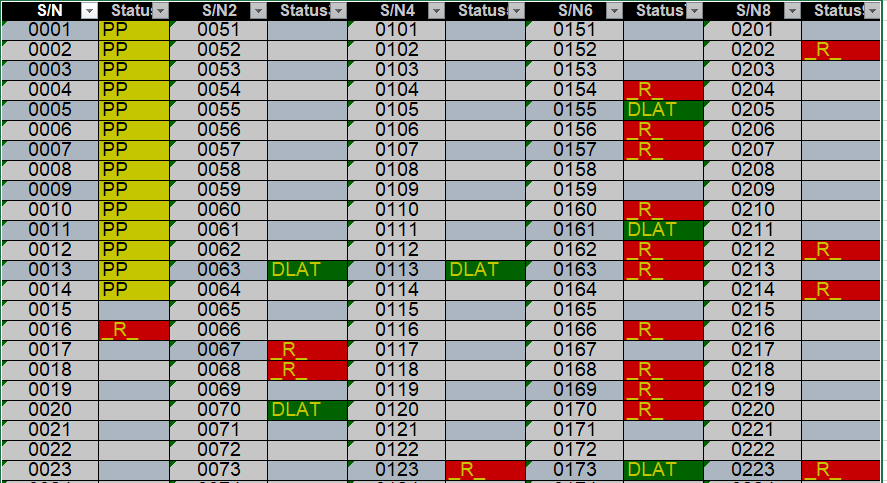
I have a terrible spreadsheet I can't change the format of . . . . It's multiple serial numbers across 4 different columns with their individual statuses.
How can I stack all these columns into one set so I can pivot the data after the back?
it goes from Serial Number 1 through 50, then S/2 Column starts at 51 and goes to 100. Each is followed by a status column . . .
Solved! Go to Solution.
You can make 4 versions(copies) of the table.
Remove the appropriate columns so that each version has s/n and status for a pair of columns (1, or 2 or 4 or 8).
Rename the columns in each version to s/n and status. (they must be the same in each version)
Append the tables.
You can make 4 versions(copies) of the table.
Remove the appropriate columns so that each version has s/n and status for a pair of columns (1, or 2 or 4 or 8).
Rename the columns in each version to s/n and status. (they must be the same in each version)
Append the tables.
This makes a lot of sense; I didn't think logically about it - I can also teach this to someone who doesn't know Power Query.
NewStep=#table({"S/N","Status"},List.TransformMany(List.Split(Table.ToColumns(PreviousStepName),2),List.Zip,(x,y)=>y))
Check out the April 2026 Power BI update to learn about new features.
If you have recently started exploring Fabric, we'd love to hear how it's going. Your feedback can help with product improvements.
A new Power BI DataViz World Championship is coming this June! Don't miss out on submitting your entry.
| User | Count |
|---|---|
| 5 | |
| 5 | |
| 4 | |
| 4 | |
| 4 |