Don't miss your chance to take the Fabric Data Engineer (DP-600) exam for FREE! Find out how by attending the DP-600 session on April 23rd (pacific time), live or on-demand.
Learn moreNext up in the FabCon + SQLCon recap series: The roadmap for Microsoft SQL and Maximizing Developer experiences in Fabric. All sessions are available on-demand after the live show. Register now
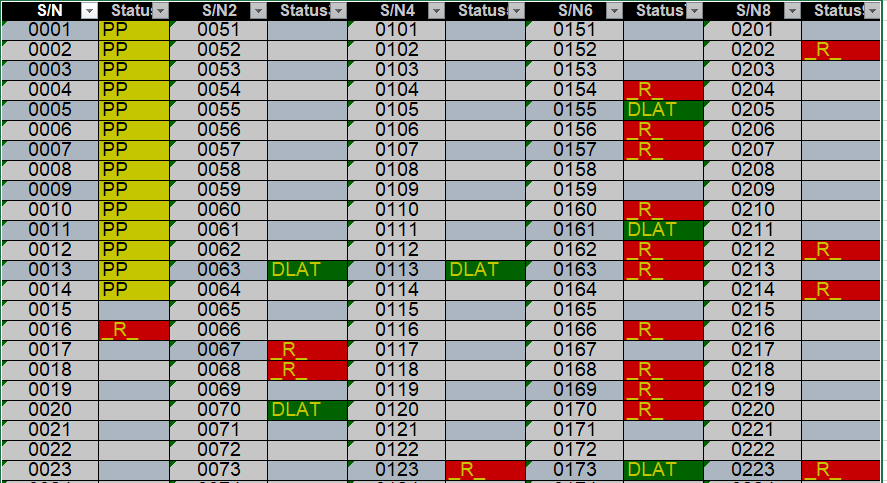
I have a terrible spreadsheet I can't change the format of . . . . It's multiple serial numbers across 4 different columns with their individual statuses.
How can I stack all these columns into one set so I can pivot the data after the back?
it goes from Serial Number 1 through 50, then S/2 Column starts at 51 and goes to 100. Each is followed by a status column . . .
Solved! Go to Solution.
You can make 4 versions(copies) of the table.
Remove the appropriate columns so that each version has s/n and status for a pair of columns (1, or 2 or 4 or 8).
Rename the columns in each version to s/n and status. (they must be the same in each version)
Append the tables.
You can make 4 versions(copies) of the table.
Remove the appropriate columns so that each version has s/n and status for a pair of columns (1, or 2 or 4 or 8).
Rename the columns in each version to s/n and status. (they must be the same in each version)
Append the tables.
This makes a lot of sense; I didn't think logically about it - I can also teach this to someone who doesn't know Power Query.
NewStep=#table({"S/N","Status"},List.TransformMany(List.Split(Table.ToColumns(PreviousStepName),2),List.Zip,(x,y)=>y))
If you have recently started exploring Fabric, we'd love to hear how it's going. Your feedback can help with product improvements.
A new Power BI DataViz World Championship is coming this June! Don't miss out on submitting your entry.
| User | Count |
|---|---|
| 5 | |
| 3 | |
| 3 | |
| 3 | |
| 2 |
| User | Count |
|---|---|
| 7 | |
| 5 | |
| 5 | |
| 5 | |
| 4 |