Join us at FabCon Atlanta from March 16 - 20, 2026, for the ultimate Fabric, Power BI, AI and SQL community-led event. Save $200 with code FABCOMM.
Register now!Vote for your favorite vizzies from the Power BI Dataviz World Championship submissions. Vote now!
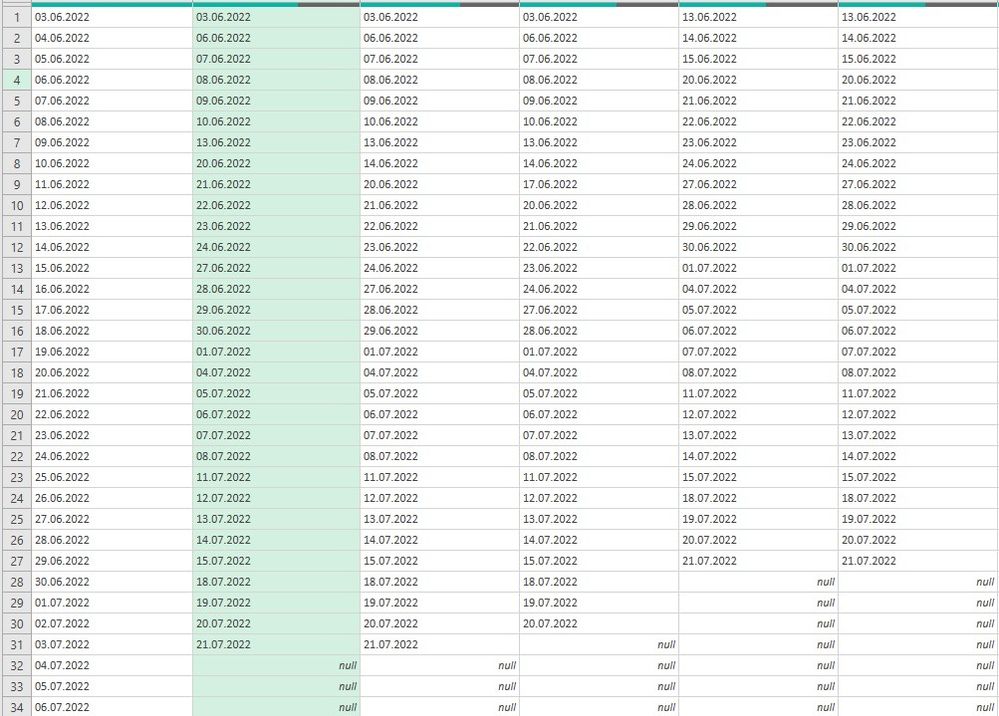
Hi, I got stuck whith independently sorting multiple columns. They consist of date logs gathered from separate csv files from about 50 users uploading daily to one location. I need to check who has and who hasn't uploaded their logs. Column A is a reference column (all consecutive days from start day up to today). Rest of columns are each user logs sorted by date. I need them to match reference column - eg. if user "column E" doesn't have log on 03.06 it should have null value. IF user (column >A) has date matching the column A it should be on the same row as in the A column. Or find another way to sort out which user has got no logs on a given day. Any help much appriecited - I've run out of ideas.
Solved! Go to Solution.
I am not sure exactly what your goal is, but what you have above will not scale. It will be a constant hassle as people come in and out with new logs.
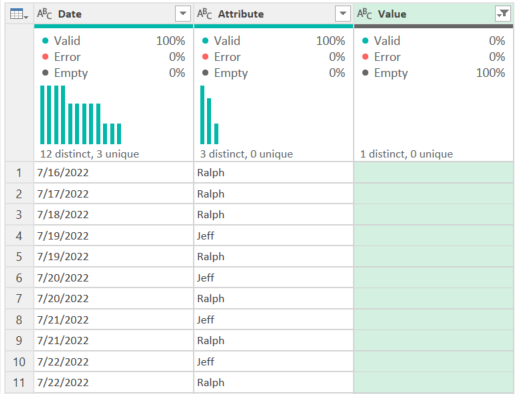
Instead, I'd select the first Date column and unpivot the rest:
let
Source = Table.FromRows(Json.Document(Binary.Decompress(Binary.FromText("hZFBDoUwCETv4trElqrVsxjvf42fH6hMCYHdY+axmudZ+lY3KkTLmuG7/m3SPES2m+Yhsr1rHiLbh+Yhsn1qHiLbXfMQ2b40D5HtW/MQ2a4FhkhYPnC6hOUD5stYPmDCjOUDZsxYPmDKjOUD5vR5iLCkz0OEEX0e4rcf97fpqUw9nNLXua+2p7kn27e5b7bfoYf48OPTj7uN3x8=", BinaryEncoding.Base64), Compression.Deflate)), let _t = ((type nullable text) meta [Serialized.Text = true]) in type table [Date = _t, Jeff = _t, Mary = _t, Ralph = _t]),
#"Unpivoted Other Columns" = Table.UnpivotOtherColumns(Source, {"Date"}, "Attribute", "Value")
in
#"Unpivoted Other Columns"
If you then filter by the Value field, you can see immediately who hasn't uploaded a log for a given day.
How to use M code provided in a blank query:
1) In Power Query, select New Source, then Blank Query
2) On the Home ribbon, select "Advanced Editor" button
3) Remove everything you see, then paste the M code I've given you in that box.
4) Press Done
5) See this article if you need help using this M code in your model.
DAX is for Analysis. Power Query is for Data Modeling
Proud to be a Super User!
MCSA: BI ReportingI am not sure exactly what your goal is, but what you have above will not scale. It will be a constant hassle as people come in and out with new logs.
Instead, I'd select the first Date column and unpivot the rest:
let
Source = Table.FromRows(Json.Document(Binary.Decompress(Binary.FromText("hZFBDoUwCETv4trElqrVsxjvf42fH6hMCYHdY+axmudZ+lY3KkTLmuG7/m3SPES2m+Yhsr1rHiLbh+Yhsn1qHiLbXfMQ2b40D5HtW/MQ2a4FhkhYPnC6hOUD5stYPmDCjOUDZsxYPmDKjOUD5vR5iLCkz0OEEX0e4rcf97fpqUw9nNLXua+2p7kn27e5b7bfoYf48OPTj7uN3x8=", BinaryEncoding.Base64), Compression.Deflate)), let _t = ((type nullable text) meta [Serialized.Text = true]) in type table [Date = _t, Jeff = _t, Mary = _t, Ralph = _t]),
#"Unpivoted Other Columns" = Table.UnpivotOtherColumns(Source, {"Date"}, "Attribute", "Value")
in
#"Unpivoted Other Columns"
If you then filter by the Value field, you can see immediately who hasn't uploaded a log for a given day.
How to use M code provided in a blank query:
1) In Power Query, select New Source, then Blank Query
2) On the Home ribbon, select "Advanced Editor" button
3) Remove everything you see, then paste the M code I've given you in that box.
4) Press Done
5) See this article if you need help using this M code in your model.
DAX is for Analysis. Power Query is for Data Modeling
Proud to be a Super User!
MCSA: BI Reporting@edhans, thanks for your reply. Following your advice is a perfect way to filter users who uploaded their logs on a given day. But with many users it's not easy to guess who hasn't. However starting from your unpivoted table and loading it to Excel sheet I was able to XLOOKUP names and dates across reference callendar and ended up with what I was looking for. Thanks a lot!
Glad I was able to help @Anonymous - I'll mark this thread as solved. Hope your project continues to go well.
DAX is for Analysis. Power Query is for Data Modeling
Proud to be a Super User!
MCSA: BI ReportingVote for your favorite vizzies from the Power BI World Championship submissions!
If you love stickers, then you will definitely want to check out our Community Sticker Challenge!
Check out the January 2026 Power BI update to learn about new features.
| User | Count |
|---|---|
| 11 | |
| 10 | |
| 6 | |
| 6 | |
| 5 |