cancel
Showing results for 
Search instead for 
Did you mean: 

July 7 - July 17 | Round 2 of the Power BI Dataviz World Championships. Don't miss your chance! Learn more

Reply
Anonymous
Not applicable

Sorting table based on reference column

Hi, I got stuck whith independently sorting multiple columns. They consist of date logs gathered from separate csv files from about 50 users uploading daily to one location. I need to check who has and who hasn't uploaded their logs. Column A is a reference column (all consecutive days from start day up to today). Rest of columns are each user logs sorted by date. I need them to match reference column - eg. if user "column E" doesn't have log on 03.06 it should have null value. IF user (column >A) has date matching the column A it should be on the same row as in the A column. Or find another way to sort out which user has got no logs on a given day. Any help much appriecited - I've run out of ideas.examle.jpg

1 ACCEPTED SOLUTION
edhans
Community Champion
Community Champion

I am not sure exactly what your goal is, but what you have above will not scale. It will be a constant hassle as people come in and out with new logs.

Instead, I'd select the first Date column and unpivot the rest:


let
    Source = Table.FromRows(Json.Document(Binary.Decompress(Binary.FromText("hZFBDoUwCETv4trElqrVsxjvf42fH6hMCYHdY+axmudZ+lY3KkTLmuG7/m3SPES2m+Yhsr1rHiLbh+Yhsn1qHiLbXfMQ2b40D5HtW/MQ2a4FhkhYPnC6hOUD5stYPmDCjOUDZsxYPmDKjOUD5vR5iLCkz0OEEX0e4rcf97fpqUw9nNLXua+2p7kn27e5b7bfoYf48OPTj7uN3x8=", BinaryEncoding.Base64), Compression.Deflate)), let _t = ((type nullable text) meta [Serialized.Text = true]) in type table [Date = _t, Jeff = _t, Mary = _t, Ralph = _t]),
    #"Unpivoted Other Columns" = Table.UnpivotOtherColumns(Source, {"Date"}, "Attribute", "Value")
in
    #"Unpivoted Other Columns"


If you then filter by the Value field, you can see immediately who hasn't uploaded a log for a given day.
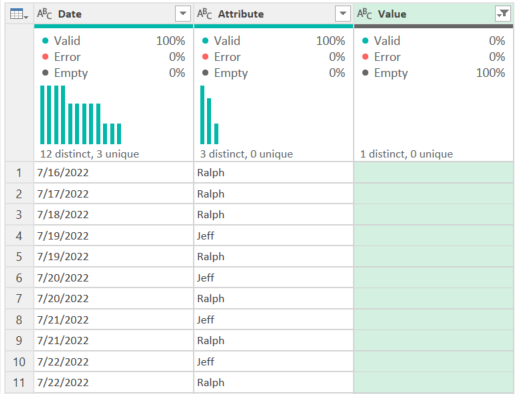
edhans_0-1658438970680.png


How to use M code provided in a blank query:
1) In Power Query, select New Source, then Blank Query
2) On the Home ribbon, select "Advanced Editor" button
3) Remove everything you see, then paste the M code I've given you in that box.
4) Press Done
5) See this article if you need help using this M code in your model.


Did I answer your question? Mark my post as a solution!
Did my answers help arrive at a solution? Give it a kudos by clicking the Thumbs Up!

DAX is for Analysis. Power Query is for Data Modeling


Proud to be a Super User!

MCSA: BI Reporting

View solution in original post

3 REPLIES 3
edhans
Community Champion
Community Champion

I am not sure exactly what your goal is, but what you have above will not scale. It will be a constant hassle as people come in and out with new logs.

Instead, I'd select the first Date column and unpivot the rest:


let
    Source = Table.FromRows(Json.Document(Binary.Decompress(Binary.FromText("hZFBDoUwCETv4trElqrVsxjvf42fH6hMCYHdY+axmudZ+lY3KkTLmuG7/m3SPES2m+Yhsr1rHiLbh+Yhsn1qHiLbXfMQ2b40D5HtW/MQ2a4FhkhYPnC6hOUD5stYPmDCjOUDZsxYPmDKjOUD5vR5iLCkz0OEEX0e4rcf97fpqUw9nNLXua+2p7kn27e5b7bfoYf48OPTj7uN3x8=", BinaryEncoding.Base64), Compression.Deflate)), let _t = ((type nullable text) meta [Serialized.Text = true]) in type table [Date = _t, Jeff = _t, Mary = _t, Ralph = _t]),
    #"Unpivoted Other Columns" = Table.UnpivotOtherColumns(Source, {"Date"}, "Attribute", "Value")
in
    #"Unpivoted Other Columns"


If you then filter by the Value field, you can see immediately who hasn't uploaded a log for a given day.

edhans_0-1658438970680.png


How to use M code provided in a blank query:
1) In Power Query, select New Source, then Blank Query
2) On the Home ribbon, select "Advanced Editor" button
3) Remove everything you see, then paste the M code I've given you in that box.
4) Press Done
5) See this article if you need help using this M code in your model.


Did I answer your question? Mark my post as a solution!
Did my answers help arrive at a solution? Give it a kudos by clicking the Thumbs Up!

DAX is for Analysis. Power Query is for Data Modeling


Proud to be a Super User!

MCSA: BI Reporting
Anonymous
Not applicable

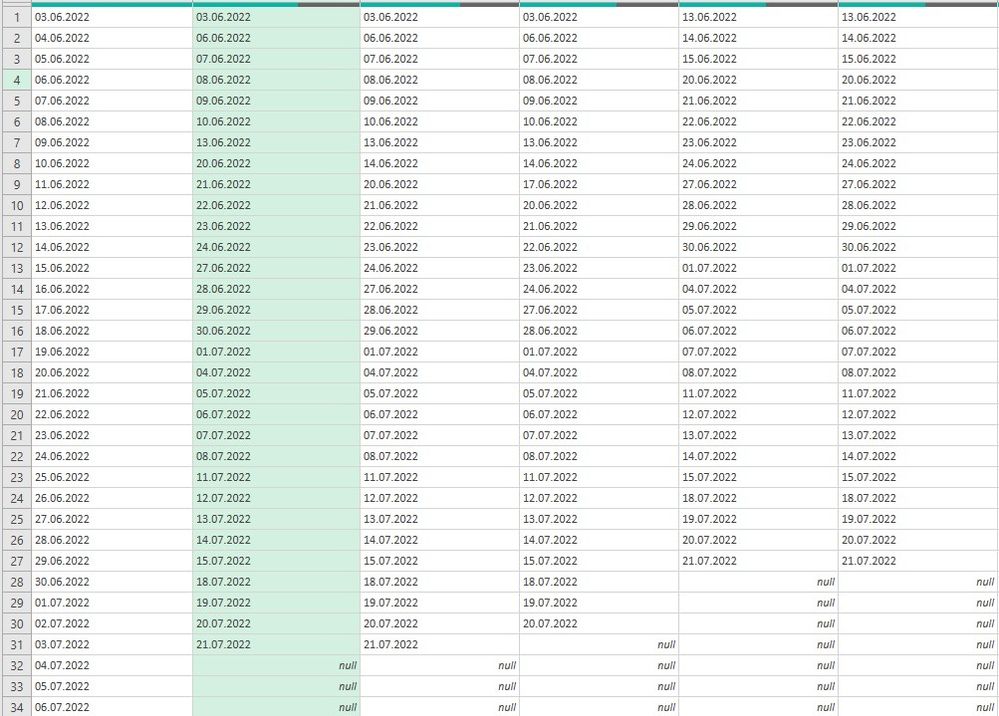
@edhans, thanks for your reply. Following your advice is a perfect way to filter users who uploaded their logs on a given day. But with many users it's not easy to guess who hasn't. However starting from your unpivoted table and loading it to Excel sheet I was able to XLOOKUP names and dates across reference callendar and ended up with what I was looking for. Thanks a lot!

examle_2.jpg

edhans
Community Champion
Community Champion

Glad I was able to help @Anonymous  - I'll mark this thread as solved. Hope your project continues to go well.


Did I answer your question? Mark my post as a solution!
Did my answers help arrive at a solution? Give it a kudos by clicking the Thumbs Up!

DAX is for Analysis. Power Query is for Data Modeling


Proud to be a Super User!

MCSA: BI Reporting

Helpful resources

Announcements
FabCon and SQLCon Barcelona 2026

FabCon & SQLCon – Barcelona 2026

Join us in Barcelona for FabCon and SQLCon, the Fabric, Power BI, SQL, and AI community event. Save €200 with code FABCMTY200.

60 days of Data Days Carousel

Data Days 2026

Join Fabric Data Days 2026: 60 days of free live/on-demand sessions, challenges, study groups, and certification opportunities.

Power BI DataViz World Championships carousel

Power BI DataViz World Championships - June 2026

A new Power BI DataViz World Championship is coming this June! Don't miss out on submitting your entry.