Join us at FabCon Atlanta from March 16 - 20, 2026, for the ultimate Fabric, Power BI, AI and SQL community-led event. Save $200 with code FABCOMM.
Register now!The Power BI Data Visualization World Championships is back! Get ahead of the game and start preparing now! Learn more
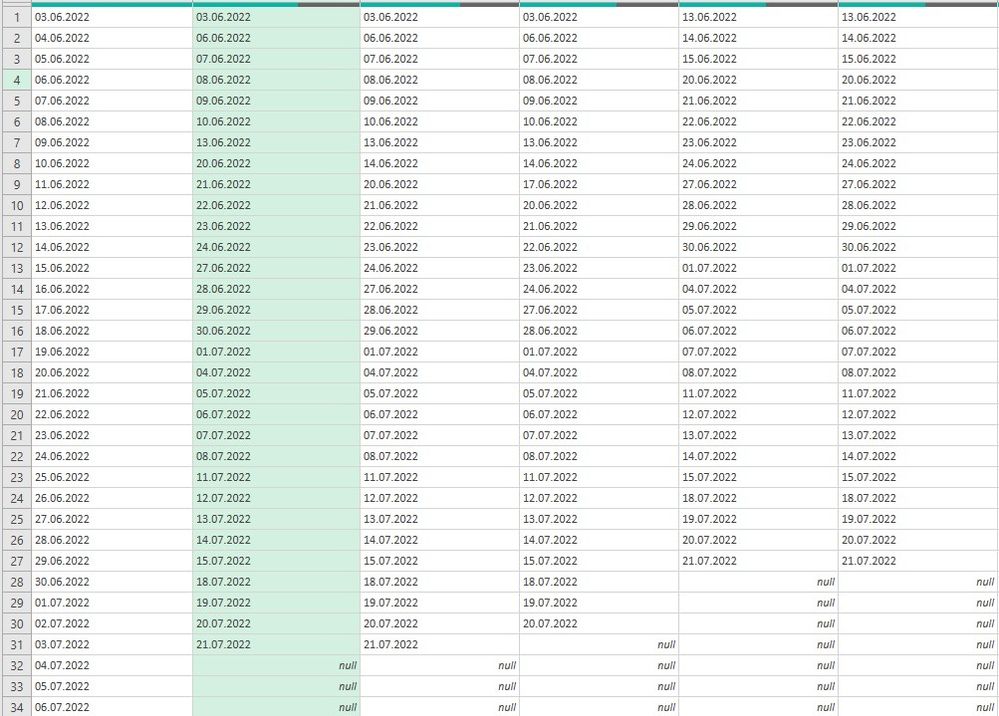
Hi, I got stuck whith independently sorting multiple columns. They consist of date logs gathered from separate csv files from about 50 users uploading daily to one location. I need to check who has and who hasn't uploaded their logs. Column A is a reference column (all consecutive days from start day up to today). Rest of columns are each user logs sorted by date. I need them to match reference column - eg. if user "column E" doesn't have log on 03.06 it should have null value. IF user (column >A) has date matching the column A it should be on the same row as in the A column. Or find another way to sort out which user has got no logs on a given day. Any help much appriecited - I've run out of ideas.
Solved! Go to Solution.
I am not sure exactly what your goal is, but what you have above will not scale. It will be a constant hassle as people come in and out with new logs.
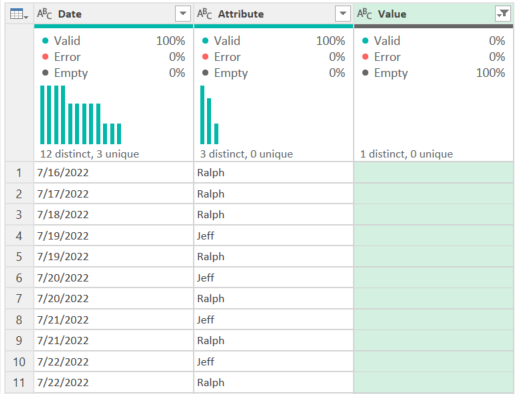
Instead, I'd select the first Date column and unpivot the rest:
let
Source = Table.FromRows(Json.Document(Binary.Decompress(Binary.FromText("hZFBDoUwCETv4trElqrVsxjvf42fH6hMCYHdY+axmudZ+lY3KkTLmuG7/m3SPES2m+Yhsr1rHiLbh+Yhsn1qHiLbXfMQ2b40D5HtW/MQ2a4FhkhYPnC6hOUD5stYPmDCjOUDZsxYPmDKjOUD5vR5iLCkz0OEEX0e4rcf97fpqUw9nNLXua+2p7kn27e5b7bfoYf48OPTj7uN3x8=", BinaryEncoding.Base64), Compression.Deflate)), let _t = ((type nullable text) meta [Serialized.Text = true]) in type table [Date = _t, Jeff = _t, Mary = _t, Ralph = _t]),
#"Unpivoted Other Columns" = Table.UnpivotOtherColumns(Source, {"Date"}, "Attribute", "Value")
in
#"Unpivoted Other Columns"
If you then filter by the Value field, you can see immediately who hasn't uploaded a log for a given day.
How to use M code provided in a blank query:
1) In Power Query, select New Source, then Blank Query
2) On the Home ribbon, select "Advanced Editor" button
3) Remove everything you see, then paste the M code I've given you in that box.
4) Press Done
5) See this article if you need help using this M code in your model.
DAX is for Analysis. Power Query is for Data Modeling
Proud to be a Super User!
MCSA: BI ReportingI am not sure exactly what your goal is, but what you have above will not scale. It will be a constant hassle as people come in and out with new logs.
Instead, I'd select the first Date column and unpivot the rest:
let
Source = Table.FromRows(Json.Document(Binary.Decompress(Binary.FromText("hZFBDoUwCETv4trElqrVsxjvf42fH6hMCYHdY+axmudZ+lY3KkTLmuG7/m3SPES2m+Yhsr1rHiLbh+Yhsn1qHiLbXfMQ2b40D5HtW/MQ2a4FhkhYPnC6hOUD5stYPmDCjOUDZsxYPmDKjOUD5vR5iLCkz0OEEX0e4rcf97fpqUw9nNLXua+2p7kn27e5b7bfoYf48OPTj7uN3x8=", BinaryEncoding.Base64), Compression.Deflate)), let _t = ((type nullable text) meta [Serialized.Text = true]) in type table [Date = _t, Jeff = _t, Mary = _t, Ralph = _t]),
#"Unpivoted Other Columns" = Table.UnpivotOtherColumns(Source, {"Date"}, "Attribute", "Value")
in
#"Unpivoted Other Columns"
If you then filter by the Value field, you can see immediately who hasn't uploaded a log for a given day.
How to use M code provided in a blank query:
1) In Power Query, select New Source, then Blank Query
2) On the Home ribbon, select "Advanced Editor" button
3) Remove everything you see, then paste the M code I've given you in that box.
4) Press Done
5) See this article if you need help using this M code in your model.
DAX is for Analysis. Power Query is for Data Modeling
Proud to be a Super User!
MCSA: BI Reporting@edhans, thanks for your reply. Following your advice is a perfect way to filter users who uploaded their logs on a given day. But with many users it's not easy to guess who hasn't. However starting from your unpivoted table and loading it to Excel sheet I was able to XLOOKUP names and dates across reference callendar and ended up with what I was looking for. Thanks a lot!
Glad I was able to help @Anonymous - I'll mark this thread as solved. Hope your project continues to go well.
DAX is for Analysis. Power Query is for Data Modeling
Proud to be a Super User!
MCSA: BI ReportingThe Power BI Data Visualization World Championships is back! Get ahead of the game and start preparing now!
| User | Count |
|---|---|
| 19 | |
| 10 | |
| 9 | |
| 7 | |
| 6 |