Get certified for free when you join Fabric Data Days 2026 and dive into Fabric, Power BI, SQL, AI, and other essential data skills.
Join nowJuly 7 - July 17 | Round 2 of the Power BI Dataviz World Championships. Don't miss your chance! Learn more
Hi,
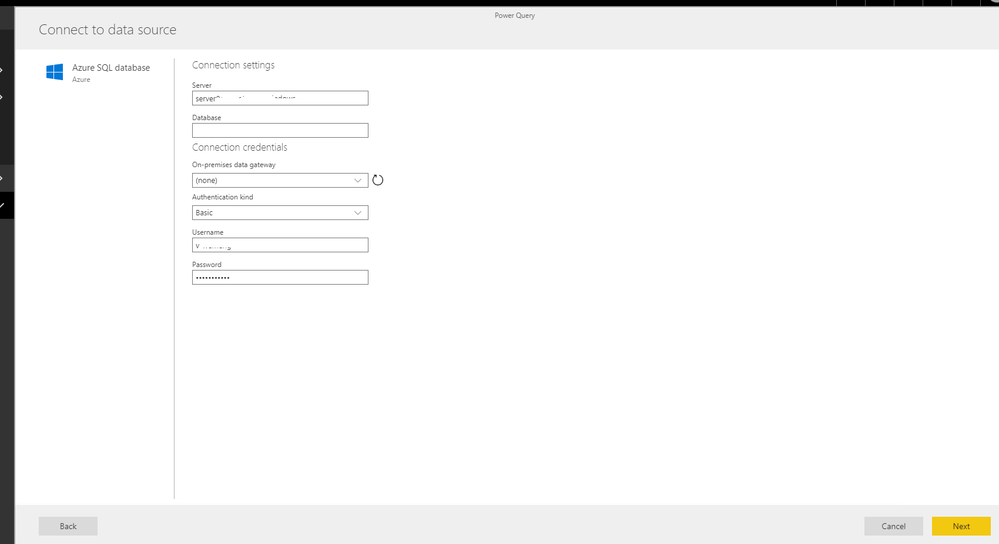
I'm trying to create a dataflow by pulling entities from Azure SQL Database. I've created a new workspace, and tried to create a dataflow. I put my server information and database name, then it's asking for a gateway, which I don't have. I'm trying to connect to a cloud service. Why would I need an on-premises gateway to connect to a cloud service?? Data flow is keep throwing errors saying that I need a gateway?! It doesn't make any sense at all. I'd really appreciate if someone has any idea about this issue. What could be going on or why do I need a gateway to connect to Azure which is on CLOUD not on prem.
Solved! Go to Solution.
Turns out Power BI gives "This connection requires a gateway" error for anything. Our problem was Azure was not recognizing our credentials so we had to create a particular role just for Azure connection.
Hi @Anonymous ,
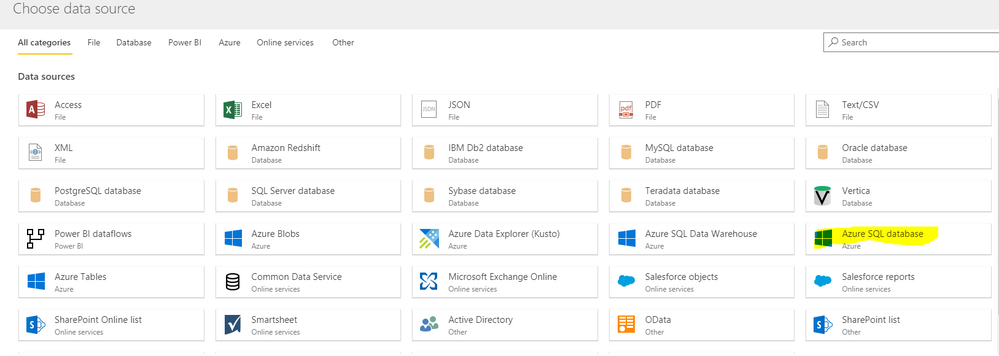
By my test, if we create the dataflow with Azure SQL Database, we don't need to configure the data gateway.
Do you connect with the datasource which is highlight?
Best Regards
Cherry
Turns out Power BI gives "This connection requires a gateway" error for anything. Our problem was Azure was not recognizing our credentials so we had to create a particular role just for Azure connection.
Hi,
We are facing the same issue. Could you explain me what you have done more in details?
thank you very much for your help.
Dominic
Join us in Barcelona for FabCon and SQLCon, the Fabric, Power BI, SQL, and AI community event. Save €200 with code FABCMTY200.
Join Data Days 2026: 60 days of free live/on-demand sessions, challenges, study groups, and certification opportunities.