Get certified for free when you join Fabric Data Days 2026 and dive into Fabric, Power BI, SQL, AI, and other essential data skills.
Join nowTry your skills in the Power BI Dataviz World Championship! Round one ends June 26. Join now
Hi Community,
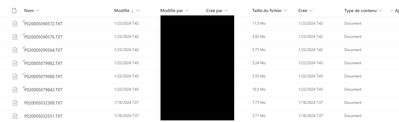
I use data in a Sharepoint folder, where 3 news files are automatically stored every days.
I want to sort them, to keep the 3 earliest files (sorted by column modified).
For the current month, I know how to do it, but how can I sort these files for every months ?
Meaning, I need the 3 last files for January, for December and so on ... ?
Thank you
Regards
Solved! Go to Solution.
Essaye cela dans ton code,
let
Source = Ta Source SharePoint,
AddYear = Table.AddColumn(Source, "Year", each Date.Year([Date modified]), type number),
AddYearMonth = Table.AddColumn(AddYear, "Month", each Date.Month([Date modified]), type number),
SortedFiles = Table.Sort(AddYearMonth, {{"Date modified", Order.Descending}}),
GroupedFiles = Table.Group(SortedFiles, {"Year", "Month"}, {
{"AllData", each _, type table}}),
AddIndexAndFilter = Table.TransformColumns(GroupedFiles, {
"AllData", each Table.FirstN(Table.AddIndexColumn(_, "Index", 1, 1, Int64.Type), 3)
})
in
AddIndexAndFilter
Ensuite tu developpes la colonne Data et tu gardes les colonnes que tu veux
Essaye cela dans ton code,
let
Source = Ta Source SharePoint,
AddYear = Table.AddColumn(Source, "Year", each Date.Year([Date modified]), type number),
AddYearMonth = Table.AddColumn(AddYear, "Month", each Date.Month([Date modified]), type number),
SortedFiles = Table.Sort(AddYearMonth, {{"Date modified", Order.Descending}}),
GroupedFiles = Table.Group(SortedFiles, {"Year", "Month"}, {
{"AllData", each _, type table}}),
AddIndexAndFilter = Table.TransformColumns(GroupedFiles, {
"AllData", each Table.FirstN(Table.AddIndexColumn(_, "Index", 1, 1, Int64.Type), 3)
})
in
AddIndexAndFilter
Ensuite tu developpes la colonne Data et tu gardes les colonnes que tu veux
Merci beaucoup, c'est parfait 😁
Don't miss out on Data Days, June 15 through August 7. Learn Fabric, Power BI, SQL, AI and more.
Check out the May 2026 Power BI update to learn about new features.
| User | Count |
|---|---|
| 4 | |
| 4 | |
| 2 | |
| 2 | |
| 1 |
| User | Count |
|---|---|
| 11 | |
| 11 | |
| 5 | |
| 4 | |
| 4 |