This time we’re going bigger than ever. Fabric, Power BI, SQL, AI and more. We're covering it all. You won't want to miss it.
Learn moreLevel up your Power BI skills this month - build one visual each week and tell better stories with data! Get started
Hi Community,
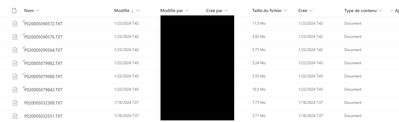
I use data in a Sharepoint folder, where 3 news files are automatically stored every days.
I want to sort them, to keep the 3 earliest files (sorted by column modified).
For the current month, I know how to do it, but how can I sort these files for every months ?
Meaning, I need the 3 last files for January, for December and so on ... ?
Thank you
Regards
Solved! Go to Solution.
Essaye cela dans ton code,
let
Source = Ta Source SharePoint,
AddYear = Table.AddColumn(Source, "Year", each Date.Year([Date modified]), type number),
AddYearMonth = Table.AddColumn(AddYear, "Month", each Date.Month([Date modified]), type number),
SortedFiles = Table.Sort(AddYearMonth, {{"Date modified", Order.Descending}}),
GroupedFiles = Table.Group(SortedFiles, {"Year", "Month"}, {
{"AllData", each _, type table}}),
AddIndexAndFilter = Table.TransformColumns(GroupedFiles, {
"AllData", each Table.FirstN(Table.AddIndexColumn(_, "Index", 1, 1, Int64.Type), 3)
})
in
AddIndexAndFilter
Ensuite tu developpes la colonne Data et tu gardes les colonnes que tu veux
Essaye cela dans ton code,
let
Source = Ta Source SharePoint,
AddYear = Table.AddColumn(Source, "Year", each Date.Year([Date modified]), type number),
AddYearMonth = Table.AddColumn(AddYear, "Month", each Date.Month([Date modified]), type number),
SortedFiles = Table.Sort(AddYearMonth, {{"Date modified", Order.Descending}}),
GroupedFiles = Table.Group(SortedFiles, {"Year", "Month"}, {
{"AllData", each _, type table}}),
AddIndexAndFilter = Table.TransformColumns(GroupedFiles, {
"AllData", each Table.FirstN(Table.AddIndexColumn(_, "Index", 1, 1, Int64.Type), 3)
})
in
AddIndexAndFilter
Ensuite tu developpes la colonne Data et tu gardes les colonnes que tu veux
Merci beaucoup, c'est parfait 😁
Check out the April 2026 Power BI update to learn about new features.
Sign up to receive a private message when registration opens and key events begin.
If you have recently started exploring Fabric, we'd love to hear how it's going. Your feedback can help with product improvements.