Get Fabric or SQL Certified for Free.
Get certified for free when you join Fabric Data Days 2026 and dive into Fabric, Power BI, SQL, AI, and other essential data skills.
Join now- Power BI forums
- Get Help with Power BI
- Desktop
- Service
- Report Server
- Power Query
- Mobile Apps
- Developer
- DAX Commands and Tips
- Custom Visuals Development Discussion
- Health and Life Sciences
- Power BI Spanish forums
- Translated Spanish Desktop
- Training and Consulting
- Instructor Led Training
- Dashboard in a Day for Women, by Women
- Galleries
- Data Stories Gallery
- Themes Gallery
- Contests Gallery
- QuickViz Gallery
- Quick Measures Gallery
- Visual Calculations Gallery
- Fabric Apps Gallery
- Notebook Gallery
- Translytical Task Flow Gallery
- TMDL Gallery
- R Script Showcase
- Webinars and Video Gallery
- Ideas
- Custom Visuals Ideas (read-only)
- Issues
- Issues
- Events
- Upcoming Events
July 7 - July 17 | Round 2 of the Power BI Dataviz World Championships. Don't miss your chance! Learn more
- Power BI forums
- Forums
- Get Help with Power BI
- Power Query
- SQL Tables importing without associated data types
- Subscribe to RSS Feed
- Mark Topic as New
- Mark Topic as Read
- Float this Topic for Current User
- Bookmark
- Subscribe
- Printer Friendly Page

- Mark as New
- Bookmark
- Subscribe
- Mute
- Subscribe to RSS Feed
- Permalink
- Report Inappropriate Content
SQL Tables importing without associated data types
Hi,
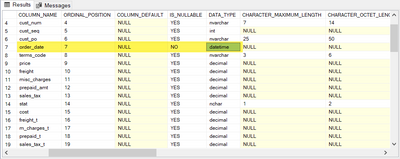
I have a fact table that I'm connecting to in SQL. When reviewing the INFORMATION_SCHEMA.COLUMNS query in SSMS for the table it shows the [order_date] field as being stored as a datetime data type which is correct:
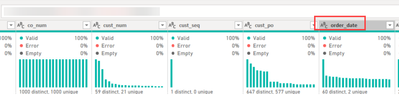
However when importing this table into PBI Desktop all the datatypes are changed to Text in transit:
The only steps in the query are:
let
   Source = Sql.Database(sqlserver, db)
   Table = Source{[Schema="dbo",Item=tablename]}[Data]
in
   Table
I can convert the data types manually in Power Query but this prevents incremental refresh if we have to download the entire dataset, change types and then filter.
Have had a search around but couldn't find any reasons as to why this would occur. Would welcome ideas as to why this is happening, and how to resolve.
Thanks Power BI Community!
Solved! Go to Solution.
- Mark as New
- Bookmark
- Subscribe
- Mute
- Subscribe to RSS Feed
- Permalink
- Report Inappropriate Content
None, it's the out of the box SQL Server connector from Power Query. The only inputs it's taking is the SQL string and DB, then navigating to the table in question.
let
   Source = Sql.Database(sqlserver, db)
   Table = Source{[Schema="dbo",Item=tablename]}[Data]
in
   Table
Agree, it doesn't seem to be a widespread issue, this is the first time I've come across an issue like this. Just tested with a sandbox WorldWideImporters DB and the native query generated brings through datatypes fine.

Odd!

- Mark as New
- Bookmark
- Subscribe
- Mute
- Subscribe to RSS Feed
- Permalink
- Report Inappropriate Content
Hello, I have the same issue with a MS SQL Database. There are a custom data type called (APdate) which is a datetime-Type, but PowerQuery didn't recognize it as datetime but set it to text.
I use the standard "From MS SQL Database"-Connector.
let
    Quelle = Sql.Databases("SQL1.xxx.de"),
    xxx = Quelle{[Name="xxx"]}[Data],
    dbo_yyy = xxx{[Schema="dbo",Item="LIEFRECHNUNG"]}[Data]
in
    dbo_LIEFRECHNUNG
select [$Table].[id] as [id],
[$Table].[timestamp] as [timestamp],
[$Table].[LIEFRECHNUNG] as [LIEFRECHNUNG],
[$Table].[STATUS] as [STATUS],
[$Table].[ADRESSE] as [ADRESSE],
[$Table].[PERSONAL] as [PERSONAL],
convert(nvarchar(max), [$Table].[RECHNUNGSDATUM]) as [RECHNUNGSDATUM],
[$Table].[RECHNUNGSNR] as [RECHNUNGSNR],
convert(nvarchar(max), [$Table].[DATUM]) as [DATUM],
if I change the M-code to:
let
    Quelle = Sql.Database("SQL1.xxx.de", "yyy", [Query="SELECT * from LIEFRECHNUNG"])
in
    Quelle
the columns typ is correct (datetime).
What's wrong with the first (out-of-the-box) M-Code?
Why isn't PowerQuery using the system data type from SQL-Server?


- Mark as New
- Bookmark
- Subscribe
- Mute
- Subscribe to RSS Feed
- Permalink
- Report Inappropriate Content
Anything suspicious on the Fiddler or Power Query Diagnostics?
- Mark as New
- Bookmark
- Subscribe
- Mute
- Subscribe to RSS Feed
- Permalink
- Report Inappropriate Content
which options parameters did you apply to your connector? If this were a widespread problem we'd have heard about it by now.
- Mark as New
- Bookmark
- Subscribe
- Mute
- Subscribe to RSS Feed
- Permalink
- Report Inappropriate Content
None, it's the out of the box SQL Server connector from Power Query. The only inputs it's taking is the SQL string and DB, then navigating to the table in question.
let
   Source = Sql.Database(sqlserver, db)
   Table = Source{[Schema="dbo",Item=tablename]}[Data]
in
   Table
Agree, it doesn't seem to be a widespread issue, this is the first time I've come across an issue like this. Just tested with a sandbox WorldWideImporters DB and the native query generated brings through datatypes fine.
Odd!
- Mark as New
- Bookmark
- Subscribe
- Mute
- Subscribe to RSS Feed
- Permalink
- Report Inappropriate Content
Run a fiddler trace and also check the query logs on your SQL server. Maybe something is blocking the meta data calls?
- Mark as New
- Bookmark
- Subscribe
- Mute
- Subscribe to RSS Feed
- Permalink
- Report Inappropriate Content
Looks like the issue is with the Power BI SQL Connector itself. Looking at the native query being sent, all fields are being converted to text data types:
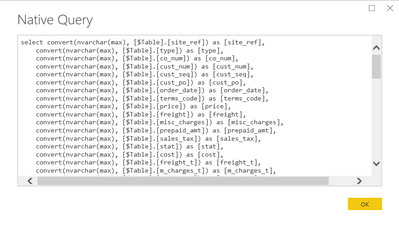
Writing a custom SQL statement to select the data seems to bring across the right datatypes. I haven't come across documentation on why this occurs and how to turn it off yet though.

Helpful resources

FabCon & SQLCon – Barcelona 2026
Join us in Barcelona for FabCon and SQLCon, the Fabric, Power BI, SQL, and AI community event. Save €200 with code FABCMTY200.

Data Days 2026
Join Data Days 2026: 60 days of free live/on-demand sessions, challenges, study groups, and certification opportunities.

Power BI DataViz World Championships - June 2026
A new Power BI DataViz World Championship is coming this June! Don't miss out on submitting your entry.


