We've captured the moments from FabCon & SQLCon that everyone is talking about, and we are bringing them to the community, live and on-demand. Starts on April 14th. Register now
Im Newer in PBI
I would like to connect to Rest API thas done , but i have this problem
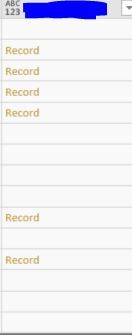
when i would like to expand the column i dont have the ICON ?
i learn the basics on Language M and i m still struggling to find the solution how can i get value of the this records .?
I have 5 column ho i have column like Image !!
Thank you in advance
Solved! Go to Solution.
@Anonymous,
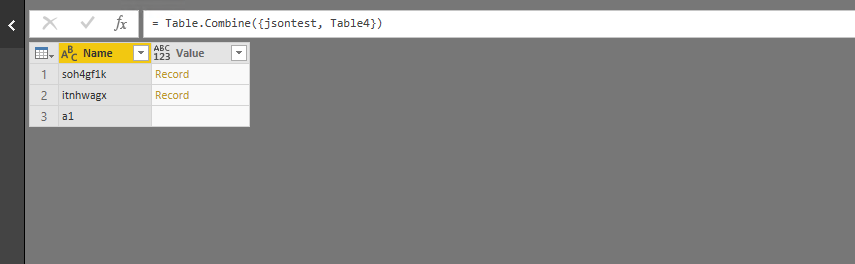
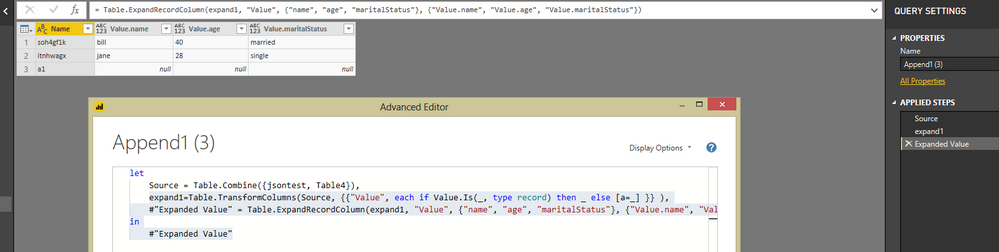
You would need to add a step in Advanced Editor to check if the type of the value is record and then expand the record.
There is an example for your reference:
let
Source = Table.Combine({jsontest, Table4}),
expand1=Table.TransformColumns(Source, {{"Value", each if Value.Is(_, type record) then _ else [a=_] }} ),
#"Expanded Value" = Table.ExpandRecordColumn(expand1, "Value", {"name", "age", "maritalStatus"}, {"Value.name", "Value.age", "Value.maritalStatus"})
in
#"Expanded Value"
Reference:
https://www.thebiccountant.com/2017/07/25/how-to-expand-a-column-that-cannot-be-expanded-in-power-bi-and-power-query-in-excel/
Regards,
Lydia
@Anonymous,
You would need to add a step in Advanced Editor to check if the type of the value is record and then expand the record.
There is an example for your reference:
let
Source = Table.Combine({jsontest, Table4}),
expand1=Table.TransformColumns(Source, {{"Value", each if Value.Is(_, type record) then _ else [a=_] }} ),
#"Expanded Value" = Table.ExpandRecordColumn(expand1, "Value", {"name", "age", "maritalStatus"}, {"Value.name", "Value.age", "Value.maritalStatus"})
in
#"Expanded Value"
Reference:
https://www.thebiccountant.com/2017/07/25/how-to-expand-a-column-that-cannot-be-expanded-in-power-bi-and-power-query-in-excel/
Regards,
Lydia
If you have recently started exploring Fabric, we'd love to hear how it's going. Your feedback can help with product improvements.
A new Power BI DataViz World Championship is coming this June! Don't miss out on submitting your entry.
| User | Count |
|---|---|
| 5 | |
| 3 | |
| 3 | |
| 2 | |
| 2 |
| User | Count |
|---|---|
| 10 | |
| 8 | |
| 7 | |
| 7 | |
| 5 |