Get certified for free when you join Fabric Data Days 2026 and dive into Fabric, Power BI, SQL, AI, and other essential data skills.
Join nowTry your skills in the Power BI Dataviz World Championship! Round one ends June 26. Join now
Im Newer in PBI
I would like to connect to Rest API thas done , but i have this problem
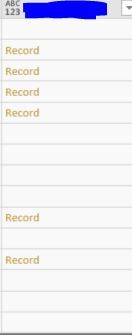
when i would like to expand the column i dont have the ICON ?
i learn the basics on Language M and i m still struggling to find the solution how can i get value of the this records .?
I have 5 column ho i have column like Image !!
Thank you in advance
Solved! Go to Solution.
@Anonymous,
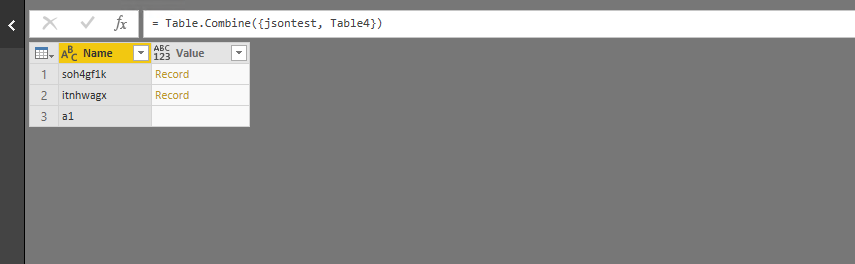
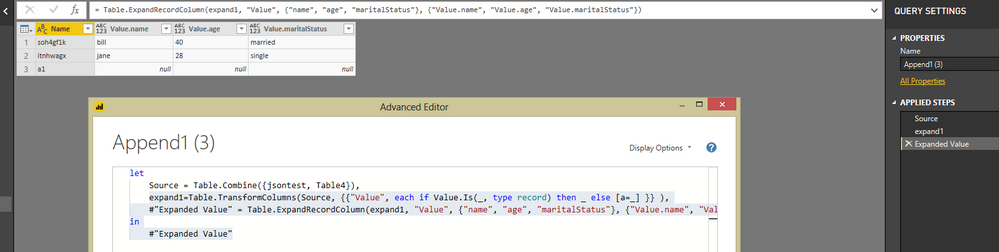
You would need to add a step in Advanced Editor to check if the type of the value is record and then expand the record.
There is an example for your reference:
let
Source = Table.Combine({jsontest, Table4}),
expand1=Table.TransformColumns(Source, {{"Value", each if Value.Is(_, type record) then _ else [a=_] }} ),
#"Expanded Value" = Table.ExpandRecordColumn(expand1, "Value", {"name", "age", "maritalStatus"}, {"Value.name", "Value.age", "Value.maritalStatus"})
in
#"Expanded Value"
Reference:
https://www.thebiccountant.com/2017/07/25/how-to-expand-a-column-that-cannot-be-expanded-in-power-bi...
Regards,
Lydia
@Anonymous,
You would need to add a step in Advanced Editor to check if the type of the value is record and then expand the record.
There is an example for your reference:
let
Source = Table.Combine({jsontest, Table4}),
expand1=Table.TransformColumns(Source, {{"Value", each if Value.Is(_, type record) then _ else [a=_] }} ),
#"Expanded Value" = Table.ExpandRecordColumn(expand1, "Value", {"name", "age", "maritalStatus"}, {"Value.name", "Value.age", "Value.maritalStatus"})
in
#"Expanded Value"
Reference:
https://www.thebiccountant.com/2017/07/25/how-to-expand-a-column-that-cannot-be-expanded-in-power-bi...
Regards,
Lydia
| User | Count |
|---|---|
| 3 | |
| 3 | |
| 2 | |
| 2 | |
| 1 |