This time we’re going bigger than ever. Fabric, Power BI, SQL, AI and more. We're covering it all. You won't want to miss it.
Learn moreLevel up your Power BI skills this month - build one visual each week and tell better stories with data! Get started
Im Newer in PBI
I would like to connect to Rest API thas done , but i have this problem
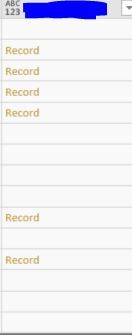
when i would like to expand the column i dont have the ICON ?
i learn the basics on Language M and i m still struggling to find the solution how can i get value of the this records .?
I have 5 column ho i have column like Image !!
Thank you in advance
Solved! Go to Solution.
@Anonymous,
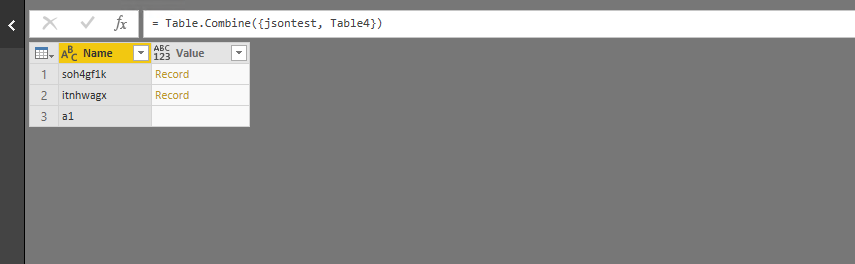
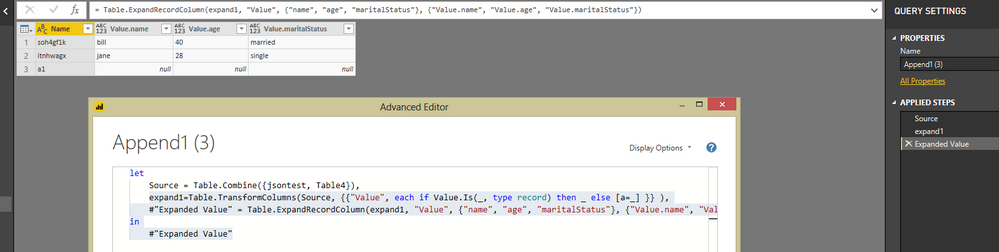
You would need to add a step in Advanced Editor to check if the type of the value is record and then expand the record.
There is an example for your reference:
let
Source = Table.Combine({jsontest, Table4}),
expand1=Table.TransformColumns(Source, {{"Value", each if Value.Is(_, type record) then _ else [a=_] }} ),
#"Expanded Value" = Table.ExpandRecordColumn(expand1, "Value", {"name", "age", "maritalStatus"}, {"Value.name", "Value.age", "Value.maritalStatus"})
in
#"Expanded Value"
Reference:
https://www.thebiccountant.com/2017/07/25/how-to-expand-a-column-that-cannot-be-expanded-in-power-bi-and-power-query-in-excel/
Regards,
Lydia
@Anonymous,
You would need to add a step in Advanced Editor to check if the type of the value is record and then expand the record.
There is an example for your reference:
let
Source = Table.Combine({jsontest, Table4}),
expand1=Table.TransformColumns(Source, {{"Value", each if Value.Is(_, type record) then _ else [a=_] }} ),
#"Expanded Value" = Table.ExpandRecordColumn(expand1, "Value", {"name", "age", "maritalStatus"}, {"Value.name", "Value.age", "Value.maritalStatus"})
in
#"Expanded Value"
Reference:
https://www.thebiccountant.com/2017/07/25/how-to-expand-a-column-that-cannot-be-expanded-in-power-bi-and-power-query-in-excel/
Regards,
Lydia
Check out the April 2026 Power BI update to learn about new features.
Sign up to receive a private message when registration opens and key events begin.
If you have recently started exploring Fabric, we'd love to hear how it's going. Your feedback can help with product improvements.
| User | Count |
|---|---|
| 3 | |
| 2 | |
| 2 | |
| 2 | |
| 2 |