This time we’re going bigger than ever. Fabric, Power BI, SQL, AI and more. We're covering it all. You won't want to miss it.
Learn moreLevel up your Power BI skills this month - build one visual each week and tell better stories with data! Get started
I'm importing multiple Excel files saved in one SharePoint folder. The files themselves are from BluJay which isn't a connectable source so I save as .xlsx on SharePoint. The files are all same format and I want to remove the top 9 rows from each file. I am able to connect the data source and combine the files but am unable to remove the top rows from each file after combining, it only removes the top rows from the first file.
Is it possible to do in the query editor or is it better to remove the rows in Excel after exporting from BluJay? Thanks.
Solved! Go to Solution.
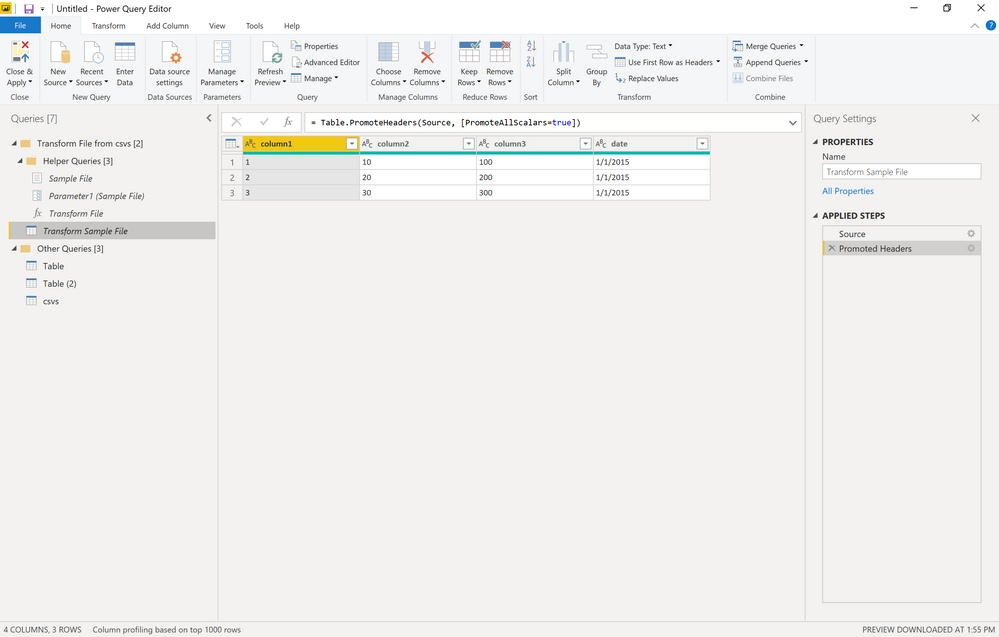
If you are using a Folder query, you need to edit the "Transform Sample File" query. You would remove your rows there and then it will take effect for the rest of the files.
tx!
Thank you!
Check out the April 2026 Power BI update to learn about new features.
Sign up to receive a private message when registration opens and key events begin.
If you have recently started exploring Fabric, we'd love to hear how it's going. Your feedback can help with product improvements.
| User | Count |
|---|---|
| 3 | |
| 2 | |
| 2 | |
| 2 | |
| 2 |